Key takeaways
- Most SaaS support issues aren’t caused by too few support agents. They’re caused by fragmented data.
- Deploying chatbots without the underlying infrastructure required to address the issue leads to longer resolution times with masked problems.
- Niche API-first solutions help resolve more complex technical issues across channels like Slack and email better than traditional helpdesks.
- Automation requires decoupling the ingestion layer from the processing and knowledge graphs to achieve true scalability.
The silent cost of fragmented support
Losing the paying user to a software bug is unfortunate, but losing them as a result of your team’s inaction is unforgivable. According to Zendesk’s recent report, 72% of clients are willing to switch to another company after only one unsolved issue. At the same time, most technical founders address the problem by patching their documentation knowledge base with a generic chatbot.
The consequences of this approach are inevitable. Your team members will be forced to spend hundreds of hours on irrelevant context fishing, and the unhappy customers will be stuck with a broken support system.
This outcome is expected, as technical founders fail to recognize the importance of building an efficient customer support AI workflow at the company’s early stages. The lack of such software creates endless loops between developers and documentation, disrupting daily operations and resulting in lost revenue. Your current AI solution is a liability, not an asset. It does not help your team scale efficiently, which is why it should be disposed of before it causes further damage.
Why your customer support AI workflow is probably failing
Most companies I talk to don’t have an AI problem – they ship broken processes to their users via their helpdesk and ticketing system, and AI uncovers it with exquisite cruelty. Automated processes only magnify the input they’re given: if you throw a broken system at an AI language model, you’ll get brokenness at scale.
I had a conversation with one of our technical founders on Tuesday about this very topic. He was exasperated about the amount of time his team spent dealing with user questions. They had signed up for one premium AI helpdesk seat per engineer after having been overwhelmed with Slack messages. But already after two weeks, his team of developers spent more time fixing the incorrect responses generated by the tool than they would have answering the original questions themselves.
The reason for this particular disaster was, of course, that traditional helpdesks and ticketing systems were built to support phone call centers, not technical software teams. If you want to receive complex technical questions and respond to them accurately, you cannot rely on canned responses and summaries of your own public documentation. You have to extract precise information from your private documentation and deliver it to the user in the tools they expect. Otherwise, you’ll find yourself building process bottlenecks that will grind your engineering operations to a halt. Those bottlenecks usually show up during AI workflow handoffs, when important context gets lost between systems or teams.
Mapping the process before touching software
Before writing a single line of code or shelling out cash for yet another subscription, take a step back and audit your current information flow. Speeding up production runs doesn’t do squat if your foundational logic is flawed. First, you need to diagram the precise information paths taken by each user request before you decide what automated routes to build in-house.
Pause and think: Take your enterprise users who report an API outage in Slack – how many human steps are involved before the issue reaches an engineer who can actually check the logs? If the number is anything greater than zero, you should pause before hiring another person or adding in-house agents. After all, you need to fully understand the existing process before building upon it – especially if you’re planning to automate any part of the operation , lets you create new points of failure down the road.
Option A vs Option B: The support architecture setup
| Option A: The generic chatbot trap | Option B: The system-first AI workflow |
| Uses all-in-one legacy helpdesk platforms | Uses decoupled, specialized API-first tools |
| Routes all messages into a centralized web inbox | Handles Slack, email, and in-app messages natively |
| Triggers instant AI replies that often hallucinate | Buffers webhooks and verifies docs before replying |
| Requires manual copy-pasting by developers | Automates background triage and context gathering |
| Hides underlying system errors from the team | Surfaces operational friction and documentation gaps |
Building a stage-based tool stack that actually scales
What I see when consulting companies is that they want to adopt too many tools and then have their operations turned inside out. For a customer support AI system, the only way to ensure smooth operation is to have one tool do one specific task. These are the five applications you need to prevent tickets from getting stuck in your technical support organization, so long as your team knows how to configure the underlying workflow infrastructure correctly.
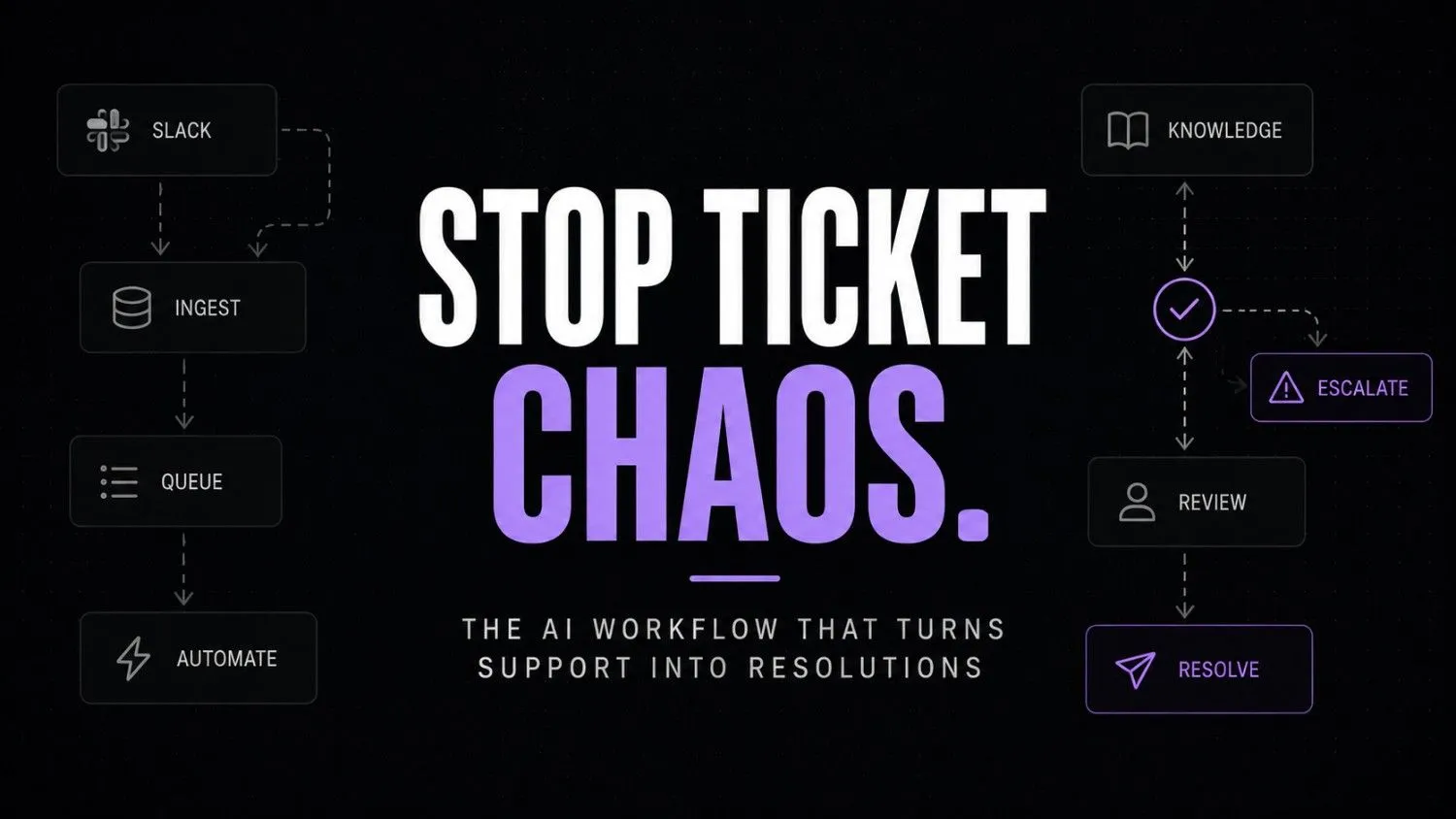
AI WORKFLOW DATA ROUTING ARCHITECTURE
[ B2B Customer / Slack Inbox ]
│
│ (1. Raw Conversational Thread)
▼
+———————————————————————+
| PYLON (Ingestion Layer) |
| Action: Converts unstructured chat into structured JSON event |
+———————————————————————+
│
│ (2. Webhook Event Payload)
▼
+———————————————————————+
| HOOKDECK (Reliability & Buffering Layer) |
| Action: Queues event, logs audit trail, absorbs API traffic spikes |
+———————————————————————+
│
│ (3. Guaranteed Event Delivery)
▼
+———————————————————————+
| TRIGGER.DEV (Orchestration & Logic Layer) |
| Action: Runs TypeScript automation, parses error syntax |
+———————————————————————+
│
├──► (4a. Query Search) ──► [ INKEEP: Indexed API Docs & Repos ]
│ │
◄─── (4b. Cited Markdown) ────────────┘
│
│ (5. Draft Technical Response + Context)
▼
+———————————————————————+
| PLAIN (Developer System of Record / Escalation Inbox) |
| Action: Presents cited draft to on-duty engineer for 1-click review |
+———————————————————————+
│
│ (6. Approved Resolution Delivery)
▼
[ Pylon -> Natively delivered to Customer Slack Thread ]
Stage 1: Ingestion and Slack routing
Unlike many other B2B customer communication tools, Pylon operates within the same Slack channels and email threads that your customers already use. This means there is no need to ask paying customers to log into a separate portal for support instead, Pylon can capture those conversations and turn them into support tickets automatically.

Pylon
Pylon is an AI-powered customer support platform built for B2B companies. It centralizes customer conversations from Slack, Microsoft Teams, email, and in-app chat while using AI to automate ticket management, answer repetitive questions, and improve support efficiency. It is designed for startups and growing SaaS teams that want to deliver fast, personalized support.
Author’s opinion: The ease of nabbing these kinds of Slack threads is unrivaled by any other tool we’ve tried, and Pylon’s interface doesn’t make users feel like they’re talking to a bot (and if they are, the conversation isn’t slowed down in the process).
Stage 2: Webhook reliability and event buffering
Hookdeck serves as the reliable API gateway between your incoming customer messages and your background automation scripts, ingesting Pylon webhooks with safe queuing to ensure no message is lost in busy periods or during server downtime.

Hookdeck
Hookdeck helps developers test, monitor, manage, and scale webhooks with built-in observability and reliability. It acts as a webhook infrastructure layer that improves debugging, delivery guarantees, and operational visibility.
The author highlights this as a stress-reduction feature, as the visual replay of events makes diagnosing and responding to failed webhook deliveries far more approachable for engineering teams dealing with black-box API failures.
Stage 3: Background workflow automation
Trigger.dev lets you write your background automation logic in real TypeScript instead of fiddling with unreliable visual block composers. It takes the queued event from Hookdeck, interprets the customer’s intent, and defines what needs to be done next without timeouts.

Trigger.dev
Trigger.dev is an open-source platform for building and deploying long-running background tasks, AI agents, and workflows using code. It provides durable execution, retries, queues, scheduling, observability, and managed infrastructure without serverless execution timeouts.
The author’s idea seems great for people who prefer to code their automation processes instead of designing them visually. Logic is much easier to maintain in text form, and real code executes substantially faster than any visual block system. The whole support routing process can be version controlled as actual software. Companies that want to host such processes on specific infrastructure can optimize their costs by comparing providers with the help of a directory like computestacker provider registry, or by weighing platform-level options like LangChain, Airbyte, Modal, and Watsonx.
Stage 4: AI knowledge retrieval and search
Inkeep provides the intelligence layer by indexing your technical documentation, github repos and past resolved issues. Whenever Trigger.dev queries for an answer, this tool analyzes the technical context and provides an accurate answer with relevant citations.

Inkeep
Inkeep is an enterprise AI platform that helps companies build AI agents for customer support, internal operations, and developer documentation. It combines AI search, workflow automation, multi-agent orchestration, and knowledge retrieval to deliver accurate, grounded answers across multiple channels.
Author’s opinion: The search accuracy on deeply nested technical documentation is surprisingly good , it actually cites relevant markdown files without hallucination which instantly gains the trust of developer focused companies.
Stage 5: The developer-first support inbox
Plain is the system of record and human escalations inbox when automation falls short. It’s an API-first customer support platform designed for software engineering teams to triage their complex issues with user data.

Plain
Plain is an AI-powered customer support platform built specifically for B2B companies. It combines support channels, AI agents, workflows, knowledge management, and automation into one API-first platform that helps teams deliver faster, more scalable customer support.
Author’s opinion: The API-first solution is Linear for support. Cut ticket triage time by half with no visual noise to distract engineers from actually fixing hard bugs in their dev environment.
What thinking-first actually looks like operationally
Let me ask you a scenario. It is a Tuesday morning at 9:14 am, and your company is a growing B2B SaaS with 15 employee the kind of small team where nobody has bandwidth to babysit a support queue. Suddenly, your customer who is an enterprise using your product reaches out to your support slack channel and says: “Hey your webhook signature check is broken after the latest patch on /v2/events.
What happens next? This message will get stuck in your slack channel until one of your customer success managers will see this message. Then, they would screenshot it, log a ticket in jira, and notify the engineer. Two hours after the initial request, the engineer will ask the customer to provide the logs about the broken payload. The customer and your team waste their time instead of doing their main job. It’s the kind of spreadsheet workflow failures you get when work keeps moving around but nobody actually owns it.
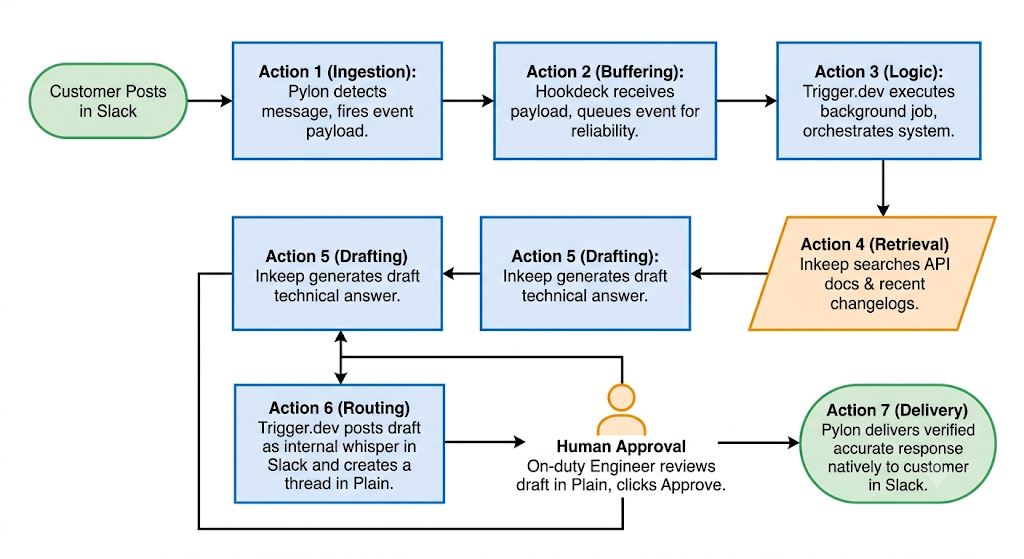
The thinking-first operational model addresses your scenario in the following fashion:
- At 9:14:02 AM, Pylon detects the query in the shared slack channel and immediately fires off an event payload containing the user ID, message text, and company data.
- At 9:14:03 AM, Hookdeck recieves the event, logs it for auditing purposes, then forwards the payload to your backend automation server of choice.
- At 9:14:05 AM, Trigger.dev kicks off a background job, parsing the error message while simultaneously pinging Inkeep to search your API auth documentation and change-log.
- At 9:14:08 AM, Inkeep identifies the cause as a hashing algorithym change in patch 2.1.4. Trigger.dev writes a technical summery of the issue and links the relevant code snippet.
- At 9:14:10 AM, Trigger.dev posts the suggested answer as an internal whisper to the Slack channel in which the query was made, while also generating a tracked thread in Plain.
- At 9:15:00 AM, your on-call engineer sees the notification within Plain, approves the suggested response with one click and Pylon delivers the response directly to the customer.
In this example you can see the entire process taking place within a single minute. Your developer spent 5 seconds reviewing the correct response while your customer got technical support as if they had an in-house engineer.
Why clear ownership prevents automated system decay
As you begin to expand your use of AI in customer support, you will find flaws in your operations as your ticket volume grows. According to research from Gartner, 80% of customer service organizations will abandon native mobile apps in favor of messaging systems by 2026. That shift puts immense pressure on automated routing systems and makes clear AI workflow governance an absolute necessity.
- Shadow operations: Developers start answering DMs in Slack, as the official ticketing system cannot keep up, which is detrimental to the historical data collection.
- Knowledge stagnation: Your AI models give confident wrong answers because your product ships features daily while your public documentation updates monthly.
- Alert fatigue: Your team routes every automated failure directly to the primary engineering channel, causing developers to ignore notifications entirely.
To avoid these issues, check your operational pipelines regularly. Your workflow should reflect how your software works today not how it worked six months ago.
The operational self-audit checklist
- Does every auto response bury a 1-click escalation button to a human engineer?
- Are your background webhook queues all setup to survive a 2 hour third party outage without losing any messages?
- Can your team re-open and debug why a auto response was sent by pulling the docs mentioned in the logs?
- Did your engineers have a weekly review of highest occurring failed queries to improve your technical documentation?
Test your retrievers with prompts like, “Let’s think about this differently,” to spot generic answers. Then, in weekly ticket reviews, ask what the user may have actually needed not just what they asked.
Tracking the metrics that actually matter for scale
Forget about vanity metrics such as chatbots or deflection rates, which usually represent the percentage of users that have given up contacting you. According to one study published in the Harvard Business Review, increasing the customer retention rate by 5% can boost profits by 25 to 95%. Instead, you should track the metrics that will bring your business actual value.
First, measure the time it takes for an agent to provide an accurate technical answer to a user. Second, determine how many auto-answered queries were approved by engineers without editing. Finally, analyze your documentation gap score by calculating how many tickets had to be escalated to developers because the answer was not found in your Markdown files.
Frequently asked questions
Your developers should be able to write the TypeScript routing logic for your use case in Trigger.dev and set up the API keys in about two days’ worth of work. The connections to Pylon, Hookdeck, and Plain are straightforward and utilize REST hooks with minimal maintenance once deployed.
A general-purpose large language model is a poor choice for production-grade customer support due to its inability to cite sources accurately. Specialized tools such as Inkeep reduce the risk of hallucinations by constraining the LLM to your proprietary knowledge base while offering a much-needed layer of control and governance over the responses your customers see.
Your support bots will not miss a beat because Hookdeck sits in front of your background workers, accepting HTTP requests and queuing them for processing. This way, even if your bots experience a sudden traffic spike, your processing workers will always work at the speed optimal for your backend systems.
Each of these tools has a generous freemium tier with a steep price increase as your usage grows exponentially and pairing them with other free AI automation tools can keep early costs close to zero. Even at the highest throughput levels, you will pay significantly less per customer than with traditional helpdesk software since you are only billed for the computing resources you use.
The entire stack is designed with enterprise-level B2B software needs in mind and can be used in a SOC2-compliant environment. You can easily configure Trigger.dev to sanitize PII from payload contents before querying your knowledge repository.
The shift toward invisible support infrastructure
We are on the cusp of eliminating destination helpdesks, where customers are forced to login and post a support ticket. Over the next two years, the most successful SaaS products will bake automated diagnostic workflows into their products themselves.
The winners will not be the companies whose chat-bots spout the most clever banter. They will be the founders who quietly build asynchronous processes to eliminate customer friction long before a human has to say sorry. That usually starts with an AI workflow audit to spot the manual steps causing the same support issues over and over.
Why are you still making your users jump through hoops to inform you of your software’s defects?
Your next move
Open your current support inbox and export the last twenty tickets that required the intervention of a software engineer. Group them by root-cause, identify the three documentation pages that would have resolved those tickets. Rewrite those pages with concrete code samples right now.