Key takeaways
- 42% of institutional knowledge belongs to one person and isn’t shared with anyone else on the team, per the Panopto Workplace Knowledge and Productivity Report
- Knowledge workers waste 5.3 hours weekly recreating information that already exists somewhere in the organization
- Organizational knowledge capture is a prerequisite for AI automation, not something you do after
- Five underdog tools each handle a distinct stage of the capture-to-systemize pipeline
- Documentation that happens reactively, after a resignation, is almost always incomplete
The most expensive resignation you’ll ever deal with isn’t always the one from your highest earner. Sometimes it’s the person who simply knew how everything connected. The one whose last day leaves three people in Slack asking variations of the same question: wait, how does this actually work?
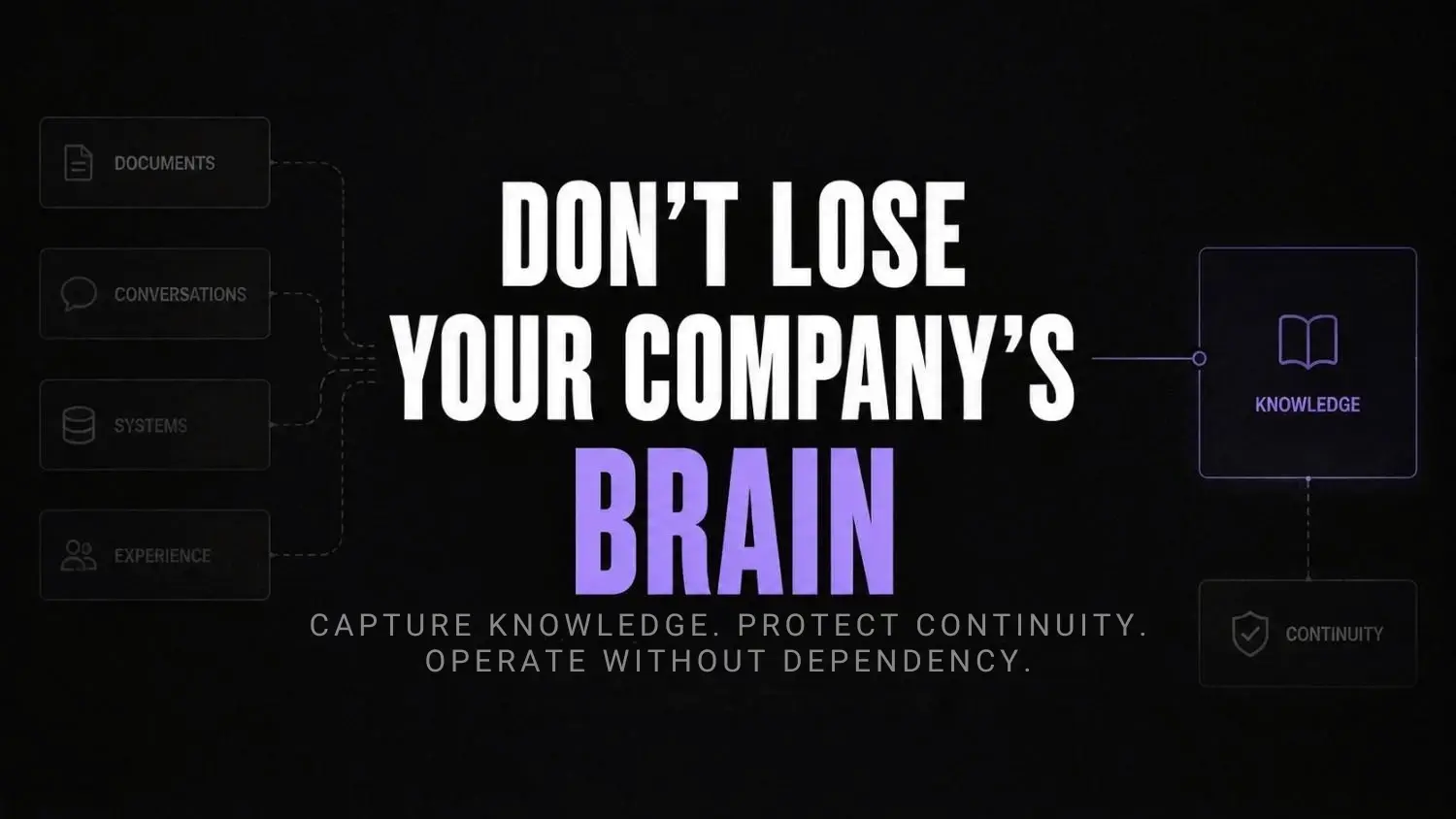
The Panopto Workplace Knowledge and Productivity Report found that 42% of institutional knowledge is unique to the individual employee, not documented anywhere, not shared with anyone. When they leave, that knowledge goes with them. And the teams left behind spend an average of 5.3 hours per week either waiting for information or rebuilding things that already existed. That’s time you’re paying for twice.
This isn’t a people problem. It’s a systems problem. And organizational knowledge capture is the fix most ops-heavy founders ignore until something breaks.
The hidden cost of knowledge living only in people’s heads
There’s the obvious version of this: a key person resigns, and suddenly nobody knows how to run the monthly reconciliation, or why that one vendor gets a different rate, or which client expects a call before the invoice goes out.
But the quieter version is actually worse. It’s the friction that accumulates before anyone quits. New hires take six months to become useful when they could take two. Senior team members become unofficial help desks, fielding the same questions instead of doing the work they were brought in for. Decisions get made slightly differently every time because the correct process was never written anywhere. The same thing happens in healthcare AI implementation, where inconsistent documentation creates inconsistent results.
Pause and think: If your three most experienced people left this month, how long could operations hold together without them? If your honest answer is less than thirty days, you don’t have a hiring problem. You have an organizational knowledge problem.
And the operational debt from undocumented processes compounds quietly. It doesn’t show up on a balance sheet until suddenly it does.
Why traditional documentation fails every time
Most founders have attempted documentation. A shared drive nobody opens. A Notion wiki that was accurate when it was created and hasn’t been updated since. A handbook that took three weeks to write and was outdated before it launched.
The problem isn’t the tool. It’s the friction of asking someone to document a task they do automatically. Interrupting someone to say “write down what you just did” is genuinely hard to sustain. The cognitive cost is real, and when it competes with actual work, documentation loses.
What I’ve noticed working with businesses is that documentation almost always happens reactively. A process breaks. A client escalates. Someone leaves. Then there’s a burst of retroactive write-ups that capture yesterday’s workflow while today’s version has already shifted slightly. It’s never quite right, and everyone knows it.
That reactive loop is exactly what AI-assisted capture is designed to break.
How AI is changing the way operations teams capture knowledge
The shift worth paying attention to here isn’t AI writing your SOPs. It’s AI dropping the cost of capturing what your team already does, without interrupting them to do it.
The tools that actually work record and structure processes as they happen. A screen walkthrough becomes a step-by-step guide. A ten-minute Loom becomes reusable onboarding content. A recurring checklist becomes an auditable workflow someone can actually run without help.
McKinsey’s research on knowledge worker productivity found that employees spend roughly 28 hours per week on email, information search, and internal collaboration, with a meaningful chunk of that recreating things that already exist. The opportunity isn’t productivity software. It’s giving existing knowledge somewhere to live that isn’t one person’s memory or one Slack thread from eight months ago.
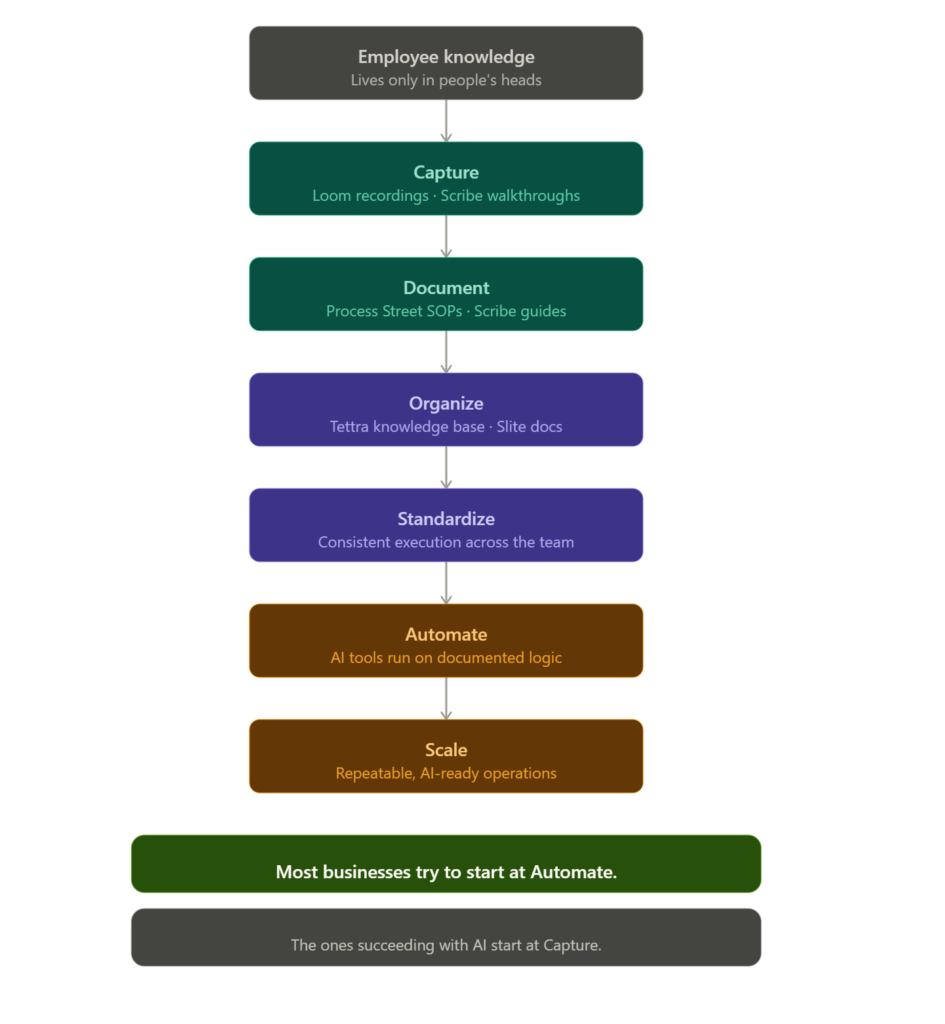
And here’s the connection most founders miss: you can’t reliably automate a process that hasn’t been documented. Trying to build AI workflow automation on top of undocumented tribal knowledge produces outputs nobody can predict or audit. The sequence matters. Capture first. Automate after.
The tools doing the actual work, and why most teams use them wrong
The tools aren’t the hard part. Most teams failing at knowledge capture aren’t using bad tools. They’re using decent tools in the wrong sequence, expecting the wrong outcome. And what makes this frustrating is that the tools themselves are genuinely good. The failure is almost always in how they’re deployed, not what they’re capable of.
The five below each own a specific point in the capture pipeline. What breaks isn’t usually the tool. It’s skipping the stage it was built for, or worse, using all five simultaneously without a clear order of operations.
Stage 1: Capture what people already do
Loom is where capture starts for most teams, whether they plan it that way or not. Someone records a walkthrough instead of scheduling a meeting. That recording becomes a reusable asset covering workflow handoffs,onboarding steps, or billing walkthroughs rather than a video buried in a sent folder nobody finds again.
Where most teams go wrong with Loom is treating it as a communication tool rather than a documentation tool. The recording gets made, shared once in Slack, and then it’s effectively gone. The teams getting real value out of it have a naming convention, a folder structure, and a rule: if you recorded it, it lives somewhere searchable within 24 hours. Without that, Loom is just a fancier way to send a video message.
Loom AI
Loom AI is an AI-powered video communication tool that records, edits, and enhances videos automatically. It’s built for teams and professionals who want faster async communication without manual editing. The key benefit is turning raw recordings into polished, shareable content instantly.
Scribe handles the processes that are genuinely hard to narrate. It runs in the background while someone works and generates a step-by-step guide with screenshots at every action. This is the tool that matters most when you’re staring down an AI workflow audit and half your processes have no source of truth.
The common mistake here is running Scribe once, saving the output, and never touching it again. Processes shift. A software UI changes, a step gets added, someone finds a faster path. Scribe guides need an owner and a review date or they become the documentation equivalent of a map from three years ago. Accurate enough to look convincing, wrong in the ways that matter.

Scribe
Scribe is a process documentation tool that automatically creates step-by-step guides, SOPs, and training materials by recording your screen activity. It is widely used by operations teams, agencies, customer support, and internal training teams to document workflows faster.
Stage 2: Turn capture into something executable
Process Street is where documentation stops being passive and starts being operational. A written SOP gets read once, maybe. A Process Street checklist gets run through, timestamped, and tracked. That distinction becomes critical when diagnosing AI implementation challengesrooted in inconsistent execution.
What most teams miss is that Process Street surfaces something Loom and Scribe can’t: whether the process is actually being followed. A Scribe guide tells you the process exists. Process Street tells you if someone skipped step seven last Tuesday. For ops-heavy teams, that audit trail is often more valuable than the documentation itself.
Process Street
Process Street is a workflow management and process automation platform that helps teams document, manage, and automate recurring business processes. It combines checklists, workflows, approvals, and automation features to help organizations improve consistency and operational control.
Stage 3: Organize so people actually use it
Tettra is the connective layer where recordings, guides, and checklists live in one searchable place and surface inside Slack when someone asks a question. Most wikis fail because finding information takes more effort than asking a person. Tettra removes that gap, which is why AI workflow failuresoften trace back to teams that skipped this layer entirely.
The friction point Tettra solves is one most founders underestimate until it’s too late: a knowledge base nobody opens is just storage. Tettra’s Slack integration means the knowledge comes to the person rather than expecting the person to go find it. That behavioral shift, passive retrieval instead of active searching, is the difference between a knowledge base that gets used and one that quietly becomes irrelevant.

Tettra
Tettra is an internal knowledge base platform designed for teams that need organized documentation SOPs and company processes in one searchable workspace. It helps growing companies reduce repeated questions and centralize operational knowledge.
Slite handles what every knowledge base eventually needs but rarely gets: staying current. Processes change, guides go stale, and AI operational debt from outdated documentation compounds quietly. Slite makes updating genuinely easy with version tracking, structured templates, and content review reminders that flag docs that haven’t been touched in a while.
Most teams build a wiki with good intentions and then abandon it six months later because updating feels like a second job. Slite’s review prompts flip that. Instead of relying on someone to remember what’s outdated, the tool tells you. That’s a small design decision with a significant impact on whether your knowledge base is actually trustworthy twelve months from now.

Slite
Slite is an AI-powered knowledge management platform that helps teams create, organize, verify, and search company knowledge. It combines collaborative documentation with AI search and automation features to help teams maintain a reliable source of truth.
The sequence matters more than the tools. Capture without organization produces a pile. Organization without standardization produces a wiki nobody trusts. Run them in order and you end up with something that actually holds.
How most teams use these tools vs how they should
| What most teams do | What actually works |
|---|---|
| Record Loom videos and share once in Slack | Store every recording in a named, searchable folder within 24 hours |
| Run Scribe once and never update the guide | Assign an owner and a quarterly review date to every Scribe doc |
| Write SOPs in Google Docs nobody revisits | Run critical processes through Process Street with timestamped tracking |
| Build a Notion wiki that goes stale in months | Use Tettra so knowledge surfaces in Slack without anyone searching for it |
| Update documentation only after something breaks | Use Slite review reminders to catch outdated docs before they cause problems |
| Treat all five tools as interchangeable | Run them in sequence: capture, document, standardize, organize, maintain |
What organizational knowledge capture actually looks like operationally
It’s 9:15 on a Wednesday morning. An ops lead at a 14-person business records a Loom walkthrough of the monthly client billing process. Nine minutes. She’s done it forty times and barely thinks about it anymore.
Scribe runs in the background and generates a 22-step written guide with screenshots. By 10 AM, both assets are uploaded to Tettra under Finance, tagged and searchable. Process Street gets the same steps added as a runnable checklist.
Two weeks later, a new hire runs through the billing cycle alone. No shadowing. No Slack messages to the ops lead. She finishes it correctly on the first attempt.
That nine-minute recording on a Wednesday eliminated a recurring onboarding bottleneck. Not a transformation project. Not a documentation sprint. Nine minutes.
Self-audit: is your business knowledge-ready?
Check these honestly:
- Can a new hire access your ten most critical processes without asking anyone?
- Do you have video walkthroughs for processes that are hard to explain in writing?
- Is your documentation in one searchable place, or scattered across tools and inboxes?
- Are recurring processes tracked as live checklists, not just written guides?
- If your three most experienced people left this month, what breaks first?
Two or more no answers means the gap is organizational knowledge infrastructure, not headcount or AI tools.
Where knowledge capture actually breaks down: a diagnostic
Most teams aren’t failing at the concept. They’re failing at one specific point in the pipeline and don’t realize it. The table below maps the five most common failure points, what they look like in practice, and the downstream consequence including why each one creates problems specifically for AI readiness.
| Failure point | What it looks like | Why it matters for AI |
|---|---|---|
| Capture only happens reactively | Documentation sprints after resignations, after client escalations, after something breaks | Reactive capture produces yesterday’s process. By the time it’s written, it’s already slightly wrong. Automating it produces consistently wrong outputs. |
| One person owns the knowledge base | A single “documentation owner” who becomes the bottleneck for every update | When that person leaves or gets busy, the knowledge base freezes. AI operational debt starts accumulating from that moment. |
| Tools aren’t connected to where work happens | SOPs live in a folder nobody opens; Slack stays the de facto answer engine | Information people can’t find without effort doesn’t exist operationally. Teams recreate, guess, or ask all of which block AI readiness. |
| Processes are documented but never standardized | Guides exist but aren’t followed consistently, so every execution varies slightly | Inconsistent process execution means your AI can’t learn from or replicate a stable baseline. AI workflow failures often trace back to this exact gap. |
| Documentation exists but isn’t maintained | Knowledge base was accurate at launch; reality has since diverged | Outdated documentation is actively dangerous for automation. It creates confidence in a source of truth that no longer reflects truth. |
The pattern across all five: the gap usually isn’t awareness. Most founders know documentation matters. The gap is that knowledge capture was treated as a project rather than infrastructure something to complete rather than something to maintain.
That framing is what produces the reactive cycle. And the reactive cycle is what makes AI implementation harder than it needs to be, because every undocumented edge case becomes a gap your automation can’t handle and nobody can explain.
What AI-ready operations teams are actually doing differently
The businesses getting consistent results from AI right now share one thing. Their processes were documented before they tried to automate them. That’s it. The tools vary. The sequence doesn’t.
But there’s one thing worth being direct about. Organizational knowledge capture only works if it’s maintained. A knowledge base that doesn’t get updated becomes as useless as the undocumented process it replaced, and faster than you’d expect. The companies doing this well treat capture as an ongoing habit. Loom opens before a handover call. Scribe runs when someone learns a new process. Tettra gets updated before a workflow changes, not after.
According to a 2024 Harvard Business Review piece on knowledge sharing, ensuring quality and consistency in the face of constant employee movement is a perpetual challenge for any growing organization. The ones that figure it out build systems that capture knowledge as a byproduct of normal work, not as a separate initiative that competes with it.
And this is where the connection to AI workflow documentation becomes practical rather than theoretical. When your processes are captured, organized, and searchable, you’ve already done the hard part. Automation becomes a layer you add on top of something solid, not a bet you’re making on top of nothing.
FAQs
Does every single process need to be documented?
No. Start with the ones that would cause real damage if done wrong or not done at all. Billing, client onboarding, critical handoffs. Those first. Everything else comes later once the habit exists.
How long does it actually take to get something like this running?
Initial setup for a small team is a few hours, not weeks. Loom and Scribe have almost no learning curve. The real work is building the capture habit, which takes a few weeks before it feels natural.
What’s different about Tettra versus just using Notion?
Notion is general purpose. Tettra is built specifically for operational knowledge, with Slack integration, content review reminders, and ownership tracking built in. For a team serious about this problem, that specificity reduces maintenance friction significantly.
Can AI keep documentation current on its own?
Partially. Scribe regenerates a guide when you re-record a process. But you still need someone accountable for flagging when a process changes. The tools lower the cost of updating, they don’t remove the need for ownership.
What if team members just don’t use the knowledge base?
Adoption is genuinely the hard part, not the build. The tools that stick are the ones embedded in existing workflows. Tettra surfaces answers in Slack without requiring anyone to open a separate wiki. If people have to change their behavior significantly to find information, most won’t.
Conclusion
The businesses treating organizational knowledge as infrastructure are building something competitors can’t simply replicate by buying the same tools. The knowledge underneath is uniquely theirs.
Here’s what’s shifting: as AI automation gets cheaper and more accessible, the bottleneck moves from “can we automate this?” to “do we have our processes documented clearly enough to automate without it breaking?” The organizations that have already done the knowledge capture work will move significantly faster when they layer automation on top. The ones who skipped it will still be trying to figure out why their automations produce inconsistent outputs. The same pattern shows up in spreadsheet workflow failures, where nobody knows who owns the automation, and in fragmented deal desk workflows that quietly leak revenue.
So the question worth sitting with is this: if your most experienced person’s last day was tomorrow, would your business slow down, or stop?
Your next move
Pick one process in your business that exists entirely in someone’s memory. Open Scribe, run through that process as you normally would, and let it generate the guide. Takes about ten minutes. That’s your first captured SOP and the starting point of an actual knowledge base.