Key takeaways
- Most AI workflow failures happen at the infrastructure layer, not the prompt or model level
- Reliability requires orchestration, retry logic, and observability, not just better automation tools
- Webhook delivery failures are one of the most common and least-monitored failure points
- Long-running AI jobs need durable execution environments, not standard serverless functions
- Monitoring triggers and execution separately reveals failure patterns that logs alone miss
Introduction
There’s a specific moment most technical founders hit around month three or four of running production automations. The workflow passed every test. It looked clean in staging. Then it started failing silently in the real environment, and the logs showed almost nothing useful.
That’s not a prompt problem. It’s not a model limitation. It’s an AI workflow infrastructure problem, and it’s the layer most founders skip entirely when building automations. The same infrastructure gaps are why many Healthcare AI implementation projects stall even when the underlying AI performs as expected.
Research from Gartner has consistently found that over 85% of AI projects fail to move from pilot to production successfully, and a significant portion of those failures trace back to execution architecture, not model quality. The AI workflow infrastructure holding everything together gets ignored while founders obsess over which model to use or how to write better system prompts.
The workflow broke because nothing was managing it when things went wrong.
Why AI workflow infrastructure gets ignored
Most founders come to workflow automation through the tools. They find a no-code builder, connect a few APIs, watch it run successfully once, and assume the problem is solved. The infrastructure conversation never happens because nothing visibly breaks during testing.
Production is different. Data volumes increase. APIs rate-limit unexpectedly. Webhooks fail to deliver. Third-party services return errors nobody anticipated. A standard automation tool processes the trigger, hits a failure, and stops. No retry. No alert. No clear record of what happened.
That silence is the real problem. The same pattern appears in AI Governance for Logistics, where broken workflows often scale unnoticed until operational disruptions become impossible to ignore.
Pause and think: If your most critical AI workflow silently failed right now, how long would it take you to notice?
If the answer is more than an hour, you probably don’t have an infrastructure layer. You have an automation that works when conditions are perfect and breaks when they’re not.
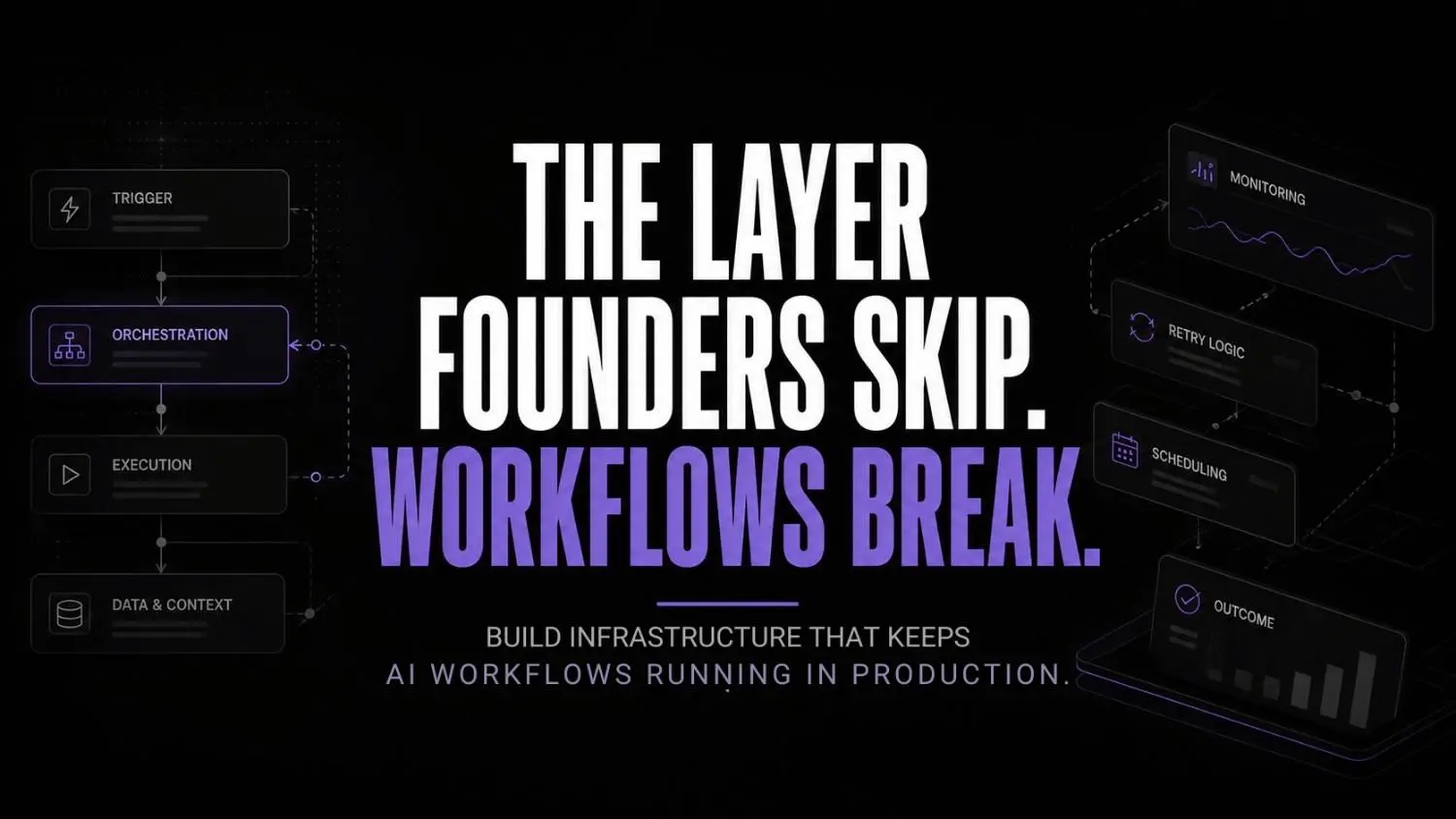
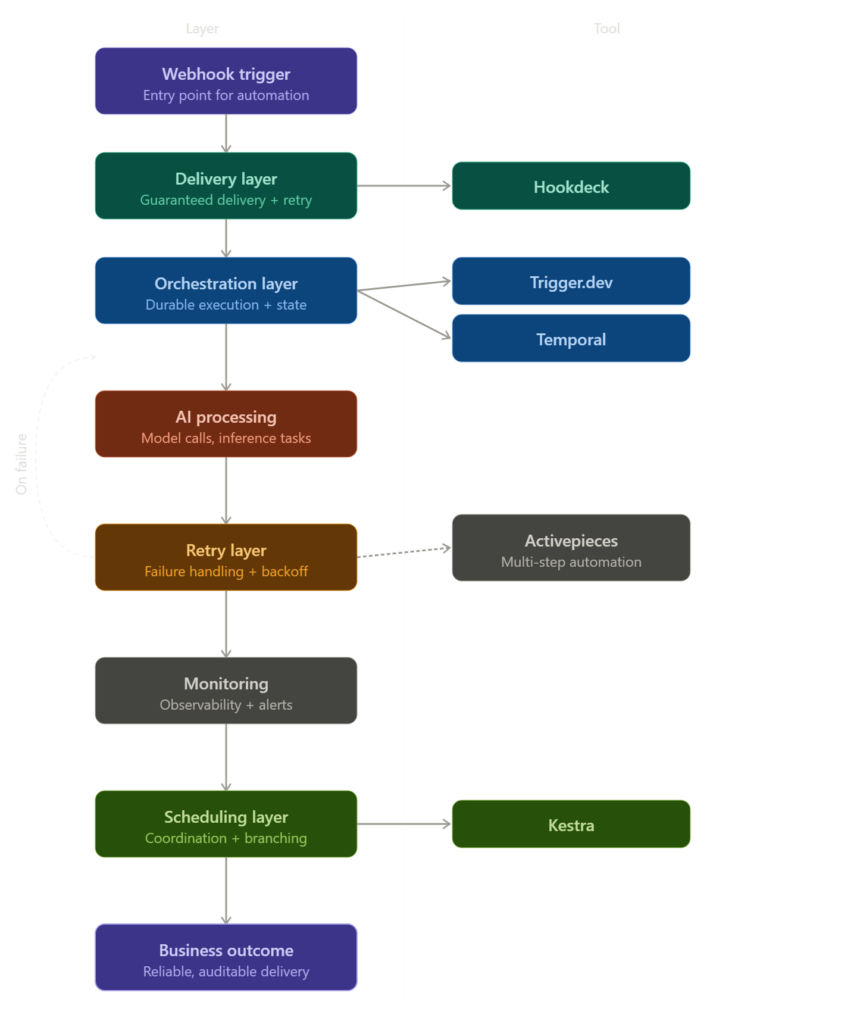
Most production AI systems rely on multiple infrastructure layers working together behind the scenes. Delivery, orchestration, retries, monitoring, and scheduling all play a role in keeping workflows operational when failures inevitably occur.
The diagram below shows what that infrastructure stack actually looks like in practice.
What actually breaks in production
The webhook delivery problem
Webhooks are the entry point for most AI workflow automations, and they get treated like guaranteed delivery systems when they’re not. A webhook fires, the receiving server is busy or slow, the event is dropped. The automation never starts. Nobody knows.
What I’ve noticed working with businesses is that webhook failures account for a disproportionate share of automation breakdowns that never get logged properly. They look like the workflow “didn’t trigger” when the real issue is delivery reliability upstream.
Long-running jobs and serverless limits
Serverless functions have execution time limits. Most AI tasks, especially anything involving document processing, multi-step reasoning, or sequential API calls, exceed those limits under real load. The job starts, hits the wall, and dies mid-execution.
Standard automation builders aren’t designed for durable execution. They’re designed for fast, short tasks. When you push longer AI jobs through them, there’s nothing there to keep state, resume on failure, or manage the execution lifecycle.
Retry logic that doesn’t exist
Most basic automation setups have zero retry logic. If a step fails, the workflow stops. If an external API is temporarily down, the whole job is lost. This is fine for low-stakes internal tasks. It’s a real problem for anything customer-facing or revenue-connected.
According to the 2024 Observability and Performance Trend Report by DZone and Honeycomb, teams operating without proper execution monitoring spend significantly more engineering time debugging production failures than teams with structured observability in place. That’s a workflow infrastructure cost hiding inside your engineering budget.
The five tools that actually handle this
Stage one: Trigger management and delivery
Hookdeck sits in front of your webhook infrastructure and handles delivery, queuing, retry, and fan-out. Instead of webhooks firing directly at your automation, they pass through Hookdeck, which guarantees delivery, retries on failure, and gives you a full event log you can actually read.
This single change eliminates the largest category of silent failures in most production AI workflow setups. It’s also the lowest-effort infrastructure addition on this list.

Hookdeck
Hookdeck helps developers test, monitor, manage, and scale webhooks with built-in observability and reliability. It acts as a webhook infrastructure layer that improves debugging, delivery guarantees, and operational visibility.
Activepieces handles the automation layer for teams that want orchestrated multi-step workflows without building custom infrastructure. It’s self-hostable, which matters for teams with data sensitivity requirements, and it handles branching logic more cleanly than most mainstream builders without requiring engineering overhead to maintain.

Activepieces
Activepieces is an open-source automation platform that helps teams build AI agents and workflow automations without coding. It’s designed for businesses that want Zapier-style automation with more flexibility, self-hosting options, and enterprise control.
Stage two: Durable execution for complex jobs
Trigger.dev is built for long-running background jobs in TypeScript environments. It handles durable execution natively, meaning jobs can be paused, resumed, and retried without losing state. For AI workflows that chain multiple model calls or process large documents, this is the architecture that doesn’t break when something upstream goes sideways.

Trigger.dev
Trigger.dev is an open-source platform for building and deploying long-running background tasks, AI agents, and workflows using code. It provides durable execution, retries, queues, scheduling, observability, and managed infrastructure without serverless execution timeouts.
Temporal is the option for teams operating at scale who need workflow orchestration that survives infrastructure failures entirely. It maintains state externally, handles failures at every step, and provides full visibility into workflow execution history. The learning curve is real. But for anything mission-critical, it’s the infrastructure that holds when everything else around it doesn’t.
Temporal
Temporal is a workflow orchestration platform that helps developers build reliable distributed applications without managing complex failure handling logic. It simplifies long-running processes, microservices coordination, and business-critical automation at scale.
Stage three: Scheduling and workflow coordination
Kestra handles declarative workflow orchestration and scheduling. It’s particularly strong for data pipeline coordination, sequential AI processing tasks, and anything that needs reliable scheduling with conditional branching. Unlike cron-based systems, Kestra tracks execution state and handles failure scenarios with actual retry policies instead of just restarting the whole job blindly.
Kestra
Kestra is an open-source orchestration platform that enables engineers to build, schedule, and automate workflows using declarative YAML definitions. It supports event-driven automation, data pipelines, infrastructure workflows, and business process orchestration.
What AI workflow infrastructure actually looks like operationally
On a Tuesday morning at 9:15, a SaaS founder opens their operations Slack channel and sees three failed job notifications from overnight. Without infrastructure, those failures would have been completely invisible until a customer reported something broken.
With Hookdeck in front of the webhook layer, the event log shows exactly which incoming triggers were received, which were retried, and which resulted in downstream failures. The failure wasn’t a prompt issue. An upstream API returned a 503 at 3am during a maintenance window, and the retry logic caught it on the third attempt for two of the three jobs. The third failed because the data payload was malformed, which is a logic problem, not an infrastructure one. That distinction matters.
In Trigger.dev, the long-running document processing job shows its full execution timeline. It paused at step four when the API rate limit was hit, waited the required interval, and resumed automatically. Without durable execution, that job would have failed completely and required a manual restart nobody would have known to trigger.
In Kestra, the scheduled morning data pipeline completed successfully but flagged a branch condition that wasn’t met, which triggered an alternative path. The full execution history is there, readable and auditable, without digging through raw server logs.
The difference between this morning and a morning without AI workflow infrastructure: three issues surfaced, diagnosed, and either resolved or queued for review before the founder finished their first coffee. None of them required reactive debugging.
Wrong approach vs right approach
| Wrong approach | Right approach |
|---|---|
| Webhook fires directly at automation | Webhooks routed through Hookdeck for guaranteed delivery |
| Serverless function handles long AI jobs | Durable execution via Trigger.dev or Temporal |
| No retry logic on step failures | Retry policies defined at every critical step |
| Logs reviewed manually after something breaks | Observability layer monitors execution in real time |
| Single automation tool handles everything | Separate tools for delivery, execution, and orchestration |
| Failures discovered by users | Failures surfaced by infrastructure before users notice |
Self-audit checklist: is your AI workflow infrastructure production-ready?
- Do you have webhook delivery guarantees, or are you relying on direct fire-and-forget?
- Can your longest-running AI jobs survive a serverless timeout without losing state?
- Does every critical workflow step have a defined retry policy?
- Can you see exactly where a failed workflow stopped and why, without reading raw logs?
- Do you receive proactive failure alerts, or do you find out when users complain?
- Is your execution state maintained externally, or does a server restart kill jobs mid-run?
If you answered no to more than two of these, the infrastructure layer is where your reliability problems are coming from. Not the model. Not the prompt.
The operational gap no tool solves alone
There’s a version of this problem that doesn’t get discussed enough. Teams add tools to their automation reliability setup without thinking about how those layers interact when something fails. Hookdeck handles delivery. Trigger.dev handles execution. Kestra handles scheduling. But if nobody has designed how these layers communicate on failure, you’ve added complexity without actually adding reliability.
For teams building serious AI workflow management systems, the orchestration question isn’t which tool to pick. It’s whether the handoffs between tools are defined and whether a failure at one layer propagates correctly to the next one.
And that’s an architectural problem, not a tooling problem. Most founders haven’t looked at it yet.
Research from the McKinsey Global Institute on AI adoption has found that operational integration challenges, not model capability, remain the primary barrier to scaling AI in business contexts. The infrastructure layer is exactly where that integration breaks down in practice.
For teams also thinking about model hosting, compute architecture, or provider selection as part of a broader AI workflow infrastructure strategy, understanding the provider landscape for AI compute is worth doing before locking into a single execution environment.
FAQs
Why does my automation work in testing but keep breaking in production? Testing environments don’t replicate real production conditions. Data volumes are lower, API rate limits don’t get hit, and failure edge cases don’t appear. The workflow looks clean until it meets real load, and then the missing infrastructure layer becomes obvious fast.
Do I actually need all five of these tools? Probably not from day one. Start with Hookdeck if you’re running webhook-based automations. Add Trigger.dev when you start hitting serverless timeout problems. Layer in Kestra or Temporal when you need orchestration across multiple interdependent workflows. Build the infrastructure in response to real failure patterns, not in anticipation of hypothetical ones.
What’s the difference between Temporal and Trigger.dev? Trigger.dev is faster to implement and fits TypeScript-native teams well. Temporal is more comprehensive, handles more complex failure scenarios, and is better suited for large-scale production systems. The overhead of Temporal is real, so it’s not the right first choice for early-stage setups.
How do I know if my workflow failures are infrastructure problems or logic problems? Infrastructure failures tend to be intermittent, environment-specific, and often correlate with load or external API behaviour. Logic problems are consistent and reproducible. If a workflow fails randomly or only under certain conditions, start investigating the infrastructure layer first.
Is Activepieces actually a replacement for mainstream automation tools? For teams with self-hosting requirements or more complex branching logic, yes. For simple linear automations with no data sensitivity concerns, mainstream tools work fine. Activepieces becomes the right choice when you need control over the infrastructure your automation runs on, not just the automation itself.
Conclusion
The conversation around AI workflow automation has been stuck at the tool selection layer for too long. Which model, which builder, which integration. But as more businesses move workflows into production, the infrastructure conversation is going to become unavoidable.
The next shift won’t be about better AI models. It’ll be about who built the execution layer underneath those models with enough rigour to survive real production conditions. Founders who treat infrastructure as an afterthought will keep debugging failures reactively, usually after a customer already noticed. Founders who design the delivery and execution layer intentionally will have workflows that quietly do their job. The same execution gaps are already delaying enterprise AI vendor success in banking, where infrastructure decisions matter long before production rollout.
The question worth sitting with: if your most critical AI workflow failed tonight, would your infrastructure surface it by morning, or would a customer tell you first?
Your next move
Open the automation or AI workflow you consider most business-critical right now. Map out what happens when any single step fails. Is there a retry policy? Is the webhook delivery guaranteed? Is the execution state maintained if the job runs longer than expected? If you can’t answer yes to all three in the next ten minutes, you’ve found your infrastructure gap. Start there.