Key takeaways
- Zapier, Make and n8n charge differently: successful action steps, module credits and full workflow runs.
- Zapier has 9,000+ app integrations, and Make has 3,000+ apps.
- n8n offers a free self-hosted Community Edition and its hosted plans will keep data in Frankfurt, Germany.
- AI Agents (beta) Make lists Zapier lists approval requests (beta) Collaborate
- Relevance AI’s public pricing page shows an Enterprise plan with contact-sales pricing.
- The cost of the same workflow is multiplied by the billing units.
Most teams select a no-code AI software the same way they do when choosing a new gym: based on the features they will use, only to realize the opportunity cost after three months. The actual price is reflected when their team has to troubleshoot a failed workflow on a Tuesday when no one knows who is responsible for the tool.
This risk is quantified as the ability to address the value of the platform: a single tool that cannot integrate into the CRM or charge ten dollars for a ten-step automation will require re-engineering the entire system around the new tool. Teams are left with vulnerable data in places unsuitable for production and a number of automations only one person can understand.
Below, each no-code AI is matched to the jobs it can perform, including the integrations and permissions, hosting and cost control, according to the vendors’ websites. A more extended section covers the circumstances under which no-code AI tools should be avoided.
Quick answer: which no-code AI platform fits which job
The best no code AI platform would be determined by the use case and who would be maintaining it. Something like Zapier would be the easiest for simple automation between apps. For visual multi-step automations, Make would be my recommendation. If you’re working in a technical environment looking to host your own automation, n8n could be the way to go. For an agent-first approach to automation, Relevance AI is built around this concept.
| Best for | Platform | Why it stands out | Consider it if |
|---|---|---|---|
| Simple app-to-app automation | Zapier | Lists 9,000+ app integrations and a free plan | You want fast setup with no code |
| Visual multi-step workflows | Make | Visual builder with routers and filters on every plan, including Free | Your workflows branch and transform data |
| Self-hosted, technical control | n8n | Free self-hostable Community Edition | Your team can run servers and wants data control |
| Agent-first builds | Relevance AI | Positions around agents and multi-agent workforces | You’re building agents, not just sequences |
Pricing, limits and features were read from each vendor’s official page on September 30, 2026. Vendors change plans often, so confirm before buying.
What is a no-code AI platform?
A no-code AI platform is a tool for building AI-powered automations, assistants or agents that can be designed through visual editors, templates, integrations instead of being built with custom code. Products that fit into this category solve a variety of use cases.
Some focus on connecting apps and transferring data between them, while others build agents that make decisions by combining different tools and actions. There are also platforms that are closer to the domain of customer support or knowledge search. Choosing the wrong category without understanding the problem you have to solve is the first mistake one can make.
For a deeper look at where automation ends and agents begin, see this guide to AI agents versus automation for small businesses.
How to choose a no-code AI platform
Start with the workflow, then the data, then the permissions. The platform comes last.
1. Define the workflow. Name the trigger, the data it needs, the output it creates and what happens when the AI is unsure.
2. Decide on automation or an agent. A fixed automation follows predefined steps. An AI-assisted automation uses AI inside a fixed sequence to classify, summarize or draft. An agent chooses among approved tools to reach a goal. Agents need tighter controls.
3. Check integrations first. List your must-have systems: CRM, email, helpdesk, accounting, spreadsheets, calendar. If one is missing, the platform is out.
4. Decide what the AI may do. Use this permission ladder:
| Permission level | Example | Recommended control |
|---|---|---|
| Read | Summarize a customer record | Access limits and logging |
| Draft | Write a proposed reply | Human review before sending |
| Suggest | Recommend a lead score | Confidence threshold and human check |
| Write | Update CRM fields | Validation, logging, rollback plan |
| Act externally | Send messages, issue refunds | Approval required before execution |
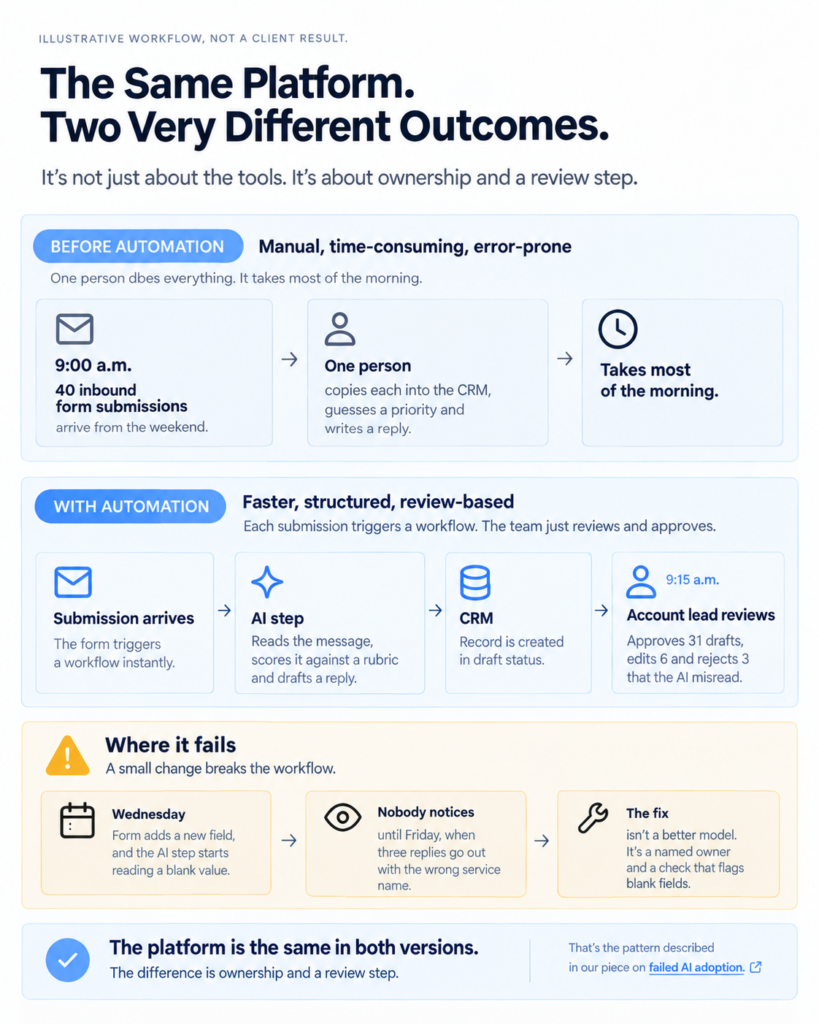
5. Count the maintenance burden. Who fixes it when an app changes its API? Our note on AI workflow maintenance covers why ownership after launch is where most automations die.
Pause and think: if the person who built your most important workflow left tomorrow, could someone else fix it by Friday?
No-code AI platform comparison table
This is the table to bookmark. Every cell comes from the vendor’s official page as read on September 30, 2026. “Ease of use” is our editorial judgment, not a vendor claim, and it’s labeled that way.
| Platform | Best for | Workflow type | AI agent capability | Integrations | Human approval | Hosting and data options | Ease of use (editorial) | Pricing starting point |
|---|---|---|---|---|---|---|---|---|
| Zapier | Simple app-to-app automation with AI steps | Trigger and action Zaps, multi-step on paid plans, with filters and paths | Zapier Agents: free tier with 400 activities per month, Pro at $400 billed annually for 1,500 activities. Zapier MCP lets AI apps act across apps, and one MCP tool call uses two tasks | 9,000+ apps | Approval requests listed as a beta collaboration feature. Confirm plan availability | Zapier-hosted cloud. Enterprise lists advanced deployment options and custom data retention | Low learning curve. Zapier states no coding is needed | Free: $0 for 100 tasks. Professional from $19.99/month. Team from $69/month (25 users). Enterprise by quote |
| Make | Visual, branching multi-step scenarios | Scenarios with routers and filters on all plans | Make AI Agents (beta), built with Make’s AI provider or your own LLM key. Also Maia for building through conversation and an MCP server | 3,000+ apps | No human-approval step listed on the pricing page. Check Make’s documentation | AWS, EU or North America | Medium learning curve | Free: 1,000 credits per month. Core $12/month for 10,000 credits as displayed. Pro $21 and Teams $38. Annual billing saves 15% or more per Make |
| n8n | Technical teams wanting control and self-hosting | Workflows with code steps (JS or Python), webhooks, custom API requests | AI agents and RAG are listed as n8n use cases. An AI Assistant is in preview | Every integration included on all plans | No human-approval feature listed on the pricing page. Check n8n’s documentation | Hosted plans store data in Frankfurt, Germany. Self-hosted runs wherever you choose. Business plan is self-hosted only | Higher learning curve | Community Edition free (self-hosted). Starter €20/month billed annually for 2,500 executions. Pro €50/month for 10,000. Business €667/month for 40,000 (self-hosted) |
| Relevance AI | Teams building agents and multi-agent workforces | Agent-centric | Unlimited agents and tools, agent evaluations, A/B testing and analytics (Enterprise) | 2,000+ integrations | Not listed on the pricing page | Not stated on the pricing page. Vendor links a trust center | Not assessed | Pricing page currently shows an Enterprise plan with contact-sales pricing. Self-serve tiers weren’t visible when checked |
Methodology note: platforms are compared on workflow fit, integration depth, AI capability, governance options, maintenance burden and value for the intended user. Marketing claims alone don’t count.
What we tested and what we checked
This section is where editorial credibility lives, so it has to be honest about what was and wasn’t done.
What was verified (desk review, September 30, 2026):
- Live pricing and plan pages for Zapier, Make, n8n and Relevance AI.
- Billing units, free-plan limits, trial terms, hosting locations and governance features as each vendor states them.
- Conflicting third-party numbers were discarded rather than averaged. Several blogs quoted Make Core at $9 and others at $12, for example.
Platform notes: problem solved, where it fits, why it matters
Zapier: fastest route from idea to working automation
Problem solved: connecting apps without code. Where it fits: low-volume, linear workflows with AI steps. Why it matters: Zapier lists 9,000+ integrations, so the odds your odd-ball tool is covered are high.
The only catch is billing. Zapier bills every successful action step as a task, while both triggers and filters are free. A heavy usage of a long workflow can accumulate tasks rapidly, and at higher volumes, it can get expensive. Zapier also warns that if you exhaust your task allowance, you will be moved to a higher-priced pay-per-task billing plan unless you disable the feature.
Who should avoid it: teams running long, high-volume workflows on a tight budget.

Zapier
Zapier Central is a no-code AI automation platform that lets you build intelligent agents to handle tasks across thousands of apps. It’s designed for businesses and teams who want to automate workflows, delegate tasks to AI, and reduce manual work without coding.
Make: visual control for branching logic
Problem solved: workflows that branch, loop and transform data. Where it fits: scenarios with routers and filters, which Make includes even on the Free plan. Why it matters: the visual builder makes logic visible, which helps the next person who has to fix it.
Make charges one credit per module action, though routers and error-handler modules aren’t counted. Credits expire at the end of the term. If you run out, scenarios stop until you add credits.
Who should avoid it: anyone who wants a built-in human approval step and expects to find it on the pricing page. Verify that in the docs first.
Make
Make (formerly Integromat) is a visual automation platform that lets you connect apps and build workflows without coding. It’s designed for businesses and creators to automate repetitive tasks and streamline operations across tools.
n8n: control, self-hosting and cost predictability for technical teams
Problem solved: running AI workflows where you control data location. Where it fits: teams with someone who can manage servers. Why it matters: n8n bills per workflow execution regardless of step count, so a 40-step workflow and a 3-step workflow each count once.
The free Community Edition is self-hosted, and n8n’s hosted plans keep data in Frankfurt. Business features such as SSO, SAML, LDAP and Git version control are on the self-hosted Business plan. That plan currently has no hosted option, only a waitlist.
Who should avoid it: nontechnical teams with nobody to maintain the setup.

n8n
n8n is a workflow automation platform built for technical teams that need more flexibility than traditional no-code tools. It supports self-hosting advanced logic AI integrations and custom workflows while giving developers full control over automation infrastructure.
Relevance AI: agents as the main product
Problem solved: building agents and multi-agent workforces rather than fixed sequences. Where it fits: teams that already know they need agents. Why it matters: the platform lists agent evaluations and A/B testing, which address the “how do we know the agent is any good” problem.
The vendor’s pricing page in my check showed Enterprise only, with contact-sales pricing and SSO, RBAC and audit logs. Expect a sales conversation.
Who should avoid it: small teams that want a self-serve price before talking to anyone.

Relevance AI
Relevance AI is an AI agent platform that helps businesses build, deploy, and manage autonomous AI agents for operations, customer support, sales, and internal workflows. It is built for teams that want AI automation beyond simple chatbots or task automation
Operator opinion
- Speed to first result: Zapier, because setup is the lightest.
- Ease of adoption: Zapier first, Make second, n8n last.
- Cost behavior at volume: this depends on your workflow shape, and the arithmetic later in this article matters more than the plan names.
- Biggest limitation across all four: none lists a simple “pause here for a human” step on its pricing page. Confirm it in documentation before you build anything that sends messages or moves money.
- Who should avoid no-code entirely: teams whose workflow is the product. More on that next.
What a no-code AI platform actually looks like operationally
No-code AI platform vs custom development
A no-code AI platform is the right call when you’re validating a workflow, using mainstream integrations and able to live with the vendor’s limits. Custom development is the right call when the workflow is your competitive advantage or your constraints exceed what the vendor offers. Most businesses should start no-code and earn their way out.
| Factor | Choose no-code when | Choose custom development when |
|---|---|---|
| Speed | You need a working version this week | You can wait for a scoped build |
| Integrations | Your tools are in the vendor’s catalog | You need unusual or internal systems |
| Logic | Branching and transforms fit a visual editor | You need proprietary logic or complex state |
| Scale | Volume is moderate and cost is predictable | Volume makes per-unit billing painful |
| Control | Vendor logging and approvals are enough | You need fine-grained security or infrastructure control |
| Compliance | Vendor hosting regions are acceptable | You have strict residency or regulatory rules |
| Change rate | The process changes often | The process is stable and central to the product |
| Ownership | A nontechnical owner can maintain it | You have engineers to maintain it |
Where the cost actually shows up
Same workflow → different billing units1,000 runs × 10 steps
Zapier
→ ~9,000 tasks
Make
→ ~10,000 credits
n8n
→ 1,000 executionsSame workflow. Different economics.When to leave no-code
Workflow → pressure point → next moveProduct logic → Vendor dependency → Build itHigh volume → Rising cost → Compare buildsData rules → Residency limits → Self-hostMessy canvas → Too many workarounds → Use codeTesting needed → Version control → Engineer itThe hybrid path most teams miss
You don’t have to pick one. A common pattern is to prototype in a no-code AI platform, prove the workflow works, then move only the critical step into code. Keep the rest in the platform. Zapier’s SDK and n8n’s code steps are examples of vendors building this bridge, and our note on MCP versus API explains how the connection layer changes that decision.
What I’ve noticed working with businesses…
What I learned when working with businesses is that teams outgrow their platform when their tool doesn’t meet their needs, not that it is poor. They outgrow it because nobody captured what their intended workflow was. In custom development, they rebuild the same miscommunication in code, and it costs them ten times as much.
Questions to settle before commissioning custom work
- Can you describe the workflow in one page, including exceptions?
- Who owns it after launch, and who fixes it at 8 a.m. on a bad day?
- What does the no-code version fail at, specifically?
- What happens to the data if the vendor changes terms?
If you can’t answer the first two, don’t build anything yet. This is exactly the workflow infrastructure gap that turns good tools into expensive mess.
Business autopsy: the rebuild nobody needed
A services firm moved a working lead-routing automation to custom code because the no-code bill crossed a threshold. The rebuild took months. The code reproduced every undocumented shortcut, including a rule only one person remembered. What failed wasn’t the platform. It was the missing documentation. What should have changed: write the process first, then decide between tool and build.
Wrong approach vs right approach
| Wrong approach | Right approach |
|---|---|
| Choosing by feature count | Choosing by workflow, data and permissions |
| Letting an agent act externally on day one | Starting read-only or draft-only |
| Estimating cost by plan name | Estimating cost by billing unit times workflow steps |
| Building without an owner | Naming an owner before launch |
| Rebuilding in code to escape a bill | Documenting the process, then deciding |
Security and governance checklist
A no-code AI platform is only as safe as the access you grant it. Answer these before connecting anything sensitive:
- Does the platform offer role-based access or team roles?
- Can workflows run on service accounts rather than personal logins?
- Can you limit what data the AI model sees?
- Can you pause, review or revoke an automation?
- Are outbound messages and destructive actions gated by a human?
- Are logs available for AI outputs and tool calls?
- Where is data hosted, and can you choose? (Make lists AWS in the EU or North America. n8n’s hosted plans use Frankfurt.)
- Can you export workflows if you leave?
Self-audit checklist
- One workflow chosen, with a written trigger and output
- Permission level set: read, draft, suggest, write or act
- Named owner for ongoing fixes
- Billing unit understood and cost estimated
- Approval step confirmed in documentation, not assumed
- Hosting region checked against your data rules
The best starting point for most small teams
Begin with one simple, low risk process: weekly reporting, meetings, lead routing or internal document search. Choose the tool which best fits the existing ecosystem of software already being used. Start with read only or draft capabilities, and layer in additional automation once the process is validated.
Free tiers make this cheap. Zapier offers a free plan and a 14-day Professional trial with no credit card. Make’s Free plan has no time limit. n8n’s hosted trial needs no credit card either. For more no-cost options, see our roundup of free AI automation tools.
Faq
The one that already connects to the apps you use and lets you build one simple workflow first. Zapier has the lightest learning curve of the four covered here, in our editorial view.
Yes. Zapier Agents, Make AI Agents (beta) and Relevance AI all offer no-code agent building. Control and governance vary widely, so check approvals before letting an agent act.
Each bills a different unit: tasks, credits or executions. The same ten-step workflow can be counted ten times or once.
The self-hosted Community Edition is free. You still pay for servers and the time to maintain them, and hosted plans are paid.
On Zapier, you’re switched to pay-per-task billing unless you turn it off. On Make, scenarios stop until you add credits, though incoming webhooks queue up.
Rarely. They handle common processes, while developers handle custom integrations, scale and security-sensitive systems.
Conclusion
Expect the next shift to be governance, not features. As agents gain the ability to act across more systems, buyers will ask what an agent is allowed to do long before they ask how clever it is. Platforms that make permissions, approvals and logs easy to see will win the serious buyers, and the feature-list race will matter less.
Which workflow in your business would hurt most if an AI handled it wrongly for a week, and does anyone check it today?
Your next move
Open a blank note and write one workflow on a single page: the trigger, the data it needs, the output, and who reviews it before anything goes out. Then count the steps. Ten minutes, and you’ll know which billing unit to worry about.