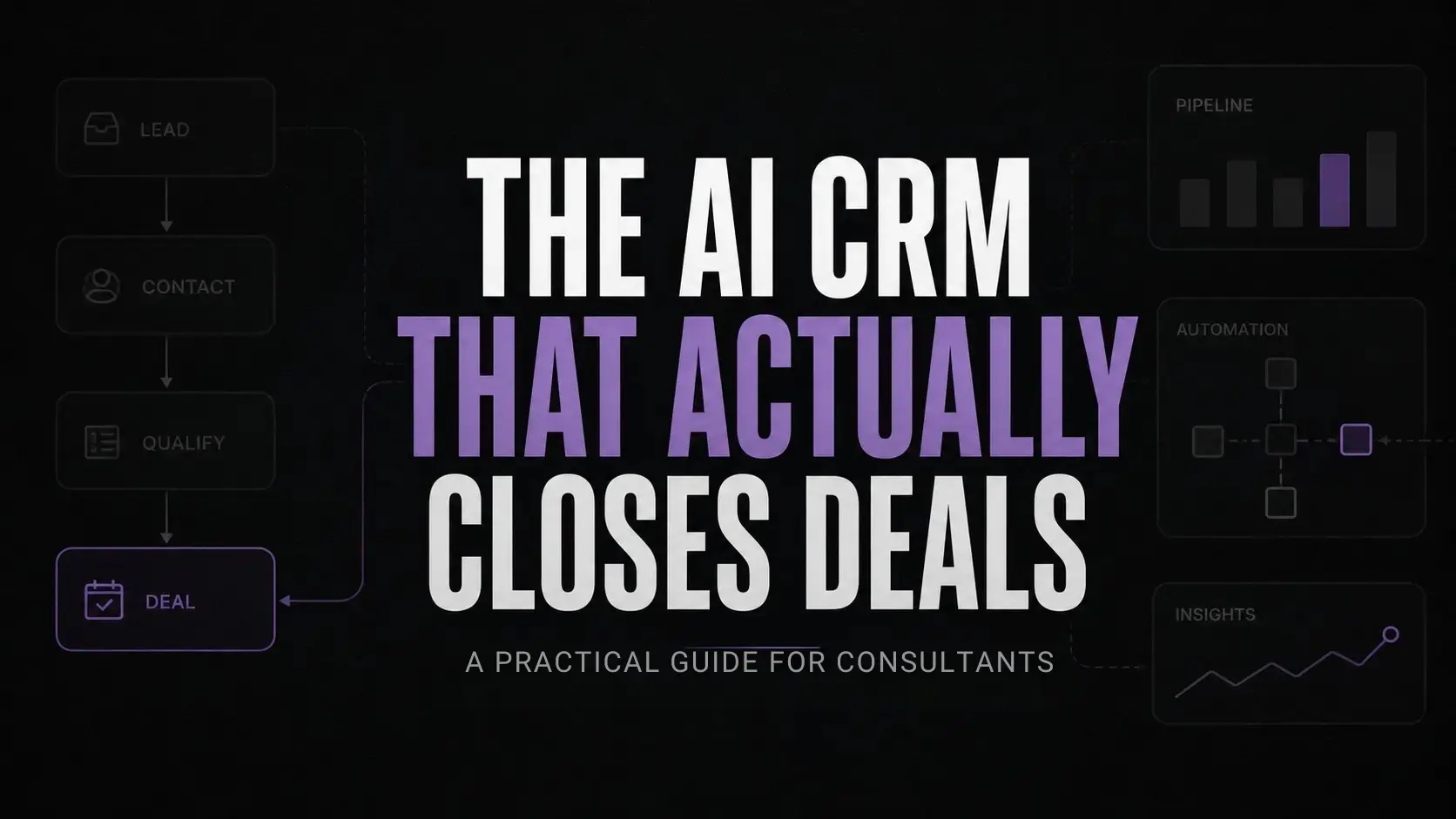
The best AI CRM for consultants isn’t the one with the longest feature list. It’s the one that cuts manual work, keeps client information in one place, and helps every deal move forward. This guide shows you how to build that workflow.
Key takeaways
- 13 hours of an advisor’s weekly advisory time are wasted on lead data entry
- Most client follow-ups fail due to unstructured pipeline workflows.
- Unified tools reduce administrative overhead by up to 40%
- Automated data enrichment eliminates pre-call research entirely.
Introduction
Every Friday afternoon, independent agencies waste tens of thousands of dollars in closed proposals buried in email threads. This lost revenue comes from clients that couldn’t be tracked down due to a disjointed discovery and tracking process. People who provide their expertise on a consulting basis usually find that their ability to capture and close business is severely hindered by the combination of manual data entry and the limitations of their own time once they start working for a particular client. According to research performed by SuperOffice, salespeople spend roughly 13 hours per week performing manual data entry.
Looking for the best AI CRM for consultants is not about finding software that makes closing easier by itself. It’s about removing the roadblocks that make getting those hard-earned contracts signed while managing client relations as a sole proprietor particularly challenging.
Many boutique consulting firms attempt to solve this problem by buying enterprise-level software solutions. The ones who do often find themselves drowning in customization and integration costs
The addition of more tools to an already hectic workflow only serves to expedite an inevitable disaster when it comes to managing one’s own business operations. If a Workflow Infrastructure is unhealthy to begin with, throwing AI into the equation only serves to accelerate the rate at which things fall apart
Why consulting pipelines break down under pressure
Consultants sell trust, bespoke solutions, and expertise. You cannot buy those qualities; they must come from experience. If you have five clients, you can memorize the details of each call and know precisely what to say to get their business. However, there comes a point when even the sharpest mind cannot retain all the information. When you get to twenty prospects, the mental load becomes too much to bear.
If you miss one task or forget a conversation’s context, weeks can pass before you recover that lost ground. A client shared with me last week that he spent three hours on a Sunday searching through six Slack channels to find the information needed to draft a proposal scope. This is not a technological problem but an infrastructural one. Consequently, proposals take too long to respond to and consequently lose out to competitors, creating significant Revenue Leakage for advisory firms that find themselves in a perpetual feast or famine scenario with their cash flow.
According to the IRC Sales Solution research , 80% of deals require five or more touches before closing, but most people give up after one follow-up.
When I speak with companies about these issues, they usually identify their lack of discipline as the problem. However, there is rarely an automated infrastructure to ensure that someone or something is accountable for nudging the deal toward closure.
Selecting the best AI CRM for consultants by stage
You can fix this issue by implementing consultative sales software that can help you track and recall critical information at various stages in the sales process. Most tools are designed like a black box into which information is permanently stored. You need something more intelligent that helps you remember what has happened while also driving the sale forward.
+-----------------------------------------------------------------------+
| THE AIFBA ADVISORY PIPELINE ENGINE |
+-----------------------------------------------------------------------+
|
v
+-----------------------------------------------------------------------+
| STAGE 1: INBOUND DATA CAPTURE & ENRICHMENT |
| [Client books Discovery Call via Calendar] |
| |
| --> CLAY: Instantly pulls background metrics & company context |
| --> FOLK: Auto-tags contact & segments lead by advisory tier |
+-----------------------------------------------------------------------+
|
v
+-----------------------------------------------------------------------+
| STAGE 2: ACTIVE PIPELINE & RELATIONSHIP VELOCITY |
| [Discovery Call Completed] |
| |
| --> ATTIO: Logs transcription & maps client to custom deal model |
| --> LINDY: Autonomous agent drafts personalized follow-up in 5 mins |
+-----------------------------------------------------------------------+
|
v
+-----------------------------------------------------------------------+
| STAGE 3: CLIENT MEMORY & KNOWLEDGE RETENTION |
| [Proposal Accepted & Project Onboarding] |
| |
| --> TANA: Supertags extract core operational bottlenecks |
| --> INSTITUTIONAL MEMORY: Flawless context transfer to delivery team |
+-----------------------------------------------------------------------+
|
v
+-----------------------------------------------------------------------+
| RESULT: ZERO ADMINISTRATIVE HOURS SPENT ON MANUAL DATA ENTRY |
+-----------------------------------------------------------------------+
Stage 1: Lead capture and data enrichment
At the top of your funnel, manual data entry is the main source of friction in terms of speeding up your time to lead. When a prospect schedules a discovery call, you shouldn’t be spending twenty minutes manually entering their professional background into your database
- Clay: Clay acts as an automated researcher, pulling in live web data, company stats, and recent news into your pipeline
Clay
Clay is a data enrichment and AI workflow platform that helps businesses automate lead generation, prospect research, and outbound personalization. It combines data providers, workflow automation, and AI research into one prospecting workspace.
Author’s Opinion: Clay removes the friction of research before outreach. The interface is similar to a spreadsheet but allows you to turbocharge the speed of data collection. What becomes easier is the rate at which you can enrich your pipeline; you can go from having a name and email to having a prospect’s entire operating history in under two seconds.
- Folk: Folk is a light-weight contact management workspace designed to help relationship-driven service businesses manage their sales pipelines

Folk CRM
Folk CRM is a lightweight relationship management platform designed for teams that want to organize contacts, pipelines, and outreach without enterprise CRM complexity. It is especially popular with agencies, founders, recruiters, and sales teams managing warm relationships and collaborative pipelines.
Author’s Opinion: If you find traditional CRMs to be a multi-tabbed jungle, then Folk is for you. The interface is clean, modern, and extremely quick to navigate. It becomes significantly easier to manage your pipeline and segment lists in real-time while also tagging important consulting and sales leads without any undue complexity.
Stage 2: Pipeline management and relationship tracking
Once in the active pipeline, the prospect requires more nuanced attention. Your goal is to keep the momentum going by managing the velocity of the relationship – who needs a call, what proposal is pending, and what dialogues have gone silent.
- Attio: Attio is a relational CRM that is highly customizable to your specific data model and workflow.

Attio
Attio is a flexible AI-powered CRM designed for startups and growing sales teams. It combines relationship management automation and collaboration into one customizable workspace. Teams use it to manage pipelines enrich contacts and automate workflows without the complexity of legacy CRMs.
Author’s Opinion: Attio is valuable for consulting because it is built on a data model that can support your unique needs. Attio is more powerful than Folk but better suited for more technically inclined operators as it requires a more hands-on approach to defining the data model.
- Lindy: Lindy is an autonomous AI assistant that can draft emails, schedule meetings, and perform other repeatable tasks.

Lindy.ai
Lindy.ai is an AI assistant that manages emails, meetings, scheduling, and follow-ups from one place. It’s designed for busy professionals and teams who want to automate repetitive admin work and save hours every week.
Author’s Opinion: Lindy is valuable for consulting because it can serve as a junior ops assistant, removing repetitive tasks and accelerating your deal pipeline. The UI is natural and intuitive you speak to Lindy as you would a human assistant. Your task is to ask nicely, and the AI will take care of the execution. The task that becomes easier is the ability to follow up faster it becomes autonomous in your pipeline, removing the need to manually track and follow up.
Stage 3: Client memory and knowledge retention
Closing the deal is only the beginning of the relationship, as long-term retention of clients hinges on exemplary institutional memory. The loss of context between sales conversations and project onboarding leads to immediate distrust.
- Tana: Tana is an AI-powered workspace that combines nodes-based note-taking and database-like features to facilitate Knowledge Capture.
Tana AI
Tana AI is a next-gen knowledge management and note-taking tool that transforms raw notes into structured data and workflows using AI. It’s designed for professionals who manage complex information like projects, research, and meetings.
Author’s Opinion: Tana is a fantastic tool for relationship memory, as the software’s “supertags” allow one to systematize the information extracted from various meetings with the client. Despite a steeper learning curve than one might expect from a simple notes app, the ability to quickly find any particular detail regarding the client significantly outweighs the effort.
The operational shift: Option A vs Option B
When you start reviewing your current operations, it becomes apparent that there are two distinct ways of doing things. Most independent contractors find themselves in option A doing things the hard way, wasting countless hours every week on menial tasks. To execute the alternative, you need to find the best AI CRM for consultants that works in the background so you can focus on your work rather than administrative tasks.
Option A: The brute-force manual workflow
You have a forty minute discovery call and fifteen minutes to type up your messy notes from the conversation while your next meeting awaits. Additionally, you have to manually set a calendar reminder to follow up in three days but that gets buried in your notifications when a client sends you twenty five slack messages about an urgent request. Finally, by the time you remember to send a proposal check in message they’ve hired another company
Option B: The systems-first automated workflow
Your discovery call ends with an automatically transcribed transcript organizing the prospects pain points directly into your crm while an ai agent composes a customized follow up email with exact timestamps of your conversation for your review. Therefore, your proposal goes out five minutes after the call ends, maintaining client momentum and removing any administrative burden from you.
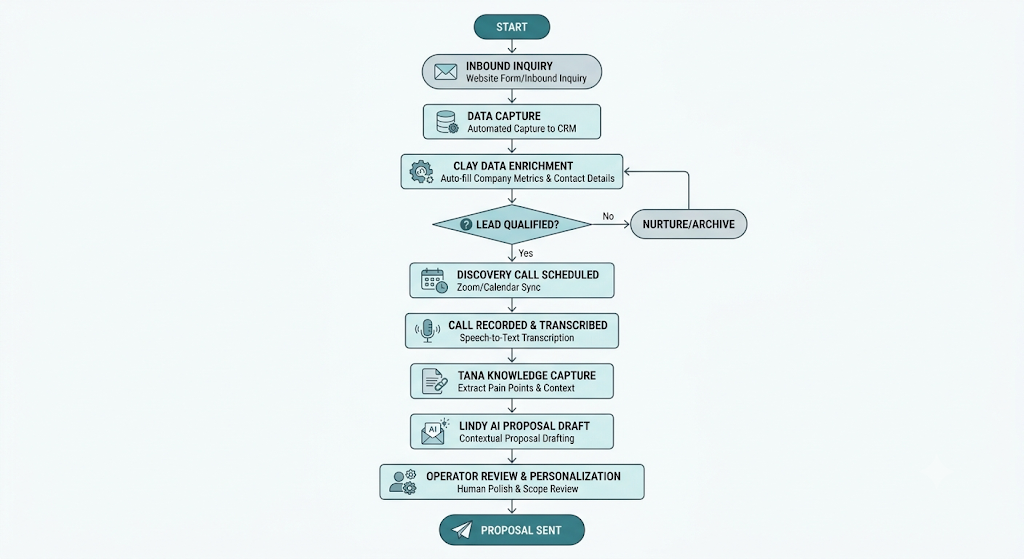
Pause and think: How many hours you spent last week typing notes into your crm, digging through emails for the right thread to follow up on, and thinking if you missed anyone. If its more than two hours you’re wasting your time with your current software.
What thinking-first actually looks like operationally
On a Tuesday morning, an operator who uses a thinking-first workflow does not check their inbox for fires at 8:30. Instead, they open up their central command dashboard in Attio, where overnight lead captures from Clay have already been scored
You have a discovery call with a prospective logistics client on Zoom at 9:00. Instead of furiously scribbling notes on a legal pad, you lean back in your chair and let your background recording system capture the conversation
At 9:45, ten minutes after the meeting has concluded, Tana has extracted the client’s highest impediments to operations and attached them to the client’s record. At the same time, Lindy has composed a tailored proposal with precise scope of work, sitting in your draft folder for a 60-second review.
By 10:00, you have sent out a perfect follow-up sequence with no manual data entry required, all while advancing your sales pipeline. This is the day-to-day reality of consultants who leverage the best ai crm for consultants vs those who continue to fight the current technological realities.
Before you invest in any new software, run through this self-audit to ensure that your current practices can support AI adoption:
- Do you have a documented, repeatable four-step sales process from inquiry to proposal close?
- Can you see all your active client deals + their next follow-up action due date on one screen?
- Is your lead capture connected to your email/calendar, eliminating manual data entry?
- Do you review your sales pipeline metrics at a set time every week?
If you answered no to any of the above, do not purchase new technology yet. First, build out your standard operating procedures, as any AI CRM for consultants will be useless if it cannot layer on top of your existing process.
How to choose the best AI CRM for consultants: wrong vs right approach
When looking for the best AI CRM for consultants, most founders reason from the feature set and algorithmic underpinnings. The right approach, however, is to adopt the systems thinking perspective and optimize for the ease of day-to-day operations.
| The wrong approach | The right approach |
| Buying a software before designing the sales process | Designing the sales process before buying software |
| Typing notes after every call | Automatically capturing call data and enriching it |
| Having hundreds of inactive leads in the CRM | Having automated processes to clean up the database |
| Getting stuck with enterprise software that has dozens of tabs | Being able to use a simple collaborative workspace |
| Having to rely on people to follow up | Having automated reminders to follow up |
To truly leverage the best AI CRM for consultants , adopt the philosophy of reducing the frictions around the daily operations, and use your precious mental bandwidth for actual value-added activities.
Core principles for sustainable client tracking
To ensure your software is not a bottleneck, make sure to design your practice around the following key principles:
- Go for speed over depth when designing your system. A simple database that takes 2 seconds to update is much better than a comprehensive system requiring 10 minutes for every update after every phone call.
- Do not remove the human from the loop. Use software for data enrichment and follow-ups, but do not let it dictate what goes into your client proposals.
- Archive everything that has not been booked in 30 days. If it has been 30 days since the last step in the booking process and it has not been booked, take it out of your active database.
- Build systems for your worst-case scenario. Design a workflow that is light enough that you could maintain it if you were to take a trip around the world while conducting client workshops.
FAQs section
Folk is typically the easiest CRM to begin with since it resembles a more familiar spreadsheet format than most other sales software. You can get the initial pipeline setup for your operations underway in under fifteen minutes, without having to deal with a heavy onboarding process.
The number one reason is that most operators attempt to update the spreadsheet manually after every client interaction. As a busy independent advisor, manually entering information is the first task to go, leaving your tracking software empty after a few weeks of use.
AI tools can help you to craft compelling follow-up messages, provided that they have been trained on the content of your calls with clients. Tools like Lindy can produce excellent follow-up content when given a conversation to work with, but it is best to spend thirty seconds reviewing the final copy before sending.
Most independent consultants should not be spending several hundred dollars per month on a CRM, as there are much cheaper options available. Modern CRMs such as Folk or Attio plus an enrichment service should only cost between fifty and a hundred dollars per month.
Notion is great for prototyping customer relationship management systems, but it is easy to outgrow as your pipeline becomes more complex. It requires additional maintenance to keep the database updated, whereas a dedicated tool for relationship management will automatically sync your emails and enrich your database, saving you time and effort.
Conclusion
Within the next two years, the line between sales software and services delivery infrastructure will disappear. We’re approaching an era where autopilot agents will handle every aspect of qualifying and guiding a lead, including all progression of the project, from behind the scenes. This shift is forcing founders to think more about AI workflow maintenance, because automated systems still need regular checks as the business changes.
The best advisory founders will not be those who can staff the largest administrative crews or who log the most billable hours, but rather the boutique operators who can design an elegant autopilot around their own operations, enabling them to serve clients of exponentially greater complexity.
When it comes to your current business development grind, does your system actually free you up to do substantive work on your clients’ issues, or are you instead just billing yourself as an unpaid administrative assistant?
Your next move
Open up your calendar and check the last five client discovery calls you scheduled within the past month. These small gaps often show where an AI stack audit is needed before workflow problems start piling up. Now, find those particular client names within your pipeline are they tucked away in emails or managed in an automated, updated and actionable fashion? Find any prospects who are not yet closed but lack a calendared follow-up date and send a brief, value-focused email to each one now, followed by a note describing what particular obstacle prevented that client from taking the next step.