Use the spreadsheet workflow failures test to expose shadow operations and broken processes before you waste capital on useless AI automations.
Key Takeaways
- Spreadsheets act as structural diagnostic indicators rather than worker preference.
- Automating unmapped tracking documents accelerates underlying system debt.
- Tracking unauthorized data exports exposes structural handoff breakdowns between departments.
- Tool selection must prioritize pipeline orchestration over feature accumulation.
Every week, operations leaders watch headcount expenses climb while process velocity drops. You notice your operations team spending hours moving data between enterprise platforms that were originally purchased to talk to each other. The typical response is to buy another SaaS subscription or hire an expensive agency to build an unmapped AI pipeline. But adding technology to an undocumented process simply creates automated chaos.
What I’ve noticed working with businesses is that this friction isn’t a lack of artificial intelligence. It’s an invisible layer of shadow operations built entirely on fragmented trackers. According to a 2024 global workplace operations study by Gartner, poorly integrated systems cost mid-sized organizations up to 20% in lost operational capacity annually. Furthermore, a comprehensive McKinsey & Company enterprise tech report notes that 70% of digital transformations fall short of their stated ROI targets due to internal process misalignment. When infrastructure fails, teams build workarounds, directly causing failed AI adoption across the organization. Before you write code or sign a new software contract, you must run a diagnostic on your existing trackers to halt these silent spreadsheet workflow failures. If you leave these grids unexamined, your upcoming automation projects are dead on arrival.
Why spreadsheet workflow failures happen under the radar
Employees rarely build custom tracking sheets because they love manual data entry. They build them because your official enterprise systems failed to support how daily tasks actually happen. When an enterprise platform lacks flexibility, your team builds a workaround using rows and columns.
[System Failure] ➔ [Employee Workaround] ➔ [Shadow Tracker Formed]
These trackers become the actual infrastructure of your business while your expensive software sits empty. This structural disconnect is where spreadsheet workflow failures quietly compound. If your team cannot trust the primary database, they will always build a secondary one that they can control. This lack of centralized visibility makes long-term AI workflow maintenance completely impossible. To fix this, you have to find out exactly where the bleeding starts.
The diagnostic framework for shadow trackers
To locate these hidden vulnerabilities, you must track where data leaves your approved systems. Look for the file downloads, the desktop CSVs, and the tabs that require manual updating every Friday morning.
Where are teams exporting data?
Look at your platform usage logs. If your account management team constantly pulls bulk reports from your CRM, your pipeline view is broken. They are likely re-sorting that data somewhere else to run their weekly meetings because the primary AI workflow infrastructure lacks proper reporting filters.
Which files cause panic when an owner is absent?
Identify the trackers that stall your operations when a specific employee takes a sick day. If a core process stops because someone cannot update a cell formula, you do not have a workflow. You have an undocumented dependency disguised as an operational tool, signaling deep workflow automation bottlenecks. Once you locate these files, you have to read their layouts like a crime scene.
What different tracker patterns reveal about your system
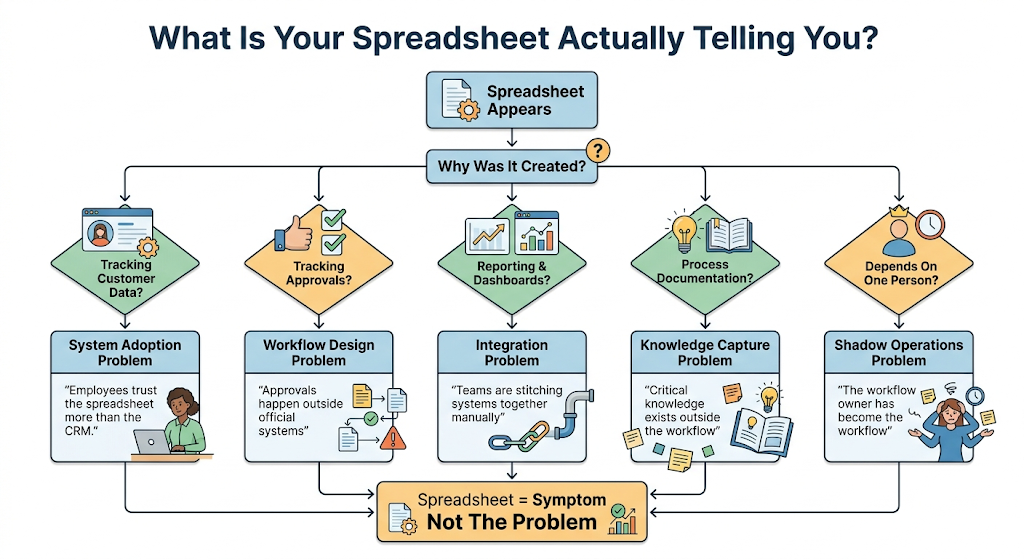
Not all tracking files indicate the same operational mistake. The layout of an unauthorized file tells you exactly where your software architecture has broken down.
What your trackers are actually whispering behind your back. If you are treating spreadsheets as a permanent fix, you aren’t fixing an automation problem you are treating a symptom of system rejection. Find your pattern above to see where the workflow actually broke.
The tracker used as a custom database
When an operation relies on a master sheet to track client statuses, your primary platform has an adoption problem. The team finds the main software too slow or too rigid for daily navigation, running a parallel, manual system instead of modern operational AI stack mechanics.
The tracker used for multi-department handoffs
When data moves from marketing to sales via a shared document, your integration layer is non-existent. These manual handoffs are where critical client information disappears, creating massive friction points that ruin subsequent scaling AI workflows initiatives. In fact, research published by the Harvard Business Review reveals that cross-functional data siloing causes manual errors that increase operational cycle times by up to 28% for scaling firms. Identifying these patterns is highly valuable, but you need to see how these failures disrupt a standard workday.
What thinking-first actually looks like operationally
Let us look at a real Tuesday morning scenario. At 9:00 AM, your logistics coordinator exports an inventory report from your main ERP system. Instead of trusting the system dashboard, they upload this data into a custom tracker to calculate reorder points manually.
9:00 AM: ERP Export ➔ 9:15 AM: Manual Tracker Upload ➔ 10:30 AM: Slack Approval
By 10:30 AM, they are messaging the purchasing manager on Slack to approve a vendor order based on that manual calculation. To fix this, you do not need an AI agent to read the Slack message. You need a data pipeline tool to sync the inventory levels directly with a conditional trigger. This shift requires trading your generic tool stacks for dedicated architecture. The same problem shows up in AI governance for logistics, where disconnected workflows make decisions harder to track.
What different failures reveal about your tool selection
When you spot a team running a critical process out of an unapproved grid, your first instinct is to hand them a cleaner template or a more rigid form. That is an expensive mistake. The shape of their workaround isn’t telling you what features they want; it is revealing exactly where your system communication has collapsed.
If every team has a different spreadsheet tracker
Most operations managers assume this is a documentation or training issue. It often isn’t. It usually means nobody actually owns how information moves between your core platforms. When systems operate in silos, teams build manual cross-platform bridges out of habits and habit-formed rows. The real underlying failure here is a lack of structural workflow orchestration.
- The interesting question: What would happen if your daily spreadsheet completely stopped acting as your integration layer?
- Tool to explore: Kestra is engineered explicitly for teams managing complex, decoupled workflows across multiple distinct enterprise systems without relying on fragile custom scripts.
Kestra
Kestra is an open-source orchestration platform that enables engineers to build, schedule, and automate workflows using declarative YAML definitions. It supports event-driven automation, data pipelines, infrastructure workflows, and business process orchestration.
If reporting requires weekly file exports
The manual export button is never the real bottleneck. The underlying issue is a fragmented, batch-processed workflow architecture. Your staff spends their Friday mornings moving rows of data simply because your primary tools never learned how to talk to each other dynamically.
- The interesting question: Which of your weekly reports exist only because real-time automation never happened?
- Tool to explore: Trigger.dev handles real-time, event-driven internal automations that execute background jobs the exact second a database change occurs, bypassing manual triggers entirely.

Trigger.dev
Trigger.dev is an open-source platform for building and deploying long-running background tasks, AI agents, and workflows using code. It provides durable execution, retries, queues, scheduling, observability, and managed infrastructure without serverless execution timeouts.
If operational knowledge lives inside spreadsheet cells
Many founders assume they have a functional documentation hub. What they actually have is scattered, decaying institutional memory hidden in private bookmarks. Information becomes impossible to find, verify, or transfer, meaning your business model breaks the moment an employee logs off.
- The interesting question: Could a new operator learn your exact workflow without scheduling a single call with the person who built it?
- Tool to explore: Readwise Reader has quietly evolved from a consumer reading tool into a powerful data capture and synthesis layer for teams building systemic knowledge operations.

Readwise Reader
Readwise Reader is an AI-powered reading and knowledge management app designed for heavy readers, researchers, and productivity enthusiasts. It combines read-it-later workflows, highlighting, spaced repetition, and AI-assisted reading into one unified system.
If employees keep creating their own research sheets
This pattern consistently signals an internal data discovery problem. The resource material or market data exists somewhere within your corporate drive; your people just cannot find it without exhausting hours of manual search time. They build local sheets to avoid the broken search bar.
- The interesting question: How much operational overhead exists in your business purely because internal information is painful to access?
- Tool to explore: Phind delivers high-velocity, contextual search and synthesis, helping operators dig through internal code repositories and documentation without losing hours to generic search queries.

Phind AI
Phind AI is a developer-focused AI search engine and coding assistant that delivers precise, code-based answers in real time. It’s designed for engineers who want faster debugging, code generation, and technical research.
If processes break entirely when one person leaves
Most organizations misdiagnose this as a hiring or onboarding failure. It usually isn’t. The real problem is that critical operational context exists only inside people’s heads, buried Slack threads, and unshared tracking tabs. When the person leaves, the actual business architecture walks out the door with them.
Tool to explore: Tana approaches structural knowledge mapping through highly granular, interconnected nodes rather than traditional static folders, allowing documentation to evolve alongside actual working habits. To verify where your infrastructure stands, let us evaluate your macro approach against real operational design.
Tana AI
Tana AI is a next-gen knowledge management and note-taking tool that transforms raw notes into structured data and workflows using AI. It’s designed for professionals who manage complex information like projects, research, and meetings.
The interesting question: What if your organization’s daily operational knowledge stayed naturally connected and searchable instead of turning into a forgotten static document?
Evaluating your system architecture logic
| The wrong approach | The right approach |
| Automating a spreadsheet process exactly as it exists today | Finding why the spreadsheet exists and fixing the root system |
| Buying a mainstream platform because of marketing hype | Deploying lightweight developer tools for specific pipeline jobs |
| Forcing compliance on a broken, rigid software interface | Rebuilding the data handoff to match actual team habits |
Signals of operational decay inside your department
- Data duplication: Entering the same client email address in three separate tracking documents.
- Manual status updates: Ping-ponging in Slack to confirm if a task is ready for the next person.
- Formula dependency: A business model that breaks if an employee changes cell format rules.
The same thing happens in insurance claims workflows, where duplicate data entry and manual handoffs create unnecessary delays.
Pause and think: If you revoked access to all shared tracking links today, would your core operations survive until tomorrow morning?
The operational readiness checklist
- [ ] Every data handoff between departments happens inside a trackable system.
- [ ] No employee spends more than thirty minutes a week moving data manually.
- [ ] System dashboards serve as the single source of truth for weekly metrics.
FAQs
Why not just automate the spreadsheet using a basic macro?
Because a macro only accelerates a broken method. If the underlying data structure is flawed, you are just generating incorrect outputs at a faster rate.
How do I get my team to stop creating shadow trackers?
You cannot fix this with a policy or an executive mandate. And trying to ban them will only force your team to hide their workarounds. You must fix the core software so it is easier to use than a blank grid.
Is every tracker a sign of a failed operation?
No, small prototypes are normal for testing a new workflow. But when a prototype remains a permanent part of your daily run-book for six months, it is a failure.
When is a spreadsheet the right tool for the job?
They are perfect for ad-hoc financial modeling or isolated analysis. But they are completely unfit for multi-user workflows or long-term data storage.
Should we replace our main software if teams keep avoiding it?
Not always. Often the software is capable, but the initial setup ignored how the frontline staff actually works. Try simplifying the interface before switching vendors.
Conclusion
The era of bloated enterprise software platforms forcing rigid workflows onto flexible teams is ending. In the coming months, we will see a massive shift toward modular, event-driven internal architectures that adapt to human behavior. But you cannot automate your way out of a broken process design. The same gaps are what cause revenue leakage in fragmented deal desk workflows.
Are you running an efficient operational system, or are you just managing a collection of interconnected trackers?
Your next move
Open your web browser history right now and look at the most frequently accessed shared document links across your operations team. Pick the single most active tracker, sit with the person who created it for ten minutes, and document exactly why they could not use your primary business software to complete that task.