Key takeaways
- Adding AI to an existing workflow adds steps, not removes them
- Workers lose roughly 51 minutes weekly switching between AI tools and legacy systems
- Approval loops and versioning habits are the actual bottleneck, not output quality
- Workflow redesign must come before any AI tool decision
- Five specific failure points are costing agency teams hours every week
If your agency has more AI tools than it did twelve months ago and somehow feels slower, you’re not imagining it.
According to the Microsoft 2025 Work Trend Index, workers lose significant time every week just switching between AI tools and legacy systems. And that’s before you factor in reviewing AI drafts, chasing approvals, and reconciling outputs scattered across four different platforms.
Here’s what’s actually happening: you added AI to your workflow but never redesigned it. So now you’re running the same broken process with an extra AI step sitting in the middle of it.
What I’ve noticed working with businesses is that the most frustrated agency founders aren’t using bad tools. They’re using good tools inside bad workflows. That’s a completely different problem, and it needs a completely different fix.
The workflow your agency is actually running
Most agencies operate on what I’d call ghost workflows. Nobody officially wrote them down, but everyone follows them by habit. The client call ends, someone Slacks a summary, someone else starts a doc, a third person builds a deck, and approvals happen over email. It runs on muscle memory, not design.
When you plug AI into this, it doesn’t fix the ghost workflow. It just gives each ghost a faster pen.
Imagine this: your team uses an AI tool to draft a client report and the draft is genuinely good. But then it moves to Google Docs for comments, back to Slack for approval, gets revised in Notion, exported to PDF, and sent over email. The AI saved 20 minutes on the draft. The handoff process ate 90 minutes. You’re slower than before you added the tool.
And that’s the part nobody talks about.
Pause and think: Count how many steps happen after your AI tool completes its job. That number is your real problem, not the tool you picked.
Where the slowdown is actually coming from
Approval loops that AI made visible
AI speeds up the doing but does nothing to the approving, reviewing, or sign-off process. So every time it produces an output faster, it creates a backlog at the human checkpoint sitting downstream. The bottleneck didn’t move. It just became more visible because work is arriving at it faster than before.
Most agency approval loops were already slow. AI just makes them impossible to ignore by generating more outputs that all still need human eyes.
The versioning chaos hiding inside your tools
Your client brief lives in Notion. The AI draft lives in a chat window. The revised copy is in Google Docs. The final version is buried in an email thread. Which one is current? Nobody actually knows, and that ambiguity costs more time than the AI ever saved.
Agencies running multiple AI tools without a single source of truth end up with versioning chaos that manual workflows rarely created. Because humans naturally consolidated. AI doesn’t consolidate. It just generates, and keeps generating, across wherever you happen to be working that day.
The tool-hopping that quietly burns 30 minutes a day
Your team switches between the brief tool, the AI tool, the project management platform, the client comms channel, and the delivery folder. Research consistently shows that context switching costs anywhere between 10 and 15 minutes of recovery time per switch. Multiply that across five people over a full week and you’ve lost a significant chunk of billable hours without a single person noticing why.
The five failure points agencies keep ignoring
These are the specific places where agency workflows break after AI gets added. Not because the tools failed, but because the structure underneath them was never built to handle what AI exposes.
- No single source of truth for client work across tools, so nobody knows which version is current
- Approval steps that exist by habit, not because they actually need to exist at every stage
- AI outputs that get manually re-entered into another system, cancelling out the time AI saved
- SOPs that live in someone’s head, undocumented and impossible to hand off cleanly
- Onboarding that assumes tribal knowledge will transfer automatically when it never does
If three or more of these sound familiar, the problem isn’t your AI tool budget. It’s the absence of workflow design that should have come before any tool decision. Adding a better AI tool to a workflow with these gaps doesn’t fix anything. It just makes the gaps harder to ignore.
Why your team keeps reverting to the old way
There’s an organizational psychology principle worth understanding here. When people are under pressure, they default to familiar behavior regardless of whether a better system exists. Psychologists call this regression to habit, and it’s exactly what happens when agencies introduce AI without redesigning the workflow around it.
Your team doesn’t revert to manual processes because they’re resistant to change. They revert because the new AI-assisted process was never made easier than the old one. If opening Slack and typing a summary takes ten seconds and the new AI tool requires four steps and a login, the brain will always choose Slack. Every time, without thinking.
This is why workflow redesign has to come before tool adoption. The new process needs to be measurably easier than the old one at every single step, not just faster in theory. Until that threshold is crossed, the ghost workflow wins.
What your workflow looks like now vs what it should look like
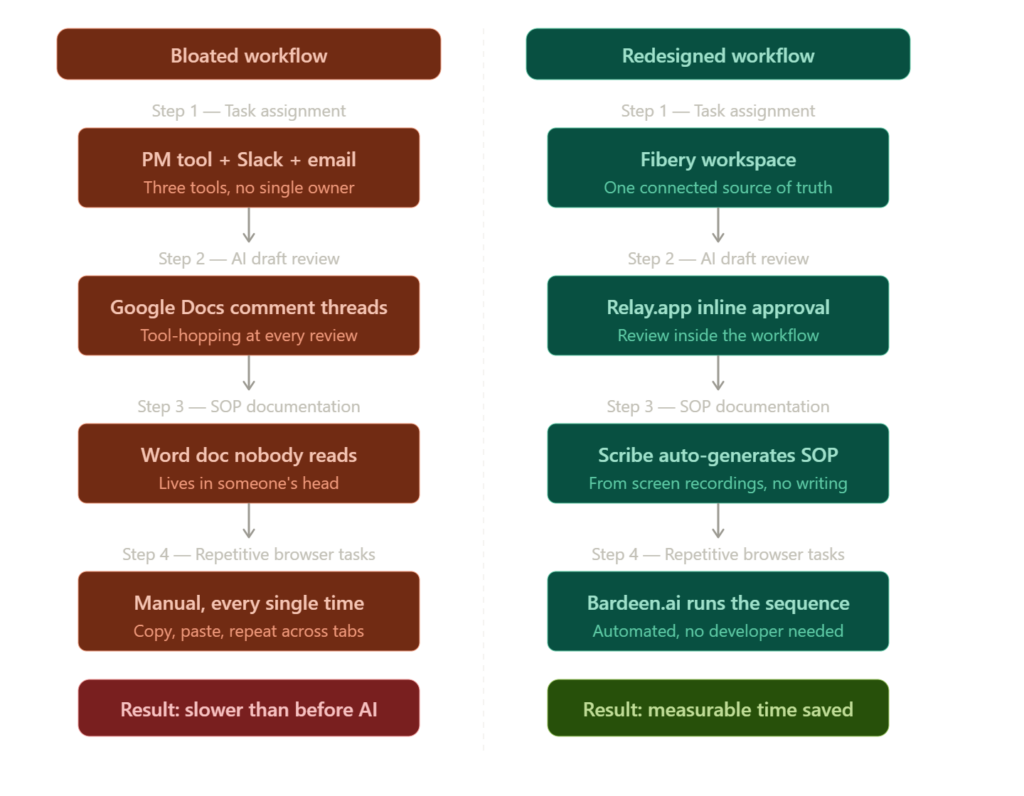
Here’s exactly where the time goes in a typical agency workflow, and what the redesigned version looks like side by side.
| Workflow step | Bloated approach | Redesigned approach |
|---|---|---|
| Task assignment | PM tool + Slack + email chain | Fibery workspace, single source of truth |
| AI draft review | Google Docs comment threads | Inline approval inside Relay.app workflow |
| SOP documentation | Word doc nobody reads | Scribe auto-generates from screen recordings |
| Repetitive browser tasks | Manual, every single time | Bardeen.ai runs the sequence automatically |
Why these tools made the list
There’s a reason this list skips the usual names. The tools most agencies default to are built for general use, not to fix the specific failure points we just went through. These ones are different, and the distinction matters.
1. Relay.app
Relay.app sequences actual logic inside a workflow rather than just firing “if this then that” triggers. It’s closer to an operator designing a business process than a developer writing a script, with approvals, conditional steps, and handoffs all living inside one connected sequence.
The screenshot below is a live test run, not a demo. One RSS trigger pulls the latest blog post, generates a LinkedIn draft and an X post simultaneously, routes both to a human approval step before anything goes out, and sends the final drafts to your inbox. Five steps, zero manual switching between tools, and a human still in the loop before anything publishes.
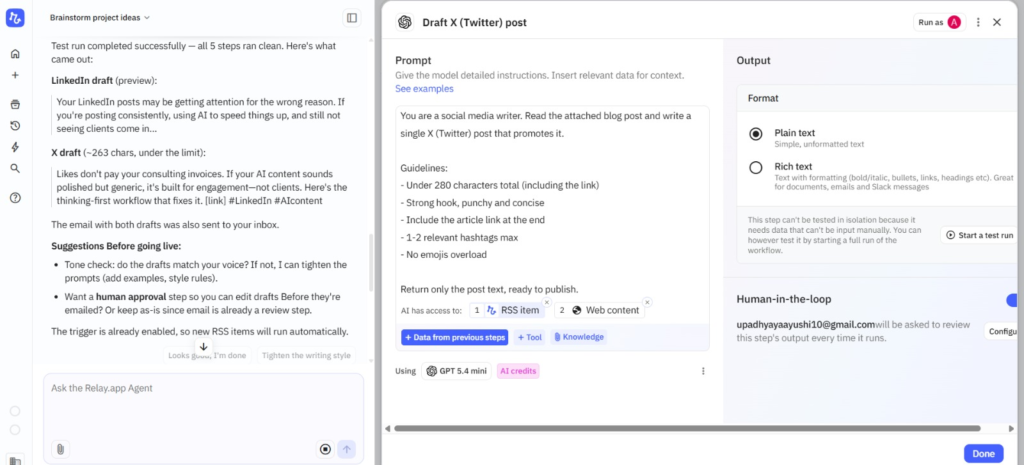

Relay.app
Relay.app is an AI-native workflow automation platform built for teams that want to automate repetitive processes without losing control. It combines visual workflows, AI actions, and human approval steps, making it especially useful for operations, agencies, and growing startups.
2. Fibery
Every tool claims to be all-in-one. Fibery is one of maybe three that actually means it.
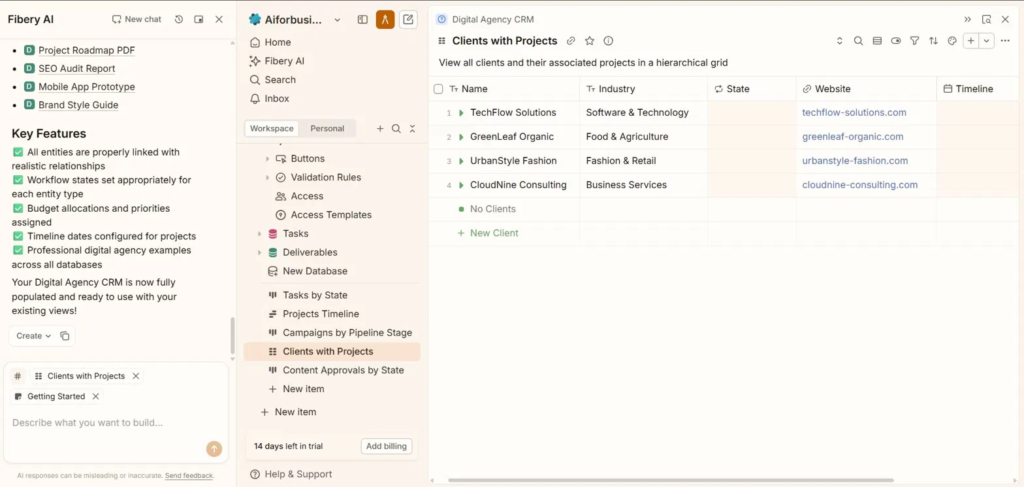
The screenshot shows a Digital Agency CRM that Fibery AI built from scratch inside the tool itself. Not imported, not templated from somewhere else. You describe what you need, it builds the structure, links the entities, sets the workflow states, and populates it with realistic data so you can see how it works before committing to it. That entire setup happened in one conversation with the AI panel.
The part that rarely gets talked about is the views. Clients with Projects, Campaigns by Pipeline Stage, Content Approvals by State. These aren’t separate databases bolted together. They’re all pulling from the same connected system, so changing something in one place reflects everywhere else automatically. That’s what most workspace tools promise and consistently fail to deliver.
For anyone managing multiple client engagements at once, that kind of consolidation is the difference between a system you actually use and five tabs you’re constantly switching between.
Fibery
Fibery is a flexible work management platform that combines docs, databases, project management, and team collaboration into one connected workspace. It is designed for teams that want to replace scattered tools like Notion, Jira, Confluence, and spreadsheets with a more structured operating system.
3. Bardeen.ai
Most automation tools handle the big, obvious connections between platforms. Bardeen handles what everyone ignores: the repetitive browser steps that live between those connections. Copying data from one tab into another, pulling content from a live page into a spreadsheet, updating a record without opening three separate tools to do it. These tasks feel too small to build a proper workflow for, but they happen fifteen times a day across an agency team and nobody tracks how much they cost.
That’s exactly where Bardeen sits. It automates the specific in-browser sequences that no other tool bothers with, and it doesn’t need a developer to set it up.
The screenshot below is a real example: Bardeen scraping the AIFBA site and pulling live content into a structured format, ready to route into another tool or database. The setup took under five minutes, and with the Schedule Run option built in, it runs on repeat without anyone touching it again.
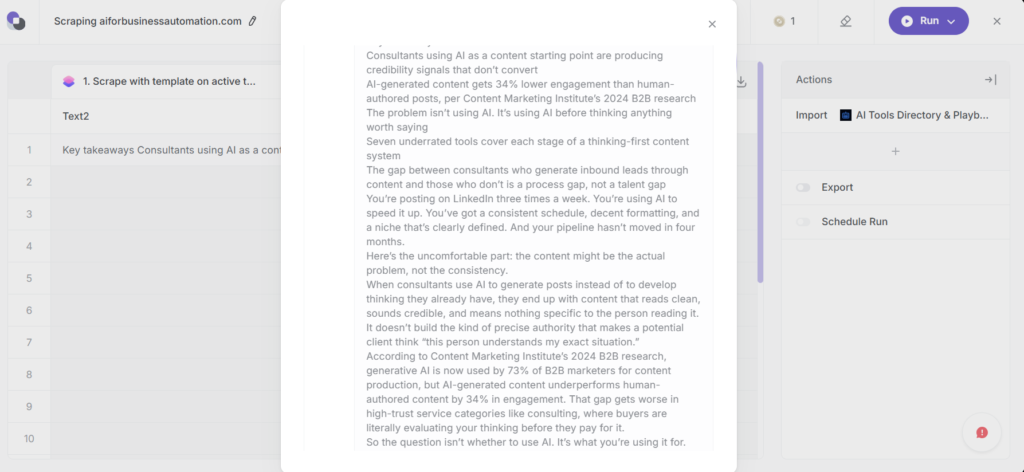
Bardeen.ai
Bardeen.ai is an AI-powered browser automation platform that helps teams automate repetitive tasks directly from their browser. It is commonly used for scraping data, lead generation, outreach workflows, and productivity automation without heavy coding.
4. Scribe
SOPs don’t get written because the person who knows the process is always the person with the least time to explain it. That’s not laziness. That’s just how agency work runs, and it’s why most process documentation either never gets done or sits in a folder nobody opens.
Scribe fixes this without adding a single task to anyone’s plate. It runs in the background while you work, captures every step you take on screen, and turns it into a documented workflow automatically. No writing, no recording yourself explaining things, no chasing team members to document their processes before they leave.
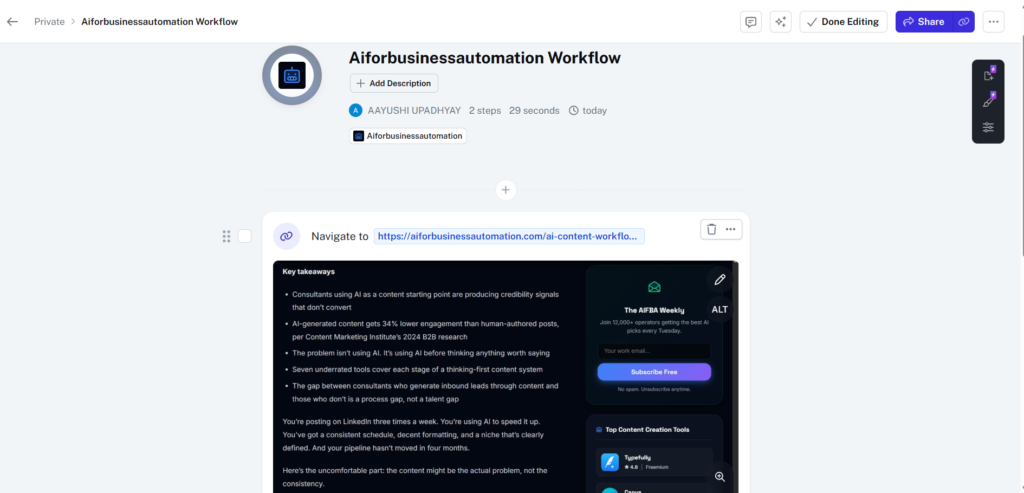
The screenshot below shows a two-step Scribe workflow built from a single navigation step on the AIFBA article page. Twenty-nine seconds of actual screen activity, automatically converted into a shareable, editable process document. The documentation happens as a byproduct of doing the work, not as a separate job on top of it.
For agencies that onboard new clients, bring in contractors, or hand off any repeatable task, this is the tool that quietly removes the dependency on whoever has been around the longest.

Scribe
Scribe is a process documentation tool that automatically creates step-by-step guides, SOPs, and training materials by recording your screen activity. It is widely used by operations teams, agencies, customer support, and internal training teams to document workflows faster.
If you’re thinking about how AI fits into a content-specific workflow, this piece on how AI fits into a content-specific workflow breaks down where most agencies make the wrong call before they ever pick a tool.
And if your AI output already feels generic regardless of how strong your prompt is, the issue is usually upstream in the brief. This article on why your AI content sounds generic is worth reading before you blame the model.
Option A vs Option B
Option A: Add AI to your current workflow. Faster drafts. Same slow approvals. More tool switching. The AI saves time in one place and loses it in three others. Net time saved: zero.
Option B: Redesign the workflow first, then embed AI. Fewer steps. Clear ownership at each stage. AI runs inside a sequence that was actually built for it. Net time saved: measurable, and it compounds as the workflow matures.
The choice sounds obvious, but most agencies pick Option A because Option B feels like more work upfront. And it is. That’s exactly why it works, and why most agencies never get there.
Are you ready to add AI? Run through this first.
Before adding any AI tool to your agency process, answer these honestly:
- Is there one clear owner for this workflow step, or does responsibility float between people?
- Does the AI output move directly into the next step, or does someone manually re-enter it somewhere?
- Are your approval steps documented, or do they just exist out of habit?
- Is there a single source of truth for client work, or is it spread across four tools?
- Could a new hire run this workflow without asking five questions on day one?
If you answered no to more than two of these, you don’t have an AI readiness problem. You have a workflow design problem. Fix that first, then add the tools.
What research keeps confirming
Over half of firms that started AI automation projects discovered major workflow fragmentation issues they’d been underestimating for years. AI didn’t create those problems. It just made them impossible to keep ignoring, and suddenly visible in a way that was hard to explain to a leadership team that had just approved the AI budget.
The pattern shows up consistently across industries: projects don’t fail because the model was wrong. They fail because the process was never designed for AI to actually sit inside it cleanly.
But here’s where most agency content misses the point entirely. It recommends a better tool, lists five integrations, and walks you through a setup tutorial. Useful, maybe. But none of it touches the reason the workflow was bloated before AI arrived in the first place.
That’s the part worth fixing.
FAQs
Why is AI making my agency workflow slower instead of faster?
Because adding AI to an existing workflow usually adds a step rather than removing one. Without a redesigned process that gives AI a clear role and a defined handoff, it just generates more outputs that still require the same manual review, movement, and approval from the same people as before.
Which tools are actually useful for fixing agency workflows?
Tools that reduce handoffs and consolidate steps consistently outperform tools that only speed up isolated tasks. Relay.app, Fibery, Bardeen.ai, Respell.ai, and Scribe each address a structural failure point directly rather than just making one individual step marginally faster.
What should I fix before adding more AI to my agency?
Identify where outputs get stuck, not where they get created. Most agency slowdowns happen at the review, approval, and handoff stages, not at the drafting stage. Fix those sequences first, then add AI to the steps that already run cleanly.
What is workflow bloat and how do I spot it?
Workflow bloat happens when steps get added without old ones being removed. If your AI-assisted process has more than three handoffs between tool output and final delivery, you almost certainly have it and it’s costing more time than your AI tools are saving.
Is there a way to document agency SOPs without spending hours on it?
Yes. Scribe generates SOPs automatically from screen recordings of real work in progress. It’s the most practical way to document processes without spinning up a separate documentation project that never actually gets finished.
Where this is heading
Agencies still adding AI tools to fix a slowdown problem are going to keep feeling slower. Because the problem was never the tool, and another tool won’t change that.
The next shift in agency operations won’t come from a better model or a smarter integration. It’ll come from founders who decide to redesign the workflow before they touch anything else. The agencies that get there first won’t just be faster. They’ll be the ones everyone else spends the next two years trying to reverse-engineer.
But here’s the question worth sitting with: if you stripped out every AI tool tomorrow and ran your workflow on the sequence alone, would it still hold up?