Key takeaways
- Tool overlap maps directly to the parts of a business where workflow decisions haven’t been made yet
- Every tool added without a clear handoff point creates maintenance, not momentum
- The 14-day real usage test eliminates most evaluation tools naturally
- Stack audits surface money and attention leaks faster than any productivity system
- Lean stacks outperform large ones because fewer decision points exist between intention and execution
Introduction
There’s a specific Tuesday afternoon pattern I’ve seen more than once. A founder is behind on three things, opens a Slack community for a quick distraction, sees someone mention a new AI tool, signs up in six minutes, and spends the rest of the afternoon half-configuring it. By Thursday it’s minimised. By the following Tuesday it’s just another favicon in the browser bar.
That isn’t laziness. That’s what happens when too many AI tools get added before anyone has defined what the workflow actually needs to produce.
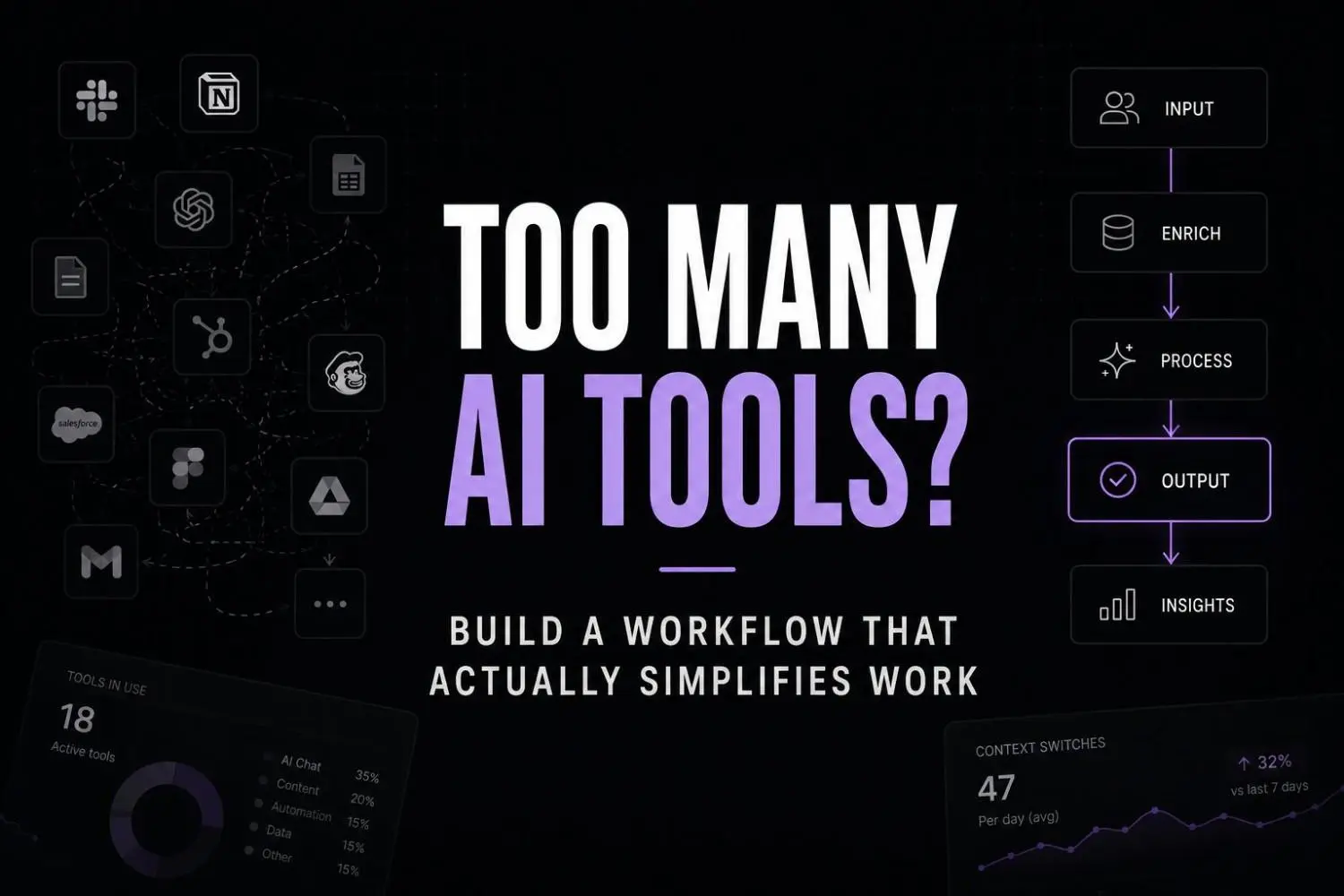
The uncomfortable part is that this doesn’t feel like a mistake when it’s happening. It feels like staying current. According to Productiv’s 2024 State of SaaS report, the average team now runs across 73 SaaS applications, with operations-heavy functions pushing that closer to 87. For solo founders, there’s no IT department enforcing consolidation, so that number doesn’t shrink on its own.
The stack grows. The output doesn’t match it. And the explanation founders reach for is usually the wrong one.
The real problem isn’t the tools
When I talk to solo founders who feel buried under their own stack, the instinct is to blame the tools. They’re not good enough, not integrated enough, not as powerful as the demo suggested. Some of that is true. But what I’ve noticed working with businesses is that tool quality is rarely what’s causing the slowdown.
The actual pattern is this: the parts of a founder’s stack with the most overlap are almost always the parts of the business where the workflow hasn’t been properly thought through. The four half-used note apps aren’t a note app problem. They’re a sign that no one has decided what information needs to be captured, where it needs to live, and who or what needs to act on it next.
Founders add tools into that fog because it feels like progress. And sometimes a new tool does temporarily clarify things. But it doesn’t fix the underlying ambiguity, so the next tool gets added to handle what the last one didn’t quite cover, and the cycle continues.
AI tool overload is a symptom, not the diagnosis
There’s also a specific way AI fatigue shows up here that’s worth naming directly. A founder uses an AI tool, gets inconsistent or generic output, decides the tool isn’t quite right, and goes looking for a better one. What often gets missed is that the inconsistency isn’t coming from the tool. It’s coming from the prompt, the context, the absence of a clear definition of what “good output” looks like for that specific use case.
So the tool gets swapped, the same ambiguity gets carried into the new one, and the output is still inconsistent. But now there’s a new subscription and a new onboarding process to get through.
This is the real cost of too many AI tools. Not the money, though that adds up. It’s the repeated investment of time and attention into tool evaluation cycles that never actually solve the underlying problem.
According to HBR, it’s a common trap companies fall into with AI: believing that layering tools on top of existing processes will hide operational problems rather than expose them. For solo founders, that exposure happens faster because there’s no team absorbing the friction.
The only question that matters before adding a tool
Not “does this tool look useful” and not “could I imagine using this.” The only question worth asking is: does this tool fit into a specific day I could actually repeat?
If you can’t describe exactly when in your week this tool would run, what it would take as input, what it would produce as output, and what happens to that output next, it doesn’t have a place in your workflow yet. Maybe it will. But adding it now just adds a decision point.
What I’ve found is that founders who run lean stacks aren’t more disciplined in some abstract sense. They’ve just learned to resist tools that don’t have a clear home in a repeatable sequence. Everything else is evaluation overhead dressed up as productivity.
A five-part cut framework that actually holds
Before a tool earns a place in your stack, it should clear all five of these. First, does it replace at least two things you’re currently doing with other tools or manually? Weekly time savings matter too one-off wins don’t justify a subscription. The tool also needs to connect to at least one existing tool in your stack without a manual bridge. And it has to survive 14 days of real usage under real conditions, not evaluation mode. But the last one is the most telling. If you can’t answer whether the business would noticeably break without it, the tool probably isn’t embedded in anything real.
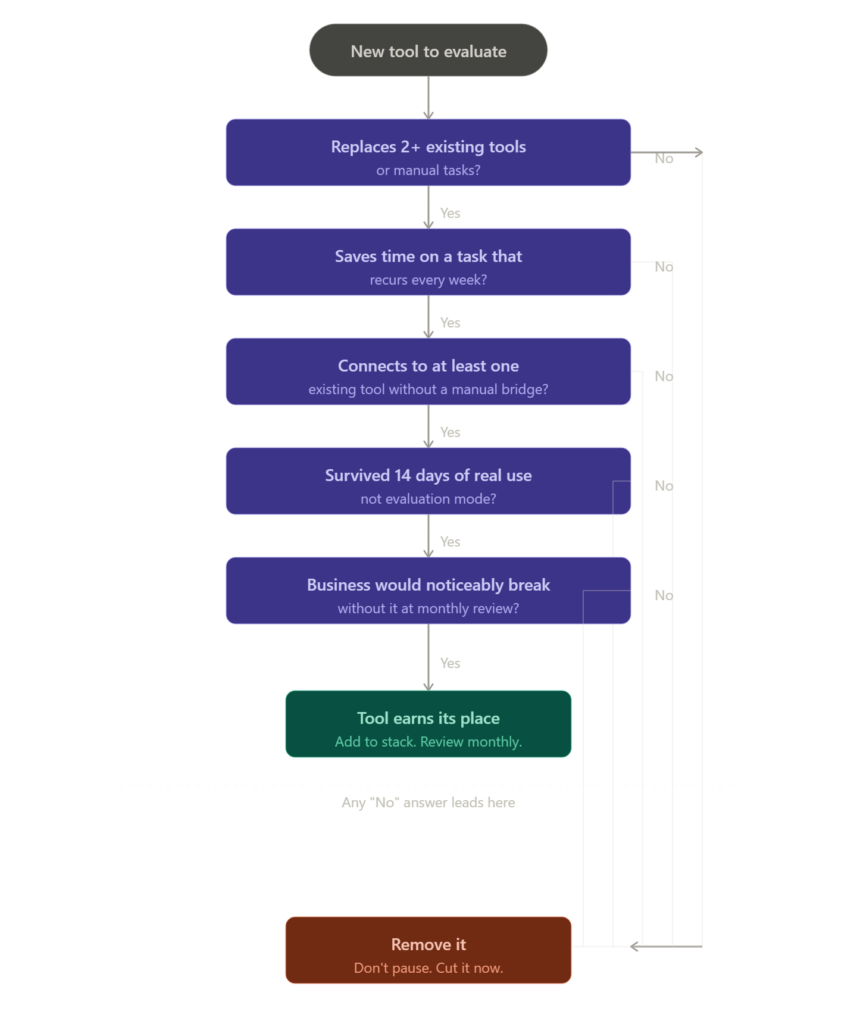
A lean stack built for one operator
The following tools aren’t here because they have the best marketing or the highest G2 score. They’re here because each one does a specific job that replaces several fragmented habits most solo founders are currently managing badly. For the wider shortlist this selection was pulled from, the best AI tools for solo founders roundup covers more ground.
Stage 1: Communication and scheduling
Lindy.ai handles email triage, follow-up sequencing, and scheduling without requiring you to build elaborate automation logic. The reason it earns its place is that it collapses three separate workflows most solo founders have never properly unified: inbox management, calendar coordination, and follow-up tracking. For anyone who’s ever missed a follow-up because it lived in a tab rather than a system, this is the consolidation that matters most.

Lindy.ai
Lindy.ai is an AI assistant that manages emails, meetings, scheduling, and follow-ups from one place. It’s designed for busy professionals and teams who want to automate repetitive admin work and save hours every week.
Stage 2: Daily task management
Akiflow pulls tasks from email, calendar, and project tools into a single daily planning view. The reason this matters is that most solo founders are doing this manually every morning, pulling from four sources, deciding what’s real versus noise, and burning 30 to 45 minutes before they’ve done anything. Akiflow doesn’t solve your prioritisation problem but it removes the aggregation friction that delays the start of actual work.

Akiflow
Akiflow combines tasks, calendars, and notifications into one productivity workspace. It helps professionals organize priorities faster and plan focused workdays without switching between apps.
Stage 3: Relationship tracking
Folk CRM is built around contacts and conversations rather than pipeline stages and deal values. For solo founders managing a mix of clients, leads, and partners, the heavyweight CRM model creates more maintenance than value. Folk tracks relationships in the way solo operators actually manage them, without requiring a full RevOps setup to get anything useful out of it.

Folk CRM
Folk CRM is a lightweight relationship management platform designed for teams that want to organize contacts, pipelines, and outreach without enterprise CRM complexity. It is especially popular with agencies, founders, recruiters, and sales teams managing warm relationships and collaborative pipelines.
Stage 4: Automation and intake
Activepieces is an open-source automation builder that handles cross-tool workflow logic without requiring developer involvement. The practical value is that it gives you one place to manage the handoffs between tools rather than maintaining separate automation rules scattered across five different platforms.

Activepieces
Activepieces is an open-source automation platform that helps teams build AI agents and workflow automations without coding. It’s designed for businesses that want Zapier-style automation with more flexibility, self-hosting options, and enterprise control.
Stage 5: Stack hygiene
Cledara tracks your SaaS subscriptions, surfaces tools you’ve stopped using, and makes cancellation friction lower. The founders who need this most are the ones who have lost track of what they’re actually paying for. That’s most of them, honestly. This isn’t a glamorous tool. It’s the operational equivalent of taking out the bins.

Cledara
Cledara is a SaaS management platform that helps finance and IT teams track software spending, manage renewals, and control subscriptions. It centralizes software payments, approvals, and vendor visibility to reduce wasted SaaS spend.
What a lean AI workflow actually looks like at 9am on a Wednesday
Akiflow opens with a populated task list pulled from yesterday’s leftovers, three emails Lindy flagged as requiring a response, and a calendar block that got moved. None of this was assembled manually. The overnight inbox has been triaged. Two threads have draft responses waiting. The rest have been filed or snoozed.
A client call starts at 9:30. Supernormal records it. By 10:10 there’s a structured summary with action items, already sitting in Akiflow as tasks. No notes were taken. No reconstruction needed.
That’s a Wednesday morning where the system handled the logistics and left the actual work for the operator. Five tools. No overlap. Nothing running just because it looked promising in a demo.
Pause and think: Can you describe your own morning workflow at that level of specificity? If the answer involves “it depends” or “I usually check a few different places,” the system isn’t there yet.
The 20-minute stack audit
Do this before adding anything new. The goal isn’t to find tools you hate. It’s to find tools that are costing you attention without earning it back.
Stack audit checklist
- List every AI or SaaS tool currently running, including free tiers
- Group by function: communication, tasks, CRM, content, automation, admin, finance
- Flag any function with two or more tools
- Mark everything unused in the last 30 days
- Mark anything that doesn’t connect to at least one other tool in the stack
- Remove everything marked. Not review. Remove.
- Identify the one daily workflow that still runs on manual decisions. That’s the only legitimate place for a new tool.
For founders managing client delivery alongside their own operations, the consolidation logic in AI workflow for agencies covers the same audit applied to slightly higher volume.
For anyone running content as part of a service model, the AI content workflow for consultants approach is worth reading alongside this, particularly around avoiding separate content-specific tool sprawl.
Wrong approach vs right approach
| Wrong approach | Right approach |
|---|---|
| Adding a tool to solve a symptom | Finding the workflow gap the symptom is pointing at |
| Keeping tools in case they become useful | Removing anything unused in 30 days, no exceptions |
| Two tools doing similar things in the same category | One tool per function, chosen for integration fit |
| Automating a workflow that hasn’t been defined | Defining the workflow first, then deciding if automation helps |
| Measuring a tool by its feature list | Measuring it by weekly time saved on a specific recurring task |
| Passive subscription renewal | Active monthly review with a genuine cut decision |
What AI tool overload is actually costing you
The subscription cost is usually the smallest part. Research from the University of California Irvine found that it takes an average of 23 minutes to fully regain focused attention after a context switch. If you’re moving across eight tools in a morning, the compound attention cost dwarfs whatever the tools individually cost per month.
But the more important cost is the one that doesn’t appear on any dashboard: the decisions that don’t get made because the operational overhead of running a bloated stack is quietly consuming the time and attention those decisions require. If budget is part of what’s driving the sprawl, it’s worth checking the free AI automation tools that can cover the same function before adding another paid layer.
And if the output of all this tooling is still sounding generic or impersonal, that’s a separate but related problem. The framing in how to make AI content sound human is relevant here, specifically around what happens when AI tools are configured without enough operational context to produce anything distinctive.
FAQs
Q: How many AI tools is actually too many for a solo founder? There’s no universal number, but the useful question is whether you can describe every tool’s specific job in one sentence without it overlapping with another tool’s answer. If you can’t, that’s where the problem is. Most solo founders hit meaningful diminishing returns somewhere around seven to ten tools. Beyond that, the coordination overhead is usually growing faster than the output.
Q: How do I tell the difference between AI fatigue and just using the wrong tools? AI fatigue usually means the tools are working technically but the results feel inconsistent or shallow. That’s almost always a context and workflow problem, not a tool problem. Wrong tools are simpler: they don’t do the job they were supposed to do, or the job was never clearly defined when the tool was added. The harder pattern to diagnose is when the tool is fine but it’s solving a problem that wasn’t the actual bottleneck.
Q: Won’t consolidating into fewer tools mean losing features I might need? Sometimes. But the question is whether you’re actually using those features today, in a way that produces something measurable. Features you might need eventually are the primary reason most stacks get bloated. The realistic calculus is that a tool you use cleanly every day creates more value than five tools you use partially and inconsistently.
Q: What if I’m already locked into an annual subscription for something I barely use? Calculate what it costs to finish the year versus what you’re losing in attention and workflow clarity by keeping it. For most founders, the attention cost of maintaining an ill-fitting tool over 12 months significantly exceeds the subscription price. And finishing a bad annual contract often becomes the justification for never cancelling anything, which compounds the problem.
Q: Should I use an all-in-one AI platform instead of building a custom stack? Only if the all-in-one actually covers your specific workflows without significant compromise. Most don’t. They tend to be broad and shallow, which means you end up adding specialist tools alongside them anyway and arriving at the same fragmentation problem via a different route. The integrated custom stack approach takes more initial thought but gives you clearer visibility into each component and why it’s there.
Conclusion
The direction this is heading is fairly predictable. AI tools will get cheaper, more accessible, and more aggressively marketed. The barrier to adding something to your stack will drop further. Which means the skill that compounds in value isn’t tool awareness. It’s tool restraint.
The founders who build real operational leverage over the next few years probably won’t be the ones who found the best tools. They’ll be the ones who built clear enough workflows that they knew exactly what a tool needed to do before they decided whether to add it.
The question worth sitting with isn’t which tools you should add next. It’s whether your current stack reflects how your business actually runs, or how you hoped it would run when you signed up for everything.
Your next move
Open a spreadsheet right now and list everything you’re paying for or actively using. Just the list. Then mark anything you haven’t opened in the last 30 days. Don’t analyse it. Just mark it. Then cancel two of those things before you close the tab. The audit doesn’t need to be finished to be useful. Start with the obvious cuts and let the clarity follow from there