Key takeaways
- Most AI adoption failures happen weeks after rollout, not during implementation
- Employees stop using tools when they add friction rather than remove it
- Rollout success metrics like logins and activations hide real usage drop-off
- The gap between “we deployed it” and “people use it” is an operational problem, not a change management one
- Fixing AI adoption requires auditing workflows before selecting tools, not after
Introduction
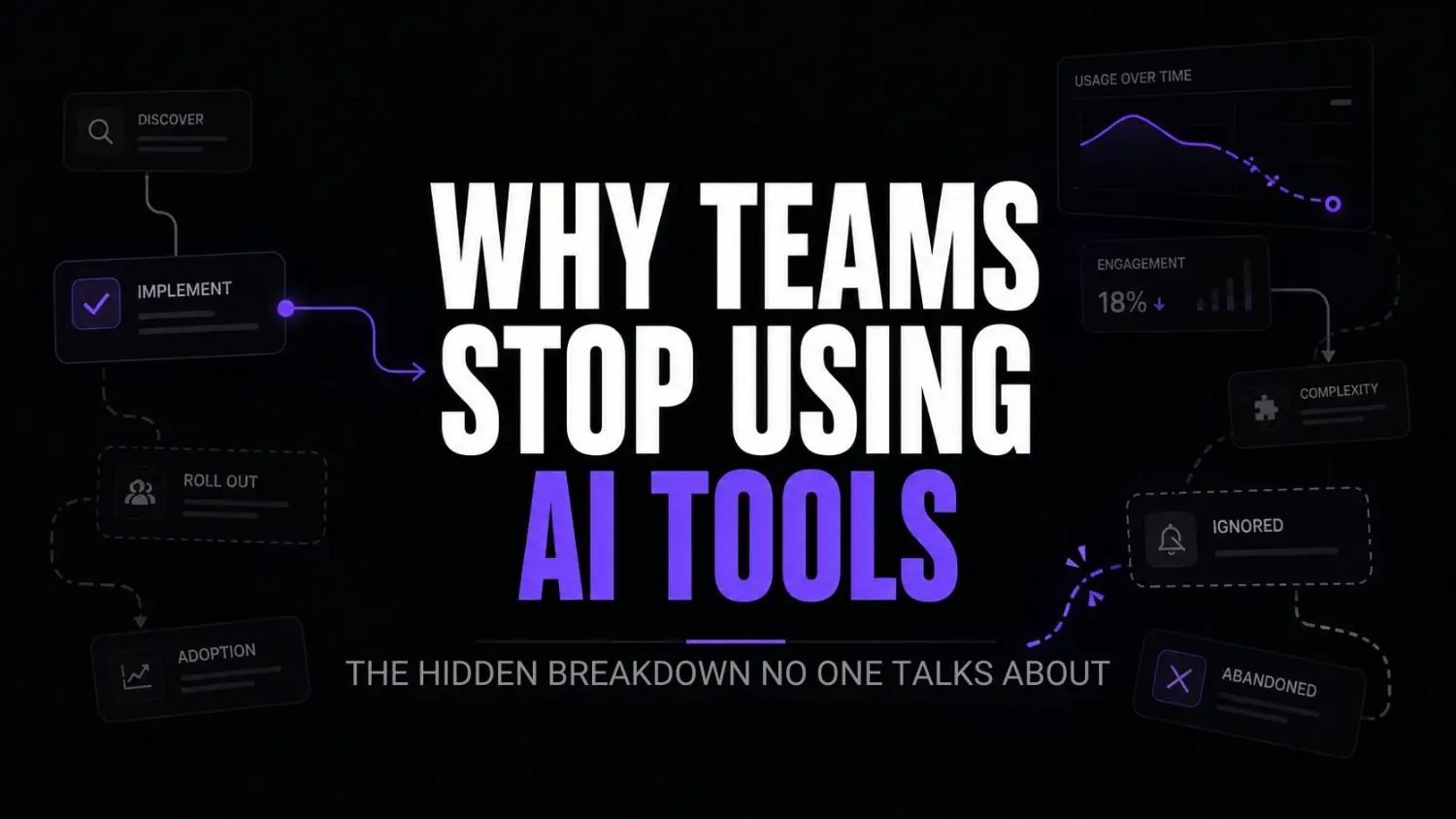
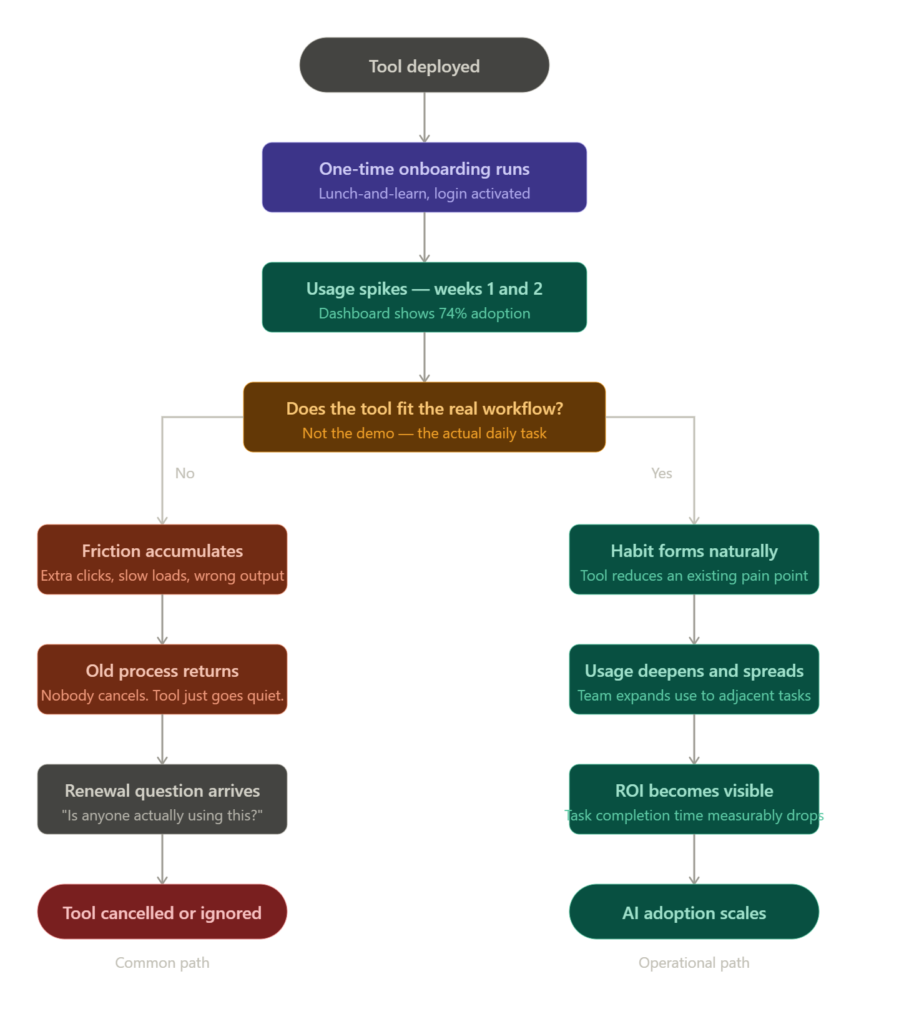
There’s a pattern that keeps showing up. A team requests an AI tool. Leadership approves it. IT deploys it. Someone runs a lunch-and-learn. Usage spikes for two weeks. Then it flatlines.
Nobody cancels the subscription. Nobody complains. The tool just quietly gets ignored while everyone goes back to exactly what they were doing before. And somehow this gets filed under “adoption challenges” like it’s a human psychology problem instead of an operational one.
According to research from McKinsey on workplace AI, fewer than 30 percent of employees who complete AI tool training actually integrate those tools into regular workflows within 90 days. That number should bother anyone running operations. But what it actually tells you is that the failure point isn’t the tool, and it isn’t the people. It’s the gap between what the tool was designed to solve and what the team’s workflow actually looks like on a normal Tuesday.
That gap is the AI adoption problem most leaders aren’t diagnosing correctly.
Why AI rollout and AI adoption are two completely different problems?
Most organisations treat rollout as the hard part. Source the vendor, negotiate the contract, get IT to deploy, schedule training. Once that’s done, the assumption is that adoption follows naturally.
It doesn’t. Rollout solves a procurement problem. Adoption is an operational problem, and the two require completely different approaches.
What I’ve noticed working with businesses is that teams with the lowest AI adoption rates are almost never the ones who resisted the tool. They’re the ones who asked for it. They were excited. They showed up to the demo. And then somewhere between week two and week six, the drop-off happened quietly.
That breakdown is rarely visible in standard rollout metrics. Login rates look fine. Activation numbers seem decent. But nobody’s checking whether people are completing actual work tasks inside the tool, or whether they opened it, hit one confusing prompt, and silently pivoted back to their old process. We’ve seen the same adoption pattern in Healthcare AI implementation, where successful pilots often lose momentum once day-to-day workflows take over.
The metrics that hide the real problem
Rollout teams typically track activations, logins, and seats used. These measure access, not behaviour. A person can log in every Monday morning out of habit and never use the tool meaningfully. Glean, an AI-powered workplace search platform, approaches this differently by tracking search query completion rates rather than just session starts. That distinction matters more than most rollout dashboards acknowledge.
But most teams aren’t running that level of analysis. They’re looking at a dashboard that reads 74 percent adoption and feeling confident about it while their people silently route around the tool entirely. Similar hidden adoption gaps appear in insurance claims workflow operations, where teams bypass official systems when the process slows them down.
What AI adoption actually looks like operationally?
It’s 9:15 on a Tuesday. A project manager at a mid-size agency opens LinearB to review engineering cycle time data. There’s an AI summary feature built in. She’s been trained on it. But this morning, like most mornings, she skips it and scrolls directly to the raw metrics herself because the summary takes 12 seconds to load and doesn’t surface the breakdown she actually needs without a follow-up prompt.
Twelve seconds. One extra click. That’s the entire gap. And across a team of forty people making similar small friction decisions dozens of times a day, that is your AI adoption rate.
This is not a motivation problem. It’s a workflow-fit problem.

LinearB
LinearB helps engineering leaders measure developer productivity, optimize software delivery, and understand the impact of AI coding tools. It combines engineering analytics, workflow automation, and AI-powered insights.
Stage one: Before the meeting
She uses Workhelix to map which engineering tasks are repetitive enough to flag for automation review. Workhelix specifically analyses job task composition at the role level, which means she can see where AI augmentation is actually feasible rather than where it’s just vendor optimism dressed up in a slide deck.

Workhelix
Workhelix helps enterprises understand, measure, and optimize the impact of AI investments. Its platform tracks AI adoption, workforce productivity, and ROI to guide AI transformation initiatives.
Stage two: During async review
The team uses Unleash as their internal prompt and knowledge management layer. Instead of everyone building their own prompt library from scratch, shared workflows live inside Unleash and get refined over time. The real difference between this and a prompt dump in a shared doc is that Unleash tracks what’s actually being used. That feedback loop changes how the team improves its AI workflows over time.

Unleash
Unleash is an enterprise feature management and experimentation platform that helps teams release software safely. It enables progressive rollouts, feature flags, A/B testing, and controlled deployments while reducing release risk.
Stage three: Surfacing context
Glean sits underneath everything. When someone needs to find a previous decision, a client brief, or a Slack thread from six weeks ago, Glean pulls it without them having to remember where it was stored. The AI adoption win here isn’t a flashy capability. It’s just removing the “I’ll figure it out myself” moment that costs ten minutes and breaks focus.
Glean
Glean is an AI-powered workplace search and knowledge platform that helps employees find information across company apps, documents, conversations, and systems. It combines enterprise search, AI assistants, and agents to make organizational knowledge instantly accessible.
Stage four: Guided workflows for new users
WalkMe overlays on top of whatever tools are already live. When a new hire opens LinearB for the first time, WalkMe surfaces the right workflow step contextually. Not a PDF guide. Not a video sitting in a shared drive. A prompt that appears exactly when the friction actually exists.

WalkMe
WalkMe is a digital adoption platform that helps organizations guide users through software workflows, improve productivity, and accelerate technology adoption with AI-powered assistance and automation.
Pause and think: When did someone on your team last complete a task end-to-end using the AI tool you deployed? Not log in. Not open it. Actually complete something with it, start to finish.
The wrong approach vs the right approach
| Wrong approach | Right approach |
|---|---|
| Deploy tool, then run training | Audit workflows first, then select tools |
| Measure logins and activations | Measure task completion rates inside the tool |
| One-time onboarding session | Contextual, in-workflow guidance at the moment of friction |
| Assume adoption follows rollout | Treat adoption as a separate operational phase with its own metrics |
| Give everyone access simultaneously | Pilot with one team, capture friction, then expand |
| Blame resistance to change | Audit whether the tool actually fits the workflow |
Why employees stop using AI tools?(and it’s not what you think)
The standard explanation is change resistance. People default to familiar processes. You need better change management, more training, stronger leadership buy-in.
That framing is mostly wrong, and it lets the real problem off the hook.
According to research from MIT Sloan on scaling GenAI across teams found that the primary reason employees abandon new tools isn’t resistance. It’s that the tool solves a problem the employee doesn’t experience as painful enough to justify changing their behaviour. The AI tool fixes something abstract. The old process fixes something real, right now, with less effort and zero learning curve.
But there’s a second reason that rarely gets discussed. The tool was purchased to solve a leadership visibility problem, not a ground-level workflow problem. Someone in the executive team wanted an AI strategy. The purchase happened. The deployment happened. And somewhere in that process, nobody spent thirty minutes sitting next to the person who would actually use it every day to watch what they do inside the real workflow
The infrastructure layer nobody maps
Here’s where it gets more specific. Most AI adoption failures aren’t just about the end-user tool. They’re about the invisible layer underneath it. Data pipelines that weren’t built to feed AI models. Permissions structures that block the tool from accessing what it actually needs. Compute allocation that creates latency at peak hours. For teams scaling AI workflow infrastructure, this is where the gap between rollout and adoption becomes structural. It’s worth understanding how your operational AI stack is actually configured before the next tool goes live.
Self-audit: is your AI rollout set up to fail?
Check which of these apply to your last AI tool deployment:
- Training happened once, at launch, and was never revisited
- Success was defined by seats activated, not tasks completed
- The tool was chosen by leadership without workflow input from the people who’d use it daily
- Nobody mapped the existing workflow before selecting the tool
- There’s no process for capturing friction feedback after week two
- The tool requires users to change how they work rather than fitting into what they already do
If three or more of these apply, you don’t have an adoption problem yet. You have a setup problem that will become one in about four weeks.
Option A vs Option B: how rollout decisions play out
Option A: You buy WalkMe to guide users through an existing enterprise tool. You configure it based on what the vendor recommends. Users see generic tooltips. They skip them after day three. Adoption plateaus.
Option B: You spend two weeks before configuration watching how your team actually navigates the tool. You identify the three moments where they get stuck or route around a feature. You build WalkMe flows around exactly those friction points. Adoption climbs because the guidance appears when it’s actually relevant.
Same tool. Completely different result. The variable isn’t the software. It never was.
For teams working on AI workflow for agencies, this distinction is even more acute because agency workflows tend to be non-linear, client-specific, and resistant to generic automation assumptions.
FAQs
Why do employees stop using AI tools after the initial rollout? Usually because the tool was integrated into their access, not into their actual work. If using it requires even slightly more effort than the existing process, most people quietly revert. It’s rational behaviour, not resistance.
What’s the difference between AI rollout and AI adoption? Rollout is a procurement and deployment event. Adoption is a behavioural outcome that develops weeks later. Most organisations measure rollout success and mistake it for adoption success. They are not the same thing.
How do you actually measure AI adoption? Stop tracking logins. Start tracking task completion rates inside the tool, time-to-task metrics, and qualitative friction feedback from the people using it daily. If you can’t get that data from your current tooling, that’s a signal worth paying attention to.
What causes AI initiatives to fail after a promising start? The two most common causes are: the tool was selected without auditing the workflow it was meant to improve, and there’s no structured feedback loop after the initial rollout period. Problems compound silently until someone notices the licence cost at renewal.
Is scaling AI across teams just a matter of more training? No. More training addresses a knowledge gap. If the problem is workflow friction or tool-fit mismatch, more training makes it worse by adding another obligation on top of a process that’s already breaking down. Fix the workflow first.
Do enterprise AI adoption challenges differ from smaller team challenges? The failure modes are the same. Enterprise just has more people experiencing the same friction simultaneously, which makes it harder to locate the root cause because the symptom looks like a culture problem rather than an operational one.
What thinking-first actually looks like operationally?
The operations leads who get AI adoption right do one thing differently before any tool gets purchased. They map what actually happens.
Not what should happen. Not the idealised version in the process documentation nobody reads. What actually happens when someone does the task on a normal day with a full inbox and three competing priorities open at once.
That mapping usually takes a few hours. It’s unglamorous work. It requires sitting with people, watching them work, asking slightly awkward questions about why they do things in a particular order. But it surfaces the friction points a vendor demo will never show you.
And then, when a tool gets selected, it gets selected because it addresses a specific friction point that genuinely exists. Not because it had the best AI feature set. Not because it ranked well in a comparison article. Because it fits precisely into the moment where the work actually breaks down.
That’s the only version of why AI workflow maintenance costs more than the build ever did becomes relevant. Because once a tool is embedded in a real workflow, maintaining it is about keeping that workflow fit, not just keeping the software updated. The same operational discipline is becoming essential when selecting an enterprise AI vendor, where long-term workflow fit matters more than impressive demos.
Conclusion
The AI adoption gap isn’t closing on its own. It’s widening as more tools get purchased faster and more teams cycle through the same pattern of excitement, plateau, and quiet abandonment. According to research published in Harvard Business Review on why AI adoption stalls,organisations that treat adoption as a separate operational initiative with its own metrics and ownership achieve significantly higher sustained usage rates when scaling AI across teams than those that fold it into the rollout project.
The next generation of AI tools will be more capable, more integrated, and even more likely to sit unused if the underlying workflow problems don’t get solved first. Better AI doesn’t fix a broken rollout process. It just makes the unused licence cost higher.
Here’s the question worth sitting with: if every AI tool your team deployed in the last twelve months disappeared tomorrow, which ones would anyone actually notice?
Your next move
Pick one AI tool your team deployed in the last six months. Pull the last 30 days of active usage data, not logins, actual feature use inside the tool. Then ask one person who attended the original onboarding what they use it for day-to-day. That ten-minute conversation will tell you more about your AI adoption gap than any vendor dashboard ever will.