Key takeaways
- Failed AI adoption at scale almost always traces back to workflow gaps, not model or tool failure
- AI pilots succeed at small team sizes because informal communication hides broken processes
- Growth exposes ownership ambiguity, fragmented data, and undocumented handoffs faster than anything else
- Automating an unstable process accelerates the breakdown rather than resolving it
- Workflow documentation and process ownership must be established before any AI deployment at growth stage
The pilot worked. Automations were running, outputs looked clean, and the team felt like they were ahead of the curve. Then you added headcount, took on more clients, and somewhere around the 20-person mark, things quietly started slipping.
Output quality became inconsistent, and someone left without documenting how a critical workflow actually ran. What looked like a working AI implementation turned into a failed AI adoption story that’s still expensive to unpick six months later.
According to McKinsey’s 2024 State of AI report, 72% of companies now report using AI in at least one business function. But sustained operational value from those deployments remains far less common. That gap is not a model problem. It’s not a prompting problem either.
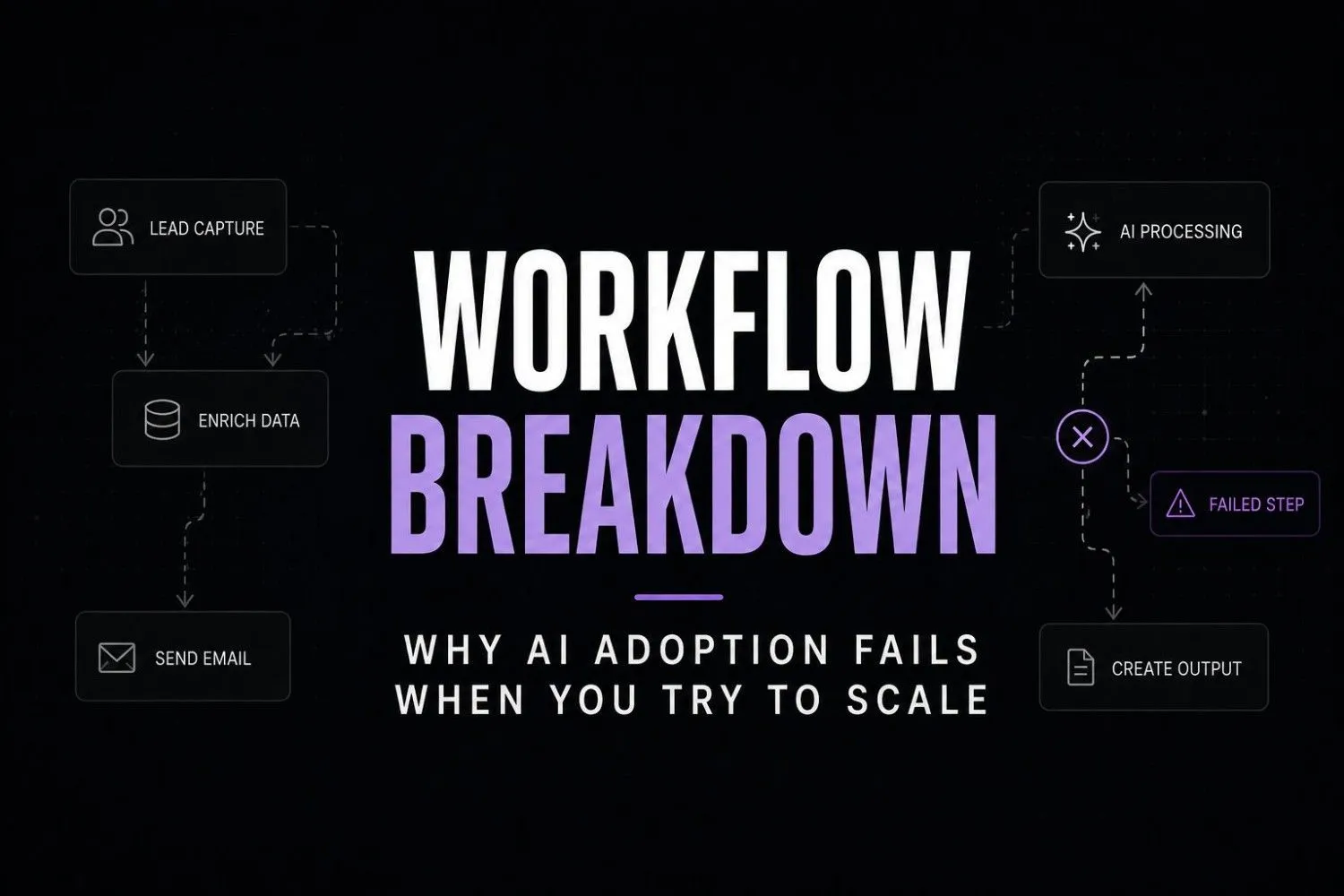
The AI didn’t fail. The workflow underneath it was never built for what scale would demand.
Why AI works at 5 people and collapses at 20
At small team sizes, informal communication fills every process gap. People just know things. They know who handles what, where files live, how edge cases get resolved. AI drops into that environment and looks like it’s working because the humans around it are constantly compensating without realizing it.
Add ten more people to that system and the compensation layer breaks. Nobody has documented the exceptions. The automation logic assumes conditions that are no longer true. Data sits fragmented across three different tools because each new hire brought their own preferred stack.
This is the actual mechanics of failed AI adoption. It’s not a technology failure. It’s a scale problem that technology makes visible faster than anything else would. The same scaling issues are one of the biggest reasons Healthcare AI implementation projects stall after successful pilots.
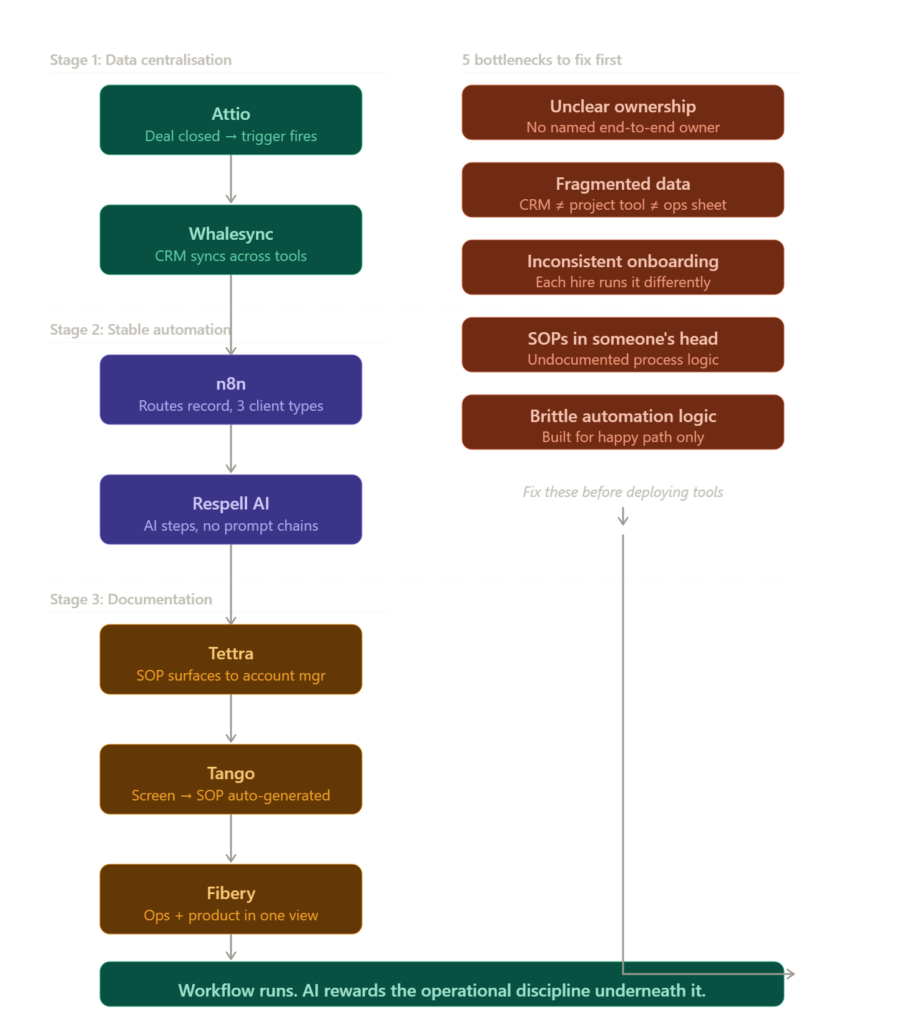
The five bottlenecks behind failed AI adoption at scale
Most post-mortems on failed AI projects blame the wrong things. They point at the model, the vendor, or the team’s technical literacy. But the bottleneck is almost always one of these five.
Workflow ownership is unclear
Nobody owns the process end-to-end. The automation was set up by one person, the data comes from another team, and output review happens whenever someone gets around to it. When ownership is ambiguous, quality control is the first thing to collapse.
Data is fragmented across tools
The AI is only as clean as the data it pulls from. If your CRM doesn’t match your project management tool, and your project tool doesn’t match your ops spreadsheet, the automation surfaces that fragmentation immediately. What used to be a manual workaround becomes an automated error, running at volume.
Client onboarding has no consistent process
This one surprises founders more than it should. Client onboarding looks standardized until you scale it. Each team member handles it slightly differently. The automation doesn’t know which version to follow, so it defaults to the pattern it encountered most, which is rarely the right one.
SOPs exist in someone’s head
What I’ve noticed working with businesses at the 15 to 30 person stage is that critical process knowledge almost never gets documented. It lives in the founder’s memory, in a senior hire’s habits, or buried in Slack threads from six months ago. When automation replaces those people or those conversations, the institutional knowledge disappears with them.
Automation logic is too brittle
Early automations are built for the happy path. They work when everything behaves as expected. Growth introduces edge cases, new client types, restructured teams, and new service tiers. Brittle automation breaks under that variation rather than adapting to it. And because it runs automatically, nobody notices until the damage is done. The same workflow fragility creates costly delays in insurance claims workflow processes, where exceptions quickly become the norm instead of the edge case.
Pause and think: Before your next automation deployment, ask yourself whether a new hire could follow this process without asking anyone for help. If the answer is no, the workflow isn’t ready. The tool selection is irrelevant at that point.
Self-audit checklist: is your workflow ready to scale with AI?
Run through this before adding any new automation layer:
- Every automated workflow has a named individual owner, not just a team or department
- Data sources feeding the automation are synchronized and consistent across tools
- The process runs identically regardless of who is executing it
- Edge cases and exceptions are documented, not handled informally
- Output quality is reviewed on a regular schedule, not just when something visibly breaks
- A new team member could understand and run the workflow without a briefing
If more than two of these are unchecked, the workflow is not ready for automation.
What workflow-first thinking actually looks like operationally
It’s a Tuesday morning. A new deal just closed. Here’s what the next 30 minutes look like when the foundation was built correctly versus patched together under growth pressure.
9:00 AM: The deal is marked closed-won in Attio. That single action fires a trigger because the CRM is the enforced source of truth. No manual entry, no duplicate field update, no Slack message asking someone to update the sheet.
9:01 AM: n8n picks up the trigger and routes the client record through an onboarding sequence. Every field is mapped. Each step has a named owner. The logic handles three client types differently because someone documented those differences before writing a single line of automation.
9:15 AM: Tettra surfaces the relevant SOP directly to the account manager’s workspace view. They don’t search for it and don’t need to ask. It’s already there, version-controlled, updated last month by the team lead who owns that process.
9:30 AM: Whalesync ensures every update made in the project management tool reflects in the CRM without anyone copying and pasting between systems.
That Tuesday runs cleanly because the thinking happened on a Wednesday three months earlier when someone sat down and documented the process before touching a single tool. The AI didn’t create that discipline. It just rewards it.
The tools that actually solve scaling workflow problems
These aren’t the tools that appear in generic AI listicles. Each one solves a specific operational bottleneck at the workflow layer rather than just adding another surface for AI outputs to land on.
Stage one: centralizing operational data
Attio replaces the CRM-as-chaos problem that scaling teams hit hard. It’s relationship management with workflow logic built underneath, so triggers and automation conditions are tied directly to deal or contact states rather than bolted on later as an afterthought.

Attio
Attio is a flexible AI-powered CRM designed for startups and growing sales teams. It combines relationship management automation and collaboration into one customizable workspace. Teams use it to manage pipelines enrich contacts and automate workflows without the complexity of legacy CRMs.
Whalesync handles bidirectional data sync between tools. If your team operates across two or three platforms, Whalesync keeps records consistent without manual reconciliation. It’s a quiet fix for a loud problem that compounds with every new hire.

Whalesync
Whalesync helps teams sync data across apps in real time without manual updates. It supports true two-way syncing between platforms like Airtable Notion Webflow and HubSpot making operations cleaner and more reliable.
Stage two: building stable automation
n8n is the automation backbone for teams that have outgrown basic consumer tools but don’t have an in-house engineering team. It’s self-hostable, highly flexible, and significantly more resistant to edge-case failure than most alternatives. If you’re building workflows you want to still trust in 18 months, this is the right foundation.

n8n
n8n is a workflow automation platform built for technical teams that need more flexibility than traditional no-code tools. It supports self-hosting advanced logic AI integrations and custom workflows while giving developers full control over automation infrastructure.
Respell AI sits on top of workflow logic and lets non-technical operators build AI-powered steps without assembling prompt chains from scratch. It’s genuinely useful for teams adding AI to established workflows rather than replacing the workflow with AI entirely.

Respell.ai
Respell.ai is a no-code AI workflow platform that helps teams build and automate AI-powered workflows using drag-and-drop logic. It is designed for business users who want to create AI agents, automations, and operational workflows without engineering complexity.
Stage three: documenting what lives in people’s heads
Tettra is a knowledge base designed specifically for operational teams. SOPs, process documentation, and escalation paths live here, and it surfaces the right document in context so team members don’t have to search or ask.

Tettra
Tettra is an internal knowledge base platform designed for teams that need organized documentation SOPs and company processes in one searchable workspace. It helps growing companies reduce repeated questions and centralize operational knowledge.
Tango records screen-based workflows and auto-generates step-by-step SOPs from them. For teams where process knowledge is locked in one person’s muscle memory, this tool extracts it in under ten minutes. Extremely underrated for scale-stage onboarding and operational continuity.
Tango
Tango automatically records workflows and converts them into step-by-step process documentation. Teams use it to create SOPs onboarding guides and training materials without manually writing instructions.
Fibery connects product thinking, operations, and project work in one place. At the 20 to 50 person stage, teams consistently hit a wall where no single tool holds the full operational picture. Fibery solves that without forcing everyone into a rigid template they’ll abandon inside two months.
Fibery
Fibery is a flexible work management platform that combines docs, databases, project management, and team collaboration into one connected workspace. It is designed for teams that want to replace scattered tools like Notion, Jira, Confluence, and spreadsheets with a more structured operating system.
When documentation is missing, AI output quality reflects that gap immediately. Teams that have built a clean AI content workflow for consultants understand this at the process level before it becomes a client-facing problem. The output is only as structured as the input feeding it, and at scale that input needs to be owned, not assumed.
Wrong approach vs right approach
| Wrong approach | Right approach |
|---|---|
| Deploy AI tools first, document later | Document workflows before adding automation |
| One person owns all automations | Each workflow has a named operational owner |
| Use AI to replace unclear processes | Use AI to scale processes that already work |
| Sync data manually between tools | Centralize data with one enforced source of truth |
| Automate only the happy path | Map edge cases and exceptions before automating |
| Add AI tools when growth pressure arrives | Build workflow foundations before growth pressure arrives |
| Treat failed outputs as tool problems | Treat failed outputs as documentation problems |
At least 50% of generative AI projects were abandoned after proof of concept due to poor data quality, inadequate risk controls, escalating costs, or unclear business value.. And a Harvard Business Review analysis of enterprise AI deployments found that the organizations generating the strongest ROI from AI were not the ones with the most sophisticated models. They were the ones with the most disciplined operational infrastructure underneath the tools.
This is also where most founders first notice the problem is not the model. The outputs look wrong, so they switch tools, adjust prompts, and run the same broken workflow through a different interface. The teams that figured out how to make AI content sound human did not do it by finding better prompts. They fixed what was going into the system before worrying about what came out.
That pattern holds at every stage of growth. The AI workflow for agencies generating consistent output aren’t better at prompting. They’ve built cleaner processes. That’s the actual competitive advantage. But that finding also reinforces a broader pattern specific to failed AI adoption: the failure often looks like a technology problem from the outside while being a process problem on the inside.
The framework that prevents failed AI adoption at scale
This isn’t a methodology with a name. It’s five decisions made in the right order:
- Map every workflow to a named owner before opening an automation tool
- Identify your single source of truth for operational data and enforce it across every tool your team touches
- Document the process as it actually runs today, including exceptions and edge cases, not as you wish it ran
- Automate only the steps that run consistently without requiring human judgment to handle variation
- Build a review cadence into every automated output from the start, not just an alert for when something visibly breaks
The founders who avoid failed AI adoption at scale are not more technical. They’re more operationally disciplined. They treat the workflow as the product and the AI as the fulfillment layer.
If you’ve already hit AI tool overload, you know more tools don’t solve this. The instinct at growth stage is to add another integration, another platform, another AI layer. But the compounding only accelerates when the foundation is unstable.
FAQs section
What does failed AI adoption actually mean for a growing team?
Outputs quietly degrade, workflows only function when a specific person is involved, and manual review time creeps back in. It rarely looks like a dramatic failure from the outside.
Why does AI work well at first and then break later?
Small teams compensate for every gap the AI doesn’t understand. Growth removes that compensation layer and nobody updated the underlying rules.
Is it a tool problem or a workflow problem?
Almost always the workflow. The same tool that fails for one team runs cleanly for another because the second team documented their process first.
How do you know when a workflow is ready to be automated?
If a new hire could follow it without asking anyone a single question, it’s ready. If not, document it first.
Do you need a technical team to fix this at scale?
No. Most of these are documentation and ownership problems. A non-technical operator with clear process ownership can resolve the majority of gaps that cause AI deployments to fail.
Conclusion
The conversation about AI adoption is still largely focused on which tools to choose and how to prompt them better. That conversation will age badly.
What’s coming is a cleaner separation between the businesses that built operational infrastructure and the ones that stacked tools on top of informal processes. As AI capabilities become more commoditized and accessible, the differentiator won’t be access to the technology. It will be the operational discipline to deploy it against stable, documented, owned processes. Banks evaluating a new enterprise AI vendor are increasingly prioritizing operational readiness over model capabilities alone.
The companies that treat workflow documentation as a core business function, rather than an afterthought, will run AI that compounds value over time. The ones that didn’t will keep cycling through new tools looking for a fix that was never located there.
The question worth sitting with: does your current workflow run cleanly enough that a new hire could follow it tomorrow without asking anyone for help? If not, you’ve found the real problem. And it existed before AI arrived.
Your next move
Pick one automated workflow running in your business right now. Write down the name of the single person who owns it end-to-end. If you can’t immediately name one person, that workflow is your highest operational risk. Spend the next 20 minutes writing down every step, every input source, and every exception you know about. Don’t open a new tool. Start with that document. The automation question comes after.