
Key takeaways
- Disconnected automation software causes extra administrative hours and data silos in different sales pipelines.
- Signal-based prospecting finds active buyers before cold outreach begins.
- Waterfall enrichment algorithms identify verified B2B email addresses at higher rates than single-source databases.
- Event-driven workflows unify lead capture, outreach, and proposal software without handoffs.
Operating outbound sales without a central coordination layer creates the risk of wasting time before achieving revenue. Most solo operators spend fifteen hours weekly copying and pasting between browser tabs in the hope that increased outreach volume will make up for their disorganized sales process.
Buying unconnected AI tools for cold outreach as a sole proprietor without unifying them under one architecture accelerates this waste and drains the budget. In fact, according to a Gartner survey, AI tools only save sellers 5 hours weekly, but 72% of organizations do not utilize this time to reinvest in their revenue-generating activities.
Why AI sales tools for solo founders need a connected workflow
What I see when working with companies is that the adoption of tools without a clearly defined workflow always ends up in an operational disaster. You cannot continue to rely on standalone applications that require constant data entry and maintenance.
When the internal process is flawed, automating it will only make it exponentially worse. You will have fragmented data, duplicated contacts, and inconsistent communication with buyers, which will lead to a poor perception of your brand.
“I need an AI tool to help me get more meetings,” one founder said to me this past Tuesday. “My calendar is completely empty. I signed up for three different scraping tools, my email domain is now on spam, and I have four thousand contacts in an Excel spreadsheet!”
I can no longer stand watching my colleagues buying another subscription to a tool recommended in a viral LinkedIn post. In most cases, the purchased solution remains inactive because the founder continues to copy-paste data manually. It’s entirely acceptable until the pipeline dries, or the CRM hasn’t been updated since Tuesday.
The 7-stage sales engine for lean teams
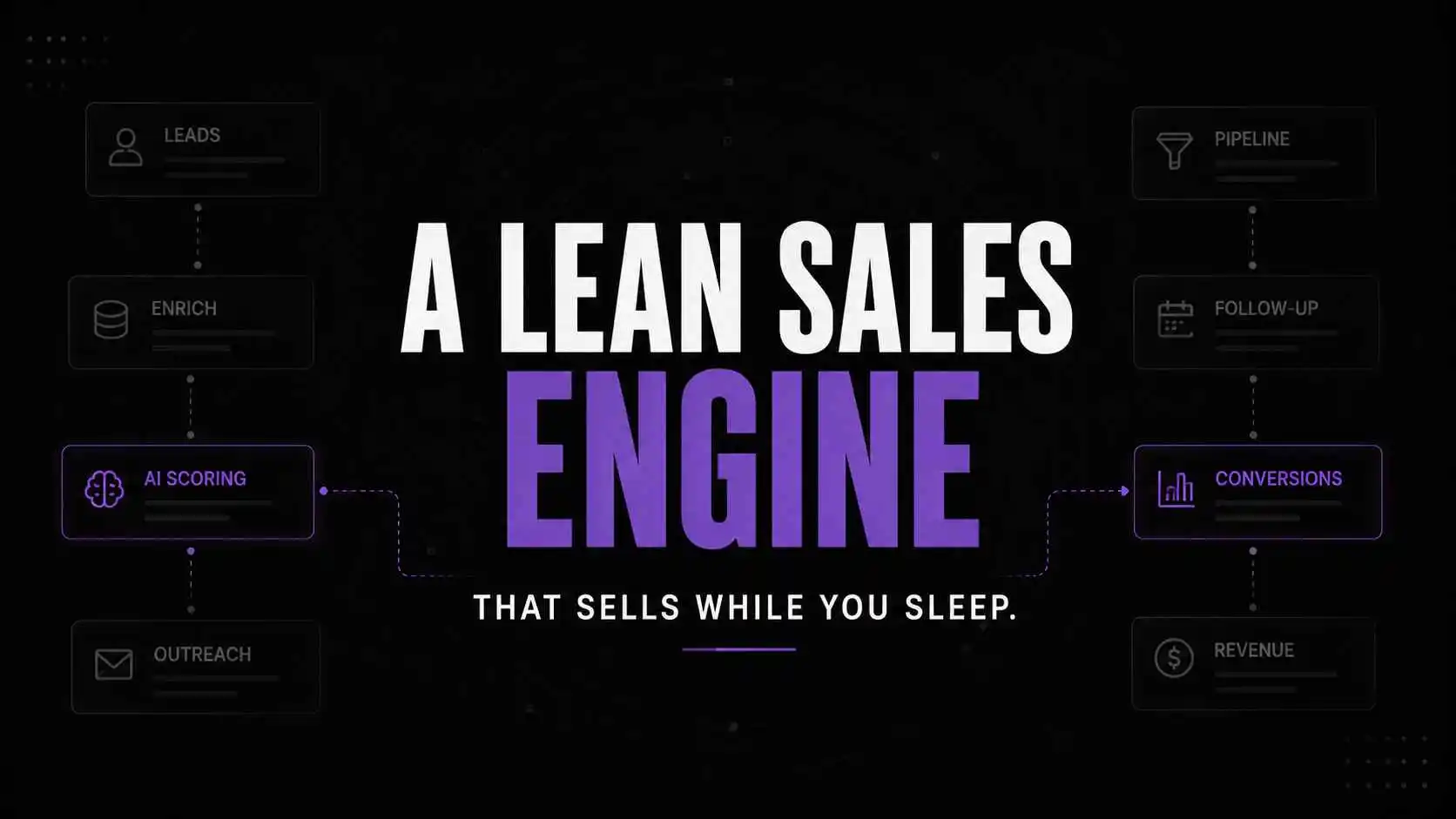
Rather than using a number of disparate software tools, you need an integrated linear system that functions as a B2B lead generation pipeline, in which one phase automatically gives way to the next.By building your own sales process with AI tools for solo founders, you can eliminate yourself from the equation entirely.
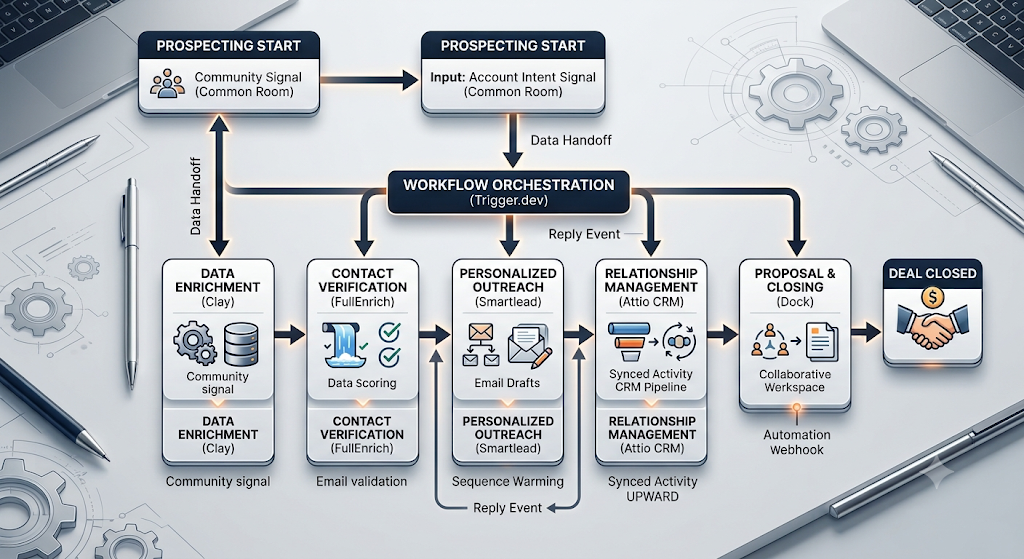
7-Stage Lean Sales Engine: Tool Overview
| Stage & Tool | Pricing (Starting At) | Best Use Case | Best Alternative |
| 1. Common Room | Free tier available / Custom B2B pricing | Intent Signaling: Catch community conversations and buyer intent before cold outreach. . | RB2B / Koala |
| 2. Clay | ~$149 / month | Data Enrichment: Automate waterfall enrichments and aggregate data from numerous providers in one spreadsheet. | BetterContact / FullContact |
| 3. FullEnrich | ~$29 / month | Contact Verification: Find and verify elusive B2B mobile numbers and personal emails. | Prospeo / Anymail Finder |
| 4. Smartlead | ~$39 / month | Outreach Execution: Run large-scale multi-channel email infrastructure with automated inbox warmups. | Instantly / Lemlist |
| 5. Attio | Free tier / ~$29 per user/mo | AI-Native CRM: Design your own code-based pipelines to sync with background processes. | Folk / HubSpot |
| 6. Dock | ~$29 per user/mo | Collaborative Closing: Construct shared buyer workspaces and digital sales rooms. | DealHub / GetAccept |
| 7. Trigger.dev | Free tier / ~$10 / month | Workflow Orchestration: Write maintenance scripts to keep background jobs running smoothly. | Inngest / Make |
Stage 1: Find companies showing active buying intent
Common Room takes community conversations, repositories, and social proof into account to find who exactly is looking for a solution right now. It’s an alternative to the traditional methods of list-building, cold outreach, and scraping databases.

Common Room
Common Room is an AI-powered buyer intelligence platform that helps revenue teams identify high-intent prospects using real-time buying signals, enrichment, and AI agents. It unifies customer data, website activity, product usage, and community engagement into one platform so sales teams can prioritize the right accounts faster.
When I used to scrape databases for B2B prospecting, half of my week was spent exporting CSV files and hoping that the contact info wasn’t outdated. With Common Room, the interface is built in a way that reflects active interest. It’s not about guessing who could need your product -it’s about responding to founders who just posted about their frustrations in the last few hours.
Stage 2: Build rich prospect profiles automatically
Clay takes base company domains or names and enriches them with data from dozens of sources at once. It allows you to define custom variables and scores leads based on your ideal customer profile.

Clay
Clay is a data enrichment and AI workflow platform that helps businesses automate lead generation, prospect research, and outbound personalization. It combines data providers, workflow automation, and AI research into one prospecting workspace.
The one-source solutions such as Apollo have limited data coverage, making it necessary to purchase multiple subscriptions to fill the gaps. Clay eliminates the need to buy numerous lead generation tools by combining dozens of data providers in one spreadsheet. Using the table to perform multi-source enrichment of your lead database is much more convenient than trying to reconcile the data in separate programs. I couldn’t believe my eyes when I saw that Clay could process hundreds of entries at once in a single interface.
Stage 3: Verify contacts before sending campaigns
FullEnrich uses a waterfall enrichment approach, checking multiple vendor databases one by one until it finds a match – so you never have to waste another outreach campaign on bounced emails.

FullEnrich
FullEnrich is a B2B contact enrichment platform that uses waterfall enrichment to find and verify professional email addresses and phone numbers from multiple premium data providers. It helps sales teams improve outbound deliverability while reducing bounced emails and incomplete contact records.
I used to waste thousands of dollars every month on bounced emails because most email finders just take a guess at an email address. FullEnrich checks many databases until it finds a verified email address and phone number. Bounce rate decreased by 8% using FullEnrich and it only takes seconds to setup, simply drag, drop and map your fields.
Stage 4: Send personalized outreach at scale
Using cold outreach campaigns directly from your main Google Workspace account is a grave mistake. The emails sent from it will eventually begin to land in the spam folder, and you’ll be damaging the reputation of your primary domain.
Smartlead resolves all these issues by allowing you to handle multiple inboxes, rotating senders’ addresses, and automatically managing the domains’ warm-up process. The tool also makes extensive use of variables, allowing you to personalize each message’s content significantly. Thanks to this, the industry-standard open rate of cold outreach campaigns using signal-personalized emails is 15-25%, as opposed to only 3-5% for non-personalized campaigns.

Smartlead
Smartlead is an AI-powered cold email outreach platform built for agencies, sales teams, and businesses that need to manage unlimited email accounts, automate domain warming, and personalize outreach at scale. It focuses on maximizing deliverability while making large-scale outbound campaigns easier to manage.
I like Smartlead because it helps me avoid spending hours upon hours every day managing my senders’ warm-up processes. All the metrics are neatly visualized in an easy-to-read interface, giving a quick glance at what domains to use and which ones to pause. It lets me keep my cold outreach operations running smoothly without additional maintenance.
Stage 5: Manage relationships without legacy CRM bloat
Attio is an AI-native relationship management system that creates custom data objects around one’s particular operational workflow. It syncs automatically to email threads and calendar invites -no manual entry needed. To understand how this compares to other CRMs, read our rundown of the Best AI CRM For Consultants: An Operational Guide

Attio
Attio is a flexible AI-powered CRM designed for startups and growing sales teams. It combines relationship management automation and collaboration into one customizable workspace. Teams use it to manage pipelines enrich contacts and automate workflows without the complexity of legacy CRMs.
HubSpot and Salesforce represent the status quo for 50-person SaaS sales teams that thrive on fourteen-step drop down menus to log a phone call. For founders considering a more established CRM, see our guide to the best AI tools for HubSpot. Attio is the tool for founder speed – it’s database structure feels like Notion or Airtable – deals can be added with custom deal stages, no CRM consultant needed. Plus, every email thread is auto synced, so I never have to manually log a client conversation again.
Stage 6: Close deals with collaborative proposals
Dock takes the place of static PDF proposals with interactive, shared client workspaces where sales teams can store their decks, price lists, and onboarding checklists. It allows monitoring buyer activity to know precisely when a prospect has opened a document.

Dock
Dock is a client collaboration platform that helps sales, customer success, and revenue teams create branded digital workspaces for buyers. Teams use Dock to share proposals, onboarding plans, documents, mutual action plans, and track buyer engagement throughout the sales cycle.
The process of sending a proposal in PDF format represents a black box, as soon as it is attached to the email and sent to the client. One cannot control if the recipient will look at the proposal on their computer or mobile device, and whether any specific section will catch their eye. That is why I chose Dock as it creates a web workspace where I can see if the prospect is reviewing the document and when exactly it happened. For instance, if an interested party looks at the price list at 3 PM on Tuesday, I will know when to remind them about our services.
Stage 7: Connect the stack into one automated workflow
The open source, event driven automation platform for developers and technical founders building their own background processing infrastructure. Orchestrates data between your enrichment tools, outreach platforms and CRM without heavy Zapier subscriptions. See the article about minimizing software bloat for your stack as a whole here.

Trigger.dev
Trigger.dev is an open-source platform for building and deploying long-running background tasks, AI agents, and workflows using code. It provides durable execution, retries, queues, scheduling, observability, and managed infrastructure without serverless execution timeouts.
No-code tools are a trap for the long run, and Zapier and Make (formerly Integromat) are no exception. Yes, they’re great for simple 2-step automations, but if you need to perform any serious amount of data brokering between tools you’ll find yourself spending way too much on their paid tiers and getting little transparency on why your valuable data isn’t being moved when you need it. With Trigger.dev you get to write code that reliably processes your background jobs. A failed API call won’t randomly drop your lead in the pipeline or kill your outbound sequence.
What thinking-first actually looks like operationally
On a typical Tuesday morning at 8:30am you’re not opening 20 tabs trying to find your leads. Your connected systems did their job while you were sleeping.
Specifically, Common Room found 3 target founders who joined the relevant cloud architecture community yesterday afternoon. Trigger.dev had already picked that up at 4am this morning and pushed their names into Clay for deeper research.
By the time you’ve got your coffee prepared, FullEnrich has validated their primary email addresses. Smartlead has queued up a draft using the conversation from the cloud architecture community they’d joined, just waiting for your 2 minute approval before sending.
+-----------------------------------------------------------------------+
| THE ZERO-TOUCH LEAD ROUTING ENGINE |
| (How a system-first founder processes outbound automation) |
+-----------------------------------------------------------------------+
|
v
[ 1. SIGNAL DETECTION ] ----> Did the prospect show active buying intent?
(e.g., joined community, asked a question)
|
+----------+----------+
| YES | NO
v v
[ 2. AUTO-ENRICHMENT ] [ IGNORE / ARCHIVE ]
Pull company and profile (Zero manual time wasted;
data in the background no spam sent to cold lists)
|
v
[ 3. WATERFALL CHECK ]
Is the primary email verified?
If yes, push to outreach queue.
|
v
[ 4. DRAFT GENERATION ]
AI queues personalized draft
referencing exact intent signal.
|
v
[ 5. TWO-MINUTE REVIEW ] ---> Founder approves draft with one click
(Done at 8:30 AM over morning coffee)
|
v
[ 6. CAMPAIGN & SYNC ]
Message sent via warmed inbox;
CRM logs activity automatically.
|
v
Did the prospect reply or click?
|
v
[ 7. SHARED WORKSPACE ]
Interactive closing workspace link sent;
prospect viewing time tracked in real time.
+-----------------------------------------------------------------------+
Pause and think: Are you prospecting qualified leads right now or working as an unpaid data entry clerk for your own business?
Software hoarding vs workflow orchestration
| The wrong approach (Software hoarding) | The right approach (Workflow orchestration) |
| Buying tools based on Twitter hype and influencer lists. | Only automating a proven, manual process. |
| Copying-and-pasting CSV files between five different web apps. | Using event-driven logic to move information between tools immediately. |
| Mass emailing five thousand contacts with non-personalized emails. | Mass sending personalized messages to fifty accounts that have demonstrated buying interest. |
| Keeping prospective customers in a disorganized set of spreadsheets and browser bookmarks. | Putting your entire sales process into a single, AI-native CRM. |
The lean engine self-audit
To find out if you’re system-first, try this self audit against your current stack
- Can a lead go from being discovered to being contacted, without you clicking a thing
- Do you know what percentage of your emails are actually being delivered to prospects’ inboxes across all your domains
- Is your CRM’s deal stage updating based on prospect reply, not your own manual entry
- Are you paying for more than two tools that do the same thing
- Have you stopped exporting CSV files from your CRMs into your prospecting tools?
When this automated stack makes financial sense
When evaluating tools for managing sales as a solo founder, focus on your revenue-generating processes. Do not invest in automating any system that has not yet yielded a single sale manually.
After identifying the offers that have proven effective, you will want to dramatically scale your prospecting efforts, which is where the value of the automated outbound workflow becomes evident.
To optimize daily operations as your business grows, discover how AI Tools for Small Teams Fixing the Context Switching Tax can help you achieve this objective.
Estimated monthly cost for a lean setup
When it comes to budgeting for AI sales tools, new solo founders needn’t break the bank. With $350 per month, you can easily secure an impressive starting suite that can fuel substantial revenue growth by focusing on the most critical features.
In this case, consider reserving around $100 for data enrichment in Clay and FullEnrich, $80 for Smartlead outreach tools, and $60 for Attio CRM. Later, as your closed revenue grows exponentially, you can think about upgrading your plan to higher tiers to accommodate more leads per month.
Frequently asked questions
Not seven different tools, but rather seven essential operating functions – and some of these can be combined by using the intersecting functionalities of one platform, especially at the beginning.
A technically inclined founder would set up the whole process and link the tools together using API keys and webhooks in about two days. If you are not very tech-savvy, a full week of testing is necessary to see if the data transferred between tools is properly formatted.
Only blasting thousands of templated emails from one sender address without any authentication would trigger spam warnings.
The number one mistake is trying to scale up outbound sales by using automated email outreach to non-qualified recipients. Your automation will fail if you cannot qualify leads on a deeper level than superficial targeting and segmentation.
If your sales engine produces so many meetings that you cannot handle them alone that is the time to consider hiring your first salesperson. Note that the more qualified your leads are, the less time the rep will need to spend on each deal, and software is better at qualifying than humans.
Why operational clarity beats tool adoption
The time of using cold emails to scale the revenue of one is over. Thus, according to Gartner’s research, in 2029, AI-driven sales enablement will make deals close 40% faster than with conventional methods.
The changes to come in the nearest future are all about the sale signal infrastructure and the way of its use. The winners of one-founder startups will be not those who will manage to equip their business with the largest toolkits but those who will create the most extensive, automated, and silent data loops.
If, hypothetically, your software stack was broken today, would your sales process without it still run smoothly on paper, or would you realize that your strategy and even revenue are purely based on monthly payments for the tools?
Your next move
Open up your current CRM or main prospect spreadsheet right now and sort by the last contact date column. Find 3 prospects that engaged with you over a month ago, but you haven’t sent them a follow-up request yet and send them a short manually written message asking about a specific project you recently worked on or a particular milestone your company has achieved.
