Key takeaways
- AI browser agents are effective assistants in single-purpose applications such as data entry and status checks.
- The failures are believed to mostly happen at hand-off points of systems than within the task that is being executed.
- The main challenges identified are related to interface changes, multifactor authentication warnings, and expired sessions.
- Governance and exception management are critical to ensuring that an agent beyond the pilot phase.
- Tool orchestration matters more than which agent model is used.
Introduction
A distribution company we know implemented a browser agent for vendor reorders in the supply chain in March. It worked flawlessly for six weeks, so the operations manager stopped paying attention to the ongoing activity. One Thursday night, the vendor portal was redesigned, which rendered the agent’s form ineffective. Although it continued to “successfully” submit the information it believed it was sending.
The fact is that nobody noticed until one shipment failed to appear. Note that vendors were not part of the demo in the first place. According to McKinsey’s survey about the application of generative AI, “fewer than a third of executives at companies that intend to adopt AI to redesign work processes actually do so.” This is the point at which the stories of technology-assisted reengineering typically begin.
Thus, the more important question is not whether browser agents are fit for purpose. But whether you’ll even notice when they aren’t.
The demo hides the one thing that actually matters
They click, type, browse and read the screen in the same way a human will do. Well, when it comes to upgrading ERPs, synchronizing CRMs, invoicing or approving a procurement request. These are the kind of tasks that APIs can hardly automate neatly in practice.
The agent does the task, then logs onto and off of the platform. This seems nice, all clean, efficient and elegant but this is rare in the production world.
As I witnessed while working with various organizations, the agents rarely make a mistake on their own. They fail at the exact moment nobody planned for, usually because no one mapped the shadow operations the agent quietly inherited. That’s why the next section matters most.
Where these agents earn their keep, and where the story changes
Now, here is a real list of processes involving people as agents. This is an area where nobody should be vague, you need to define them explicitly.
- All fields that are unchanged in CRM and ERP data entry
- You can only check statuses and reports without any analytical steps
- Pre-approval invoice match
- Elementary triage and customer support
- Purchase orders within threshold
That is a simple half of the story. The errors that arise from badly designed processes are far more complicated, but commonly start life as imperceptible to others.
- Stale Logins leading to false completions or submission
- MFA (multi-factor authentication) interruptions that only happen when entering financial or administrative systems deep into a process
- UI (user interface) inconsistencies that occur when a field or button is reworked on the backend. With zero notification to anyone front-side.
- These hidden exceptions provide no guidance on how to manage them. Only becoming apparent once an agent has passed this point in the workflow.
- Any governance that has a query. Where no one can identify precisely who approved or rejected a transaction at any stage. Nor find an audit trail.
This is where all processes split, and where most people only prepare for one of them.
[Trigger event] → [Agent logs in] → [Session valid?]
                                          │
                          ┌───────────────┴───────────────┐
                         YES                              NO
                          │                                │
                  [Agent executes task]          [Silent stall or failed run]
                          │
                  [UI matches expected path?]
                          │
              ┌───────────┴───────────┐
             YES                      NO
              │                        │
      [Task completes]        [Exception, needs human routing]
Just knowing that fork is out there is one thing. Another, and in practice it looks different than on a whiteboard, is building around it.
What a Tuesday morning looks like when the workflow is actually built for failure
Imagine it is 8:40 am and you are a mid-sized distribution company’s operations manager. You are reviewing the dashboard before your browser agent initiates its regular procurement run. It is not because you do not trust it.
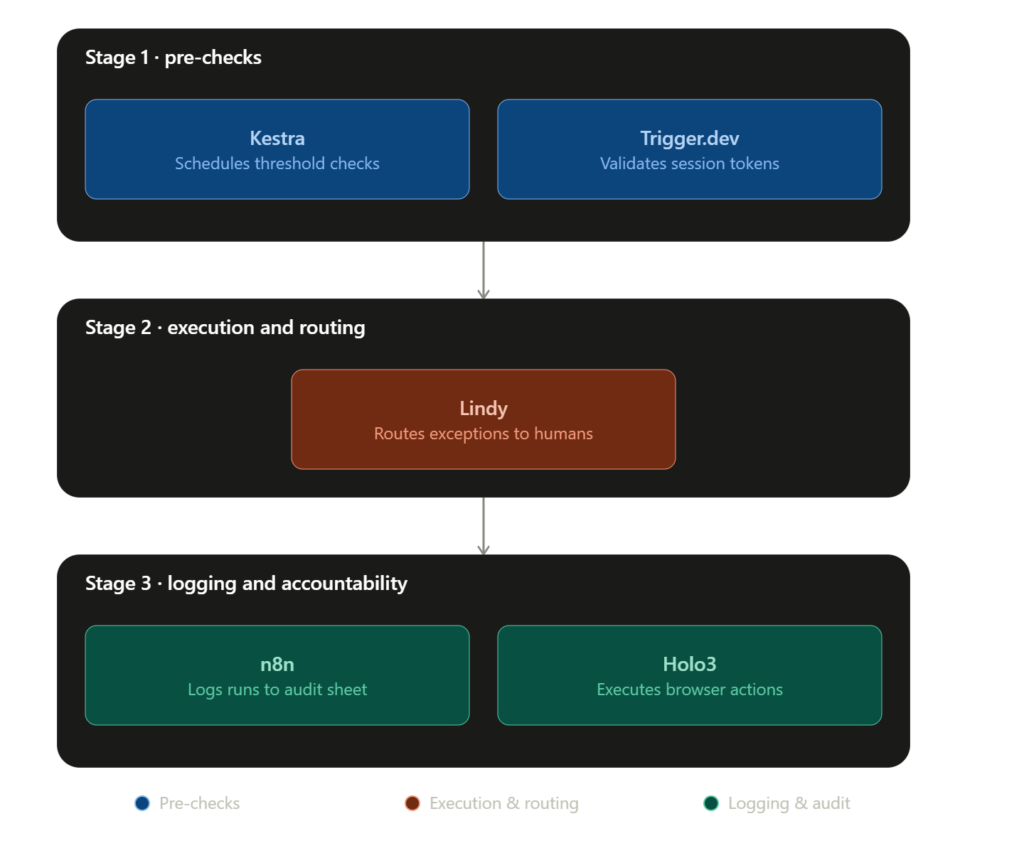
Using Kestra, you check thresholds in your ERP and find three SKUs that need reordering. Just before the agent accesses the vendor portal, your Trigger.dev instance checks whether the session key is valid because that is where it failed last month and costs you 20 minutes of AI training for an otherwise excellent maintenance workflow.
At 8:52, the agent logs into the vendor portal and places two out of three of the orders, the last one having a modified quantity field on the vendor’s end overnight. Instead of making an assumption, the agent passes an exception onto Lindy, who compiles out a slack message with some code included of a screenshot and potential resolution.
At 9:10, n8n logs the run in a shared audit sheet (2 success 1 exception).It’s the kind of shared sheet that often turns into a spreadsheet workflow failure once multiple tools start writing to it and no one owns the format. It never had to call upon a “more intelligent agent”. It needed a process that anticipated failure and circumvented it with little room for error, and this is ultimately the distinction between these two companies in this entire case.
Stage one: catching problems before the agent ever clicks anything
Kestra takes care of the scheduling and thresholding logic before anything hits the browser.
Most teams are starting their automation stack in the wrong place. They think about execution first and do not invest the time to set up proper pre-checks. That is the wrong approach, because pre-checks are much more cost efficient to fix if they have errors than trying to clean up after an erroneous execution has already taken place.
One of the things that makes Kestra such an easy tool to adopt is that it gets out of the way and lets you have that control. It focuses narrowly on making sure that the scheduling and thresholding logic is taken care of before passing execution responsibility on to the browser when a manual QA or UAT is necessary. I think that’s a unique value proposition for Kestra in the space.
Kestra
Kestra is an open-source orchestration platform that enables engineers to build, schedule, and automate workflows using declarative YAML definitions. It supports event-driven automation, data pipelines, infrastructure workflows, and business process orchestration.
On first inspection, it seems that Trigger.dev only checks the session state before performing an action. This approach may not look like something revolutionary, but in reality, it is one of the cheapest ways to solve almost all the problems mentioned here. The key difference is that it solves them at the lowest possible level, which is often much faster than trying to do it higher up in the stack.
Teams can usually get a basic session check running in an existing pipeline in less than an hour, making it a more accessible option than many of the other tools described. In short, it may not be as powerful or flexible as some of the other tools, but it gets the job done quickly.

Trigger.dev
Trigger.dev is an open-source platform for building and deploying long-running background tasks, AI agents, and workflows using code. It provides durable execution, retries, queues, scheduling, observability, and managed infrastructure without serverless execution timeouts.
Stage two: what happens the moment something doesn’t match
Unlike many other systems, whenever Lindy encounters a situation that it cannot handle on its own, control is immediately passed to a human, and the task is not returned to the agent until it has been completed successfully. While there are obvious reasons why this approach might not be desirable in customer service, this is nevertheless the kind of solution that most vendors would not talk about enthusiastically, because “the agent knows when it is lost” simply sounds much less impressive than “the agent does the task for you”.
What truly sets Lindy apart from its competitors, however, is how it handles such situations. Unlike other systems that merely notify the human agent that something has gone wrong and force them to retrace the user’s steps to fix the issue, Lindy actually takes screenshots and prepares a context message to facilitate faster resolution.
This way, instead of first figuring out what the problem was and then fixing it, the person receiving the task can immediately understand and act upon it, which ultimately means fewer abandoned tasks overall.

Lindy.ai
Lindy.ai is an AI assistant that manages emails, meetings, scheduling, and follow-ups from one place. It’s designed for busy professionals and teams who want to automate repetitive admin work and save hours every week.
Stage three: the record nobody wants to build until compliance asks for it
With n8n and Holo3 executing and logging everything, your team always has a record of what took place. Many teams see the logging as an optional feature until the time of the first audit request, at which point it becomes the only thing that matters.
The advantage that n8n brings to the table is that logging is not an add-on feature but it’s part of the same flow that runs the automation. Therefore, there is no separate tool to forget about or fail to check. Similarly, Holo3 is a layer that a lot of people do not pay attention to until it fails. Its job is to carry out the browser actions, and it does it well enough that you would forget about its existence, which is basically, one of the highest compliments you can pay to any infrastructure.

n8n
n8n is a workflow automation platform built for technical teams that need more flexibility than traditional no-code tools. It supports self-hosting advanced logic AI integrations and custom workflows while giving developers full control over automation infrastructure.

Holo3
Holo3 is H Company's multimodal AI model built for computer-use automation. It can understand graphical user interfaces across web, desktop, and mobile applications, then perform actions such as clicking, typing, navigating, and completing multi-step workflows autonomously
Your team’s decisions around where these agents are run (managed infrastructure or self-hosted compute) will dictate how much of this failure surface you have to build and manage vs. inherit from a provider. ComputeStacker’s provider directory is the right first step because your orchestration layer is only as good as the software it is run on.
The pattern that separates the teams that keep their agents from the ones that quietly shelve them
| Wrong approach | Right approach |
|---|---|
| Do deploy the agent and assume it will deal with exceptions. | In the case of exception routing, make sure to build it in advance of deployment. |
| Treat the agent as if he is replacing the entire employee. | Use as a fast executor within a supervised process |
| Do not enable a log until something fails! | Record all runs from day 1: |
| Ignore both session and MFA handling. | Before each task, pre-check the validity of the session. |
| One tool for everything! | Separate orchestration, execution and logging of detections |
Pause and think: if your browser agent was to halt in the middle of the task now, would anyone find out during the hour or did it not come out until it was a customer complaint three days later? Your truthful response to this question is a reflection on your automation readiness rather than any comparison of tools.
A short audit worth running today, not after something breaks
- What happens when a session ends while it is still in an operation?
- Does a human notification automatically happen when it is an exception or does it just silently fail?
- Be able to provide an audit trail for any automated approvement over the last 30 days?
- In the past 90 days have you had an UI change on any connected vendor portal without a workflow change?
According to a recent Gartner survey, by 2027 over 40% of agentic AI projects will be cancelled due to rising costs and the lack of business value once the pilot stage is over. No, that statistic is not for weak models. It’s the self-audit above, except this time, it’s happening at scale, across companies that never executed it.
Questions that come up once teams actually try this
Is AI browser agent an alternative to human agents?
Yes, for repetitive tasks which are narrow. If the task calls for judgment on exceptions – no, not without a human checking in periodically.
Which are the most common things that cause browsers to break?
Most silent failures we’ve observed in enterprise deployments is due to session expiry or unexpected UI changes.
Do browser agents work with legacy ERP systems?
Yes, as they communicate with the screen and not an API, however, you would see more exception handling than with modern systems.
What is your method of dealing with MFA in automated workflow?
Most teams don’t try to automate around MFA-gated steps, but go through the human checkpoints. Going around it creates a threat which is unnecessary.
Orchestration is more important than the agent?
As we’ve seen in deployments, yes. The agent can be substituted. A weak orchestration layer isn’t and it is often the layer no-one got their budget for.
Conclusion
The distribution company from the beginning of the article implemented their new process using the same three-step sequence. The agent did not become more intelligent; rather, it was simply removed as an exclusive factor in the equation between routine activity and a shipment gone wrong.
The change in approach is crucial because the businesses that will ultimately benefit from such implementations are not necessarily the ones that demonstrated the highest efficiency from their agents. They are, instead, the ones that no longer rely on the agent as the sole driving force in the equation.
Where would be the most crucial point in your business process where a silent malfunction would take the longest to become apparent?
Your next move
Take a process that your team currently performs manually, for example, invoice reconciliation or CRM updates, and document each step where they have to work around limitations or make judgment calls. This exercise will give you much more useful insight than simply asking your vendor what their product can do.