Key takeaways
- APIs are defined interfaces that allow software systems to exchange data and trigger actions through endpoints.
- MCP, or Model Context Protocol, is an open standard that enables AI applications to connect to external tools, data and prompts.
- MCP servers typically expose capabilities over existing APIs; MCP adds a layer rather than replacing one.
- MCP clients discover available tools with a tools/list request, and servers can notify them when the tool list changes.
- The MCP specification suggests keeping a human able to deny tool calls, but enforcement is up to the application builder.
Teams are linking their AI agents to real-world business systems before determining what access those agents are entitled to. The question of whether these are mcp or api-driven is one of the first that they must answer, and the majority of them are doing it by accepting the defaults in their preferred AI tool’s setup screen.
This is understandable in theory, but adding MCPs in a place where a simple API call would do only introduces a superfluous layer of control with no owner. Skipping it when your agent will need to choose between several tools results in hard-coding those choices and creating new headaches if/when a vendor discontinues its API. In either case, the cost will come due later in the form of a maintenance backlog or permissions audit.
MCPs are not a replacement for APIs; they are a mechanism by which AI agents can discover and leverage authorized tools, which are often provided by underlying APIs that you already maintain.
What matters is whether the path is known in advance or an agent has to choose. Get that right and your AI workflow infrastructure stays simple. If you’re also looking at where AI agents fit into a broader business workflow, see our guide to AI agent platform startup funding for the market context.
MCP vs API at a glance
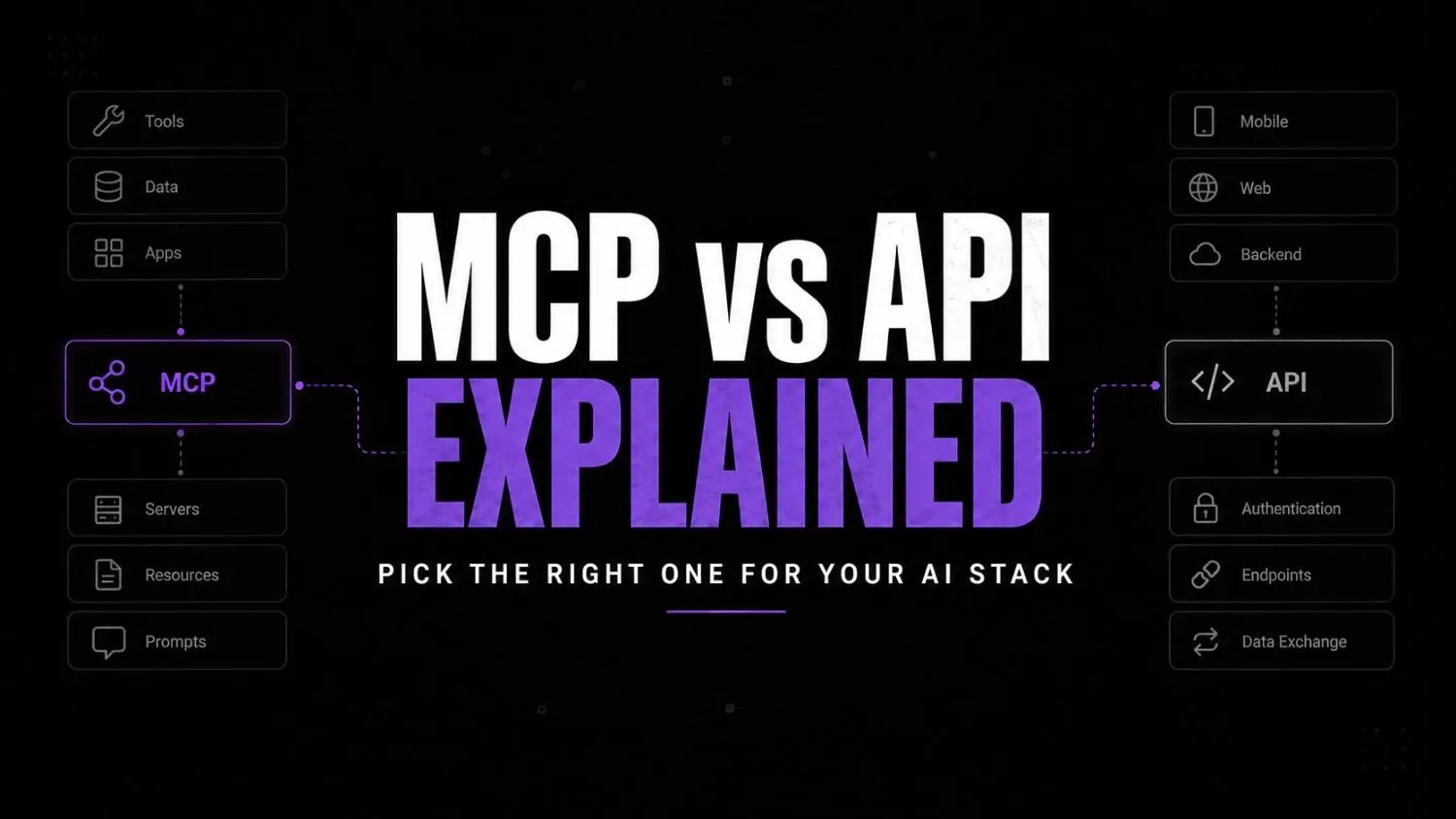
APIs connect software to software through fixed endpoints. MCP lets an AI agent find and use approved tools in a consistent format, usually on top of those same APIs.
| Area | API | MCP |
|---|---|---|
| Primary purpose | Lets software systems exchange data and trigger functions | Lets AI applications and agents access approved tools, data, and context |
| Typical user | Applications and developers | AI assistants, copilots, and agents |
| Discovery | Developers read docs and code against endpoints | Agents discover exposed tools and schemas at runtime |
| Workflow style | Usually fixed and developer-defined | Supports contextual tool selection by an agent |
| Underlying connection | Direct app-to-app interface | Often exposes API-backed capabilities in an agent-friendly format |
| Best fit | Reliable, predictable, known workflows | AI workflows needing contextual access to several approved systems |
| Biggest risk | Integration breakage, authentication, maintenance | Excessive permissions, unsafe tool calls, sensitive-data exposure, weak governance |
The useful mental model: APIs are often the plumbing. MCP is an AI-friendly control and discovery layer for selected capabilities.
What is an API?
An API can be seen as a set of rules that allows one system to request information or action from another. The requesting system will call an endpoint , another system answers. Rules about authorization and permissions must be defined.
The most common example is a REST API. Webhooks are similar, but not a twin, rather a cousin: in contrast to polling they push notification events to you.
A CRM API could allow a workflow to retrieve a contact, to create a deal or even update a lifecycle stage. The developer can define beforehand which endpoint gets called and under which conditions. And when exactly this call should happen.
This is precisely what makes APIs indispensable. Invoices, payments, syncing and notifications all require explicit logic and error handling. None of them are affected by an agent having involvement.
What is MCP?
MCP, the Model Context Protocol, is an open standard for connecting AI applications to external tools, data, and prompts. The official MCP introduction describes AI apps like Claude and ChatGPT using it to reach data sources, tools, and workflows.
Three parts matter, and the MCP specification defines them this way:
- Host: the AI application that starts the connection.
- Client: the connector inside the host that talks to a server.
- Server: the service that provides context and capabilities.
Servers offer three sorts of capability. The model is able to run tools which are functions. Resources are data and context. Prompts are templates of messages and workflows.
Instead of hard-coding every CRM, helpdesk, and analytics link into an assistant, an MCP setup presents the approved tools in a single, consistent format. The agent selects an appropriate tool within its allowed scope.
MCP is not a magic connector for all cases. Authentication, business logic and security review still require someone’s attention.
The key difference: fixed integrations vs AI tool discovery
A traditional integration follows logic someone wrote in advance. An MCP setup lets an agent choose from a limited set of tools based on the request.
Here’s the fixed version:
- A form is submitted.
- The workflow calls a CRM API.
- The CRM creates a lead.
- A confirmation email goes out.
Every step is known. Nothing is chosen at runtime.
Here’s a controlled agent version:
- A user asks an agent to research a prospect.
- The agent sees a limited set of approved research, CRM, and enrichment tools.
- It retrieves and synthesizes information using those tools.
- It prepares a suggested CRM update.
- A person approves the update before anything is written.
Behind step 2, the client asks the server for its tool list with a tools/list request, as the MCP tools specification describes. Step 5 matters most. If you’re designing approval points, our piece on AI workflow handoffs covers where human review earns its keep and where it only adds delay.
Does MCP replace APIs?
No. APIs still provide the underlying capabilities: data access, authentication, business logic and record updates. MCP standardises how AI applications discover and call selected tools, often depending on those APIs.
You can see the pattern in workflow platforms . Make exposes existing scenarios as MCP tools. n8n exposes workflows similarly. The automation underneath doesn’t budge.
Four related questions come up often:
- Can an MCP server call an API? Yes, and that’s the common pattern.
- Can an API exist without MCP? Yes. Most do.
- Can an AI agent use APIs without MCP? Yes. MCP standardizes how tools are exposed and discovered.
- Do non-AI applications need MCP? Usually not, unless there’s a specific agent or LLM use case.
When to use an API
Use an API integration when you know exactly which action should happen and a developer or automation platform controls every step.
Choose an API when:
- The workflow is deterministic and follows fixed rules.
- Your application needs a standard connection to another service.
- You need predictability, explicit error handling, and tightly controlled actions.
- You’re connecting software systems, not letting an agent choose among tools.
Example: Every new paid invoice should create a record in your accounting system and send a set receipt email. That’s an API workflow. Adding an agent only adds risk.
When to use MCP
Use MCP when an AI assistant needs access to several approved systems and the right action depends on the request.
Choose MCP when:
- An assistant needs to reach multiple approved systems.
- The correct action depends on user context.
- You want consistent tool definitions across agent environments.
- You’re building copilots, research agents, coding agents, or internal assistants.
- Your team must control which tools an AI can access.
- You need a clean boundary between what an agent can read, suggest, and change.
Example: An internal operations assistant looks up account history, reviews open support tickets, summarizes recent activity, and drafts a reply without sending it.
For a wider view of where agents beat plain automation, see our guide to AI agents vs automation for small business.
What MCP actually looks like operationally
In practice, MCP is a controlled tool list, where a person approves anything that changes data. This is an example scenario (not a client case) of where it works and where it breaks.
Tuesday, 9:15 am An account manager at a six-person services agency has a 2 p.m. renewal call. She asks the company’s internal assistant to make a brief.
Automation points:
- The assistant reads the account from the CRM through an MCP server, read-only.
- It pulls open tickets from the helpdesk.
- It checks the billing summary.
- It drafts a one-page brief and a suggested CRM note.
Human decisions:
- She reviews the brief at 10:30.
- She approves or edits the CRM note. Nothing is written until she does.
Where it can fail:
- The helpdesk tool points at a nightly synced copy, so yesterday’s escalated ticket is missing.
- Two accounts share a similar name, and the agent picks the wrong one.
- Someone granted write access “temporarily” during setup and never removed it.
The APIs still do the actual work behind each tool. MCP only changed how the agent finds and calls them.
What I’ve noticed working with businesses is that the tool rarely fails first. Ownership does. After the pilot, nobody is named to review the tool list, the permissions, or the logs. That gap is exactly what we cover in AI workflow maintenance.
Wrong approach vs right approach
┌──────────────────────────┐
│ SHOULD YOU ADD MCP?      │
└────────────┬─────────────┘
↓
Agent needs to choose
between tools?
↓
┌──────────┴───────────┐
YES                   NO
↓                      ↓
Start read-only    Keep the API
↓
Review the server
↓
Add narrow write access
↓
Assign an owner
MCP vs API vs Zapier vs Make vs n8n
These aren’t rivals in one category. APIs and MCP are interfaces, while Zapier, Make, and n8n are workflow platforms, and all three now support MCP.
| Technology | Primary role | MCP support (per official docs) | Operator view: best suited for |
|---|---|---|---|
| API | Direct software-to-software access | Not applicable | Custom applications and fixed integrations |
| MCP | Agent-friendly access to approved tools and context | Not applicable | AI agents, copilots, and multi-tool workflows |
| Zapier | Trigger-and-action app automation | Zapier MCP server | Simple, fast business workflows |
| Make | Visual scenario-based automation | MCP server and MCP client | Multi-step workflows with visible logs |
| n8n | Workflow automation, cloud or self-hosted | MCP Server Trigger, MCP Client Tool, instance-level MCP server | Technical teams wanting control |
Zapier
Problem solved: no-code app integration. Zaps are the trigger and action model, according to Zapier’s help center. Something happens in one app and then Zapier does something in other apps. Where it should be: known paths that don’t need agent judgment. Why it’s important: Zapier’s site lists an MCP server that links AI tools to those same apps.

Zapier
Zapier Central is a no-code AI automation platform that lets you build intelligent agents to handle tasks across thousands of apps. It’s designed for businesses and teams who want to automate workflows, delegate tasks to AI, and reduce manual work without coding.
Make
Problem solved: building multi-step automations visually. Make’s scenario builder includes logs and error handling, according to its own MCP Toolboxes page. Where it fits: workflows you want to see and debug. Why it matters: Make’s MCP server documentation says scenarios must be active and run on demand before AI systems can use them as tools.
Make
Make (formerly Integromat) is a visual automation platform that lets you connect apps and build workflows without coding. It’s designed for businesses and creators to automate repetitive tasks and streamline operations across tools.
n8n
Problem solved: automation with code available when needed. The official repository describes cloud and self-hosted options. Where it fits: technical teams that want control over deployment. Why it matters: n8n’s MCP Server Trigger node exposes one workflow’s tools to MCP clients, and its MCP Client Tool node calls external servers.

n8n
n8n is a workflow automation platform built for technical teams that need more flexibility than traditional no-code tools. It supports self-hosting advanced logic AI integrations and custom workflows while giving developers full control over automation infrastructure.
Operator opinion
Zapier is typically the fastest to learn for simple flows, but complex branching gets confusing. Best for people that want to see every step, at the expense of a learning curve. n8n is good for teams that are able to run and maintain their own instance and should be considered carefully.
MCP is not a replacement for any of the three, nor are any of the three a prerequisite to MCP. If a process never requires an agent to make a selection, skip MCP. They both vary significantly and often change. The best thing to do is to look at the features and roadmap on the website of each platform before making a decision.
MCP security: what to check before connecting an agent
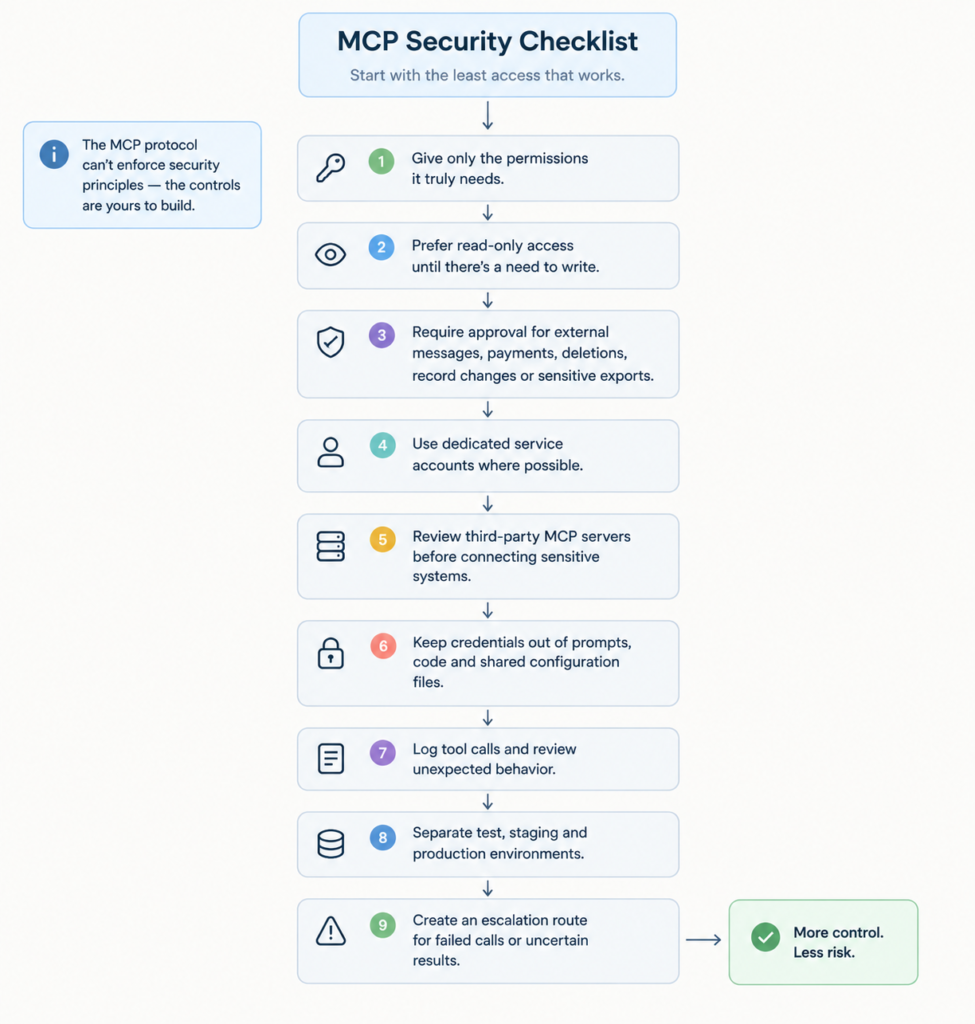
Pause and think: If an agent made a wrong tool call at 4 p.m. on a Friday, who would notice, and how?
Self-audit checklist
- Every tool the agent can call is written down.
- Each tool is marked read, suggest, or write.
- Every write action has an approval step.
- One named person owns permissions and logs.
- Test and production credentials are separate.
- The tool list was reviewed after the last server change.
Gaps here often trace back to weak process ownership. Our breakdown of why AI adoption fails at the workflow level shows the pattern.
A simple decision framework
- Choose an API when the path is known.
- Choose MCP when an AI agent needs to select from approved tools.
- Use both when the agent needs safe access to real systems.
Faq
Yes. A server can expose tools backed by multiple APIs. Keep the tool list small and clearly named.
Generally yes. The harder part is choosing which endpoints to expose and describing them well. Exposing everything defeats the purpose.
It can. Every tool definition takes up space in the model’s context, so a smaller, clearer tool list is easier to manage.
The specification lets servers notify clients when the tool list changes. That’s why a tool review done on Monday can be out of date by Friday.
No. It’s an open standard, and the official introduction lists support across assistants and developer tools. Check each app’s current support before planning around it.
Where this is heading
In a world where MCP servers will proliferate, the challenge will no longer be connecting tools but rather governing them. Teams that treat the agent tool list as an access control and audit list will proliferate faster than those who think of it as a tidy plugin folder that they never clean out.
The companies most likely to prosper will not be the ones with the most connected agents. They’ll be the ones that thought through what their agents could read, recommend, and write to before launch. That’s it. Basically the entire game plan.
So here’s a real question worth sitting with: which of your agents could do something today that nobody on your team has actually signed off on?
Your next move
Try this. Open a doc and write down every tool your AI agent or assistant can currently call. Next to each one, write “read,” “suggest,” or “write.” Then circle every “write” that has no approval step attached to it. The whole thing takes maybe ten minutes, and what you’re left with is your actual exposure, not the version you assumed you had.