Key takeaways
- An llms.txt file is a curated, prioritized index of a site’s key pages, proposed in 2024 as a lightweight alternative to feeding an entire site to an AI agent.
- Google’s official guidance (May 2026) states Google Search does not use llms.txt for ranking, AI Overviews, or AI Mode, and treating it as an SEO lever has no effect either way.
- Ahrefs’ analysis of 137,210 domains found 28% publish an llms.txt file, and 97% of those files received zero requests in May 2026.
- Chrome’s Lighthouse tool added an experimental audit checking for llms.txt as part of “agentic browsing” readiness, separate from search ranking.
- The confirmed, working use case is narrower than most guides imply: coding agents and documentation tools reading it for efficiency, not AI search engines using it to decide who to cite.
Here’s the uncomfortable number first: Ahrefs checked 137,210 domains and found that 97% of published llms.txt files got zero requests in a full month. Not low traffic. Zero. Nobody, human or bot, opened them.
That doesn’t mean skip it. It means most companies that do it wrong built the file backwards: they generated it once, dropped the sitemap into it, and have never re-evaluated since, assuming nothing else would be reading it. Generate your file below, and read on before publishing it. The three sections right here after the generator are the difference between a file that sits in a drawer and one that a coding agent, if nothing else, can actually use.
Generate your llms.txt file
1. Your site
2. Key pages (add your 10–15 most useful pages, not your whole sitemap)
Your llms.txt file
Upload this file to your site’s root directory, e.g. yoursite.com/llms.txt (same place robots.txt lives).
The output is a plain-text file with a short site description at the top, followed by grouped links under headings like “Docs,” “Product,” or “Pricing,” each with a one-line description. Save it as llms.txt and upload it to your site’s root directory, the same place robots.txt lives.
What llms.txt actually does
llllms.txt is a proposed markdown file, first suggested by Answer.AI co-founder Jeremy Howard in September 2024, meant to give an AI agent a short, curated map of a site instead of forcing it to crawl everything. It’s still officially a proposal, not an adopted web standard, and no major AI lab has confirmed that its consumer-facing model reads it to decide what to cite.
It gets confused with two other files constantly:
| File | Purpose | Who reads it |
|---|---|---|
| robots.txt | Blocks or allows crawling | Search engine crawlers |
| sitemap.xml | Lists every URL on the site | Search engine indexers |
| llms.txt | Prioritized guide to what matters | AI agents and coding tools (unconfirmed for consumer AI search) |
robots.txt controls permission. sitemap.xml is comprehensive. llms.txt is supposed to be the opposite of comprehensive, and per Google’s current documentation, it plays no role at all in classic or AI-powered Google Search. If you’re looking at the broader shift toward AI-driven discovery, see our guide to AI search optimization for the practical side of preparing content for these systems.
What to include (and what to leave out)
This is what makes almost any llms.txt guide beginner-friendly: the part that most often left out, because for these people it is obvious: this is a technical tool, written by developers, who only need to describe syntax.
Let’s flip that script: start with content quality. Your 40-page marketing site is a great achievement, but you would not stuff all of those URLs in your llms.txt. Just the 5-12 pages that most customers would ask about: the prices, the product pages, the docs and their intro pages.
And if your company does have a big website with 340 URLs on it (I am not joking, I once saw a SaaS founder doing this on a Tuesday morning)? Then prioritize. Take those 14 pages that a first-time visitor would bookmark as they explore the website, group them in 3 logical sections and write a short paragraph for each. Put the rest of the URLs in the sitemap where they belong and go make a living.
Descriptions should be written in a way that can be actionable for an agent. “Pricing page” is a good candidate for a description, but it does not tell anyone what to expect when they get there. “Pricing plans, including the free tier and what is included at each level” tells the agent what to look for in this page.
Pause and think: if you handed your current llms.txt to someone who’d never seen your site, would they know what to open first? If not, neither will an agent, assuming anything reads it at all.
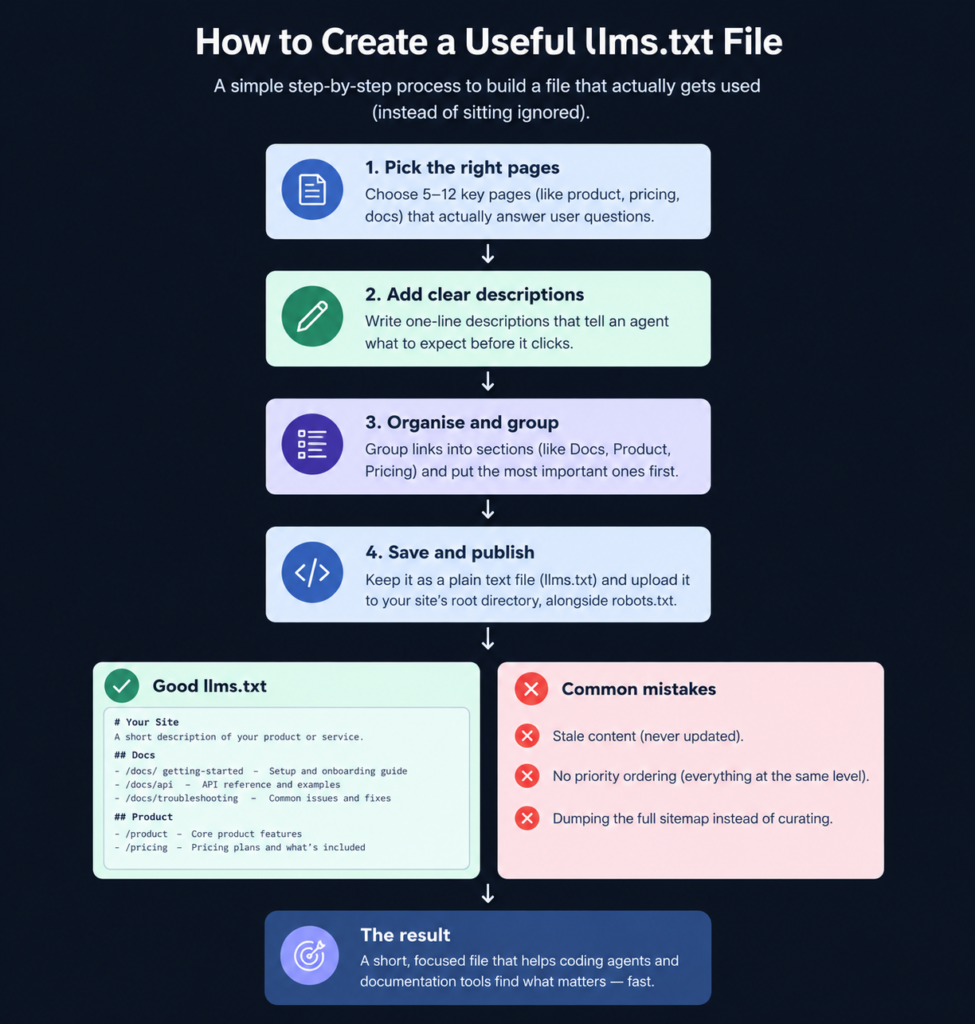
A useful llms.txt file is curated around the pages an agent actually needs, not a copy of the entire sitemap.Common mistakes that make llms.txt useless
- Stale content. Built once at launch, never touched again, even after the site restructures.
- No priority ordering. Every link sits at the same level, with no signal about what’s central.
- Dumping the sitemap instead of curating. The most common failure, and the one most likely behind Ahrefs’ 97% figure: a file nobody would bother reading because it’s just the sitemap in a different font.
WRONG: Export full sitemap → Dump every URL in → Publish once → Never update
Result: file joins the 97% that get zero requests
RIGHT: Audit 10–15 key pages → Write specific descriptions → Group by category
→ Publish to root → Recheck quarterly
Result: file has an actual chance of being readWhat I’ve seen when working with organizations on this particular issue is that the file is rarely broken because nobody knew the syntax. It’s more often broken because it was adopted on speculation, not evidence, the same pattern behind a lot of failed AI tooling: ship the thing because everyone else is shipping it, skip the part where you check if it does anything.
Want the fuller picture of what falls into that same gap? → See the full infrastructure checklist
Other llms.txt generators (and when to use them instead)
Your own file is the fastest path for most solo founders, but a few other tools are worth knowing about.
| Tool | Best for | Note |
|---|---|---|
| Ahrefs’ free llms.txt generator | Anyone who wants a data-backed default | Built by the same team that ran the 137,000-domain readership study, published July 2026 |
| WebCrawlerAPI’s llms.txt generator | Developers who want an API-driven version | Crawls up to 100 pages per run, fits into an existing pipeline |
| Mintlify’s built-in llms.txt | Teams already using Mintlify for docs | Every Mintlify-hosted docs site automatically publishes llms.txt and llms-full.txt at the root, no setup needed |
Pick based on your setup: a data-backed default, a developer pipeline, or a docs platform that already handles it.

Ahrefs' Free llms.txt Generator
Ahrefs' free llms.txt generator creates an llms.txt file from a website URL. It is designed for site owners and marketers who want to experiment with the proposed llms.txt standard without manually creating the Markdown file.
WebCrawlerAPI's llms.txt Generator
WebCrawlerAPI's free llms.txt generator crawls a website and creates an llms.txt file from up to 100 pages. It is designed for website owners and developers who want to turn an existing website structure into an llms.txt file without manually collecting and formatting URLs.

Mintlify
Mintlify is an AI-native documentation platform built for developer-focused teams. It helps companies create beautiful, searchable, and AI-ready documentation with interactive API references, smart search, and automated workflows.
Operators take
Ahrefs’ tool works well if you want a data-backed starting point. WebCrawlerAPI makes more sense for multi-site or scheduled setups, while Mintlify handles it automatically if you’re already using the platform. But none of them decide which pages actually matter or write the descriptions. That part is still on you.
How to check if it’s actually working
Realistically: for most sites, it probably isn’t, and that’s the honest starting point given what Ahrefs found. What you can do is check the server log requests for /llms.txt from any of the named user-agents, or code models such as Claude Code, which make up a decent chunk of the small amount of traffic that does come from them. GA4 doesn’t break out traffic from known AI referral sources into their own channel by default, so you would need to create a custom channel group based on the above to get anything close to an accurate number.
The actual proven use case for llms.txt is much more limited than marketers want you to believe: coding agents and documentation tools that are reading the file for efficiency, and Chrome’s lighthouse tool doing an audit for its presence as part of an experimental “agentic browsing” feature, not for ranking purposes. This file should be considered cheap plumbing with a narrow use case, not an investment in growth.
Self-audit checklist before you publish:
- File lists 20 pages or fewer, not the full sitemap
- Every entry has a description that helps a reader decide whether to click
- Links are grouped by category (docs, product, pricing, etc.)
- Someone specific owns updating this when the site changes
- You’ve set expectations correctly: this won’t move Google rankings, confirmed directly in Google’s own guidance
The disparity between 844,000-plus sites that have shipped this file and zero major AI platforms that have confirmed reading it is the actual story. It says less about llms.txt and more about the business’s rate of adoption on speculation. The more difficult question is not about building the file but the number of other tools in your stack that got adopted in the same way before anyone has checked that they actually work.
Faq
No. Google’s own guidance, updated May 2026, states plainly that Google Search does not use machine-readable AI files like llms.txt for ranking, AI Overviews, or AI Mode, and maintaining one won’t help or hurt visibility either way.
Yes, if agents access those subdomains independently. Most crawlers and agents treat each subdomain as its own root, so docs.yoursite.com needs its own file at docs.yoursite.com/llms.txt.
Review it whenever you restructure your site or retire old pages, and do a scheduled check quarterly regardless. See the AI workflow maintenance guide for a broader cadence.
The file itself has no access control. You restrict specific AI user-agents through robots.txt directives, not through llms.txt.
Where this is headed
Whether llms.txt becomes the actual format agents consume is an open question, and the evidence suggests no. Not open to question is the direction: more research and buying behavior is flowing through AI agents, instead of search results, and these agents still must understand a business from somewhere.
That is a curation issue, not a file-format issue. The sites already prepared for it are not the ones that generated an llms.txt and moved on. They are the kinds that understand their dozen most important pages well enough to describe each in a useful line, whatever format will matter once agents settle on how they read the web.
What would an agent learn about your business today, if that curated version is all it had to go on?
Your next move
Create your llms.txt file above, trim it to your 10 to 15 most helpful pages, and upload it to your root domain this day. Then go over your server logs in 30 days, not your ideas.