Key takeaways
- Most businesses accumulate broken or redundant automations without any formal review process
- An AI workflow audit evaluates existence, ownership, and measurable value, not just performance
- Five diagnostic questions can surface which workflows deserve to stay and which should be retired
- Workflow audits are distinct from workflow builds, and most teams skip them entirely
- Operational debt compounds quietly when automations go unreviewed for more than one quarter
Introduction
The automations you built six months ago are probably still running. And if you asked your team which ones still matter or what they cost monthly, you’d get silence and a few guesses.
That’s an audit problem. And according to MIT Sloan Management Review, over 60 percent of automation investments show diminishing returns within 12 months without a structured review process.
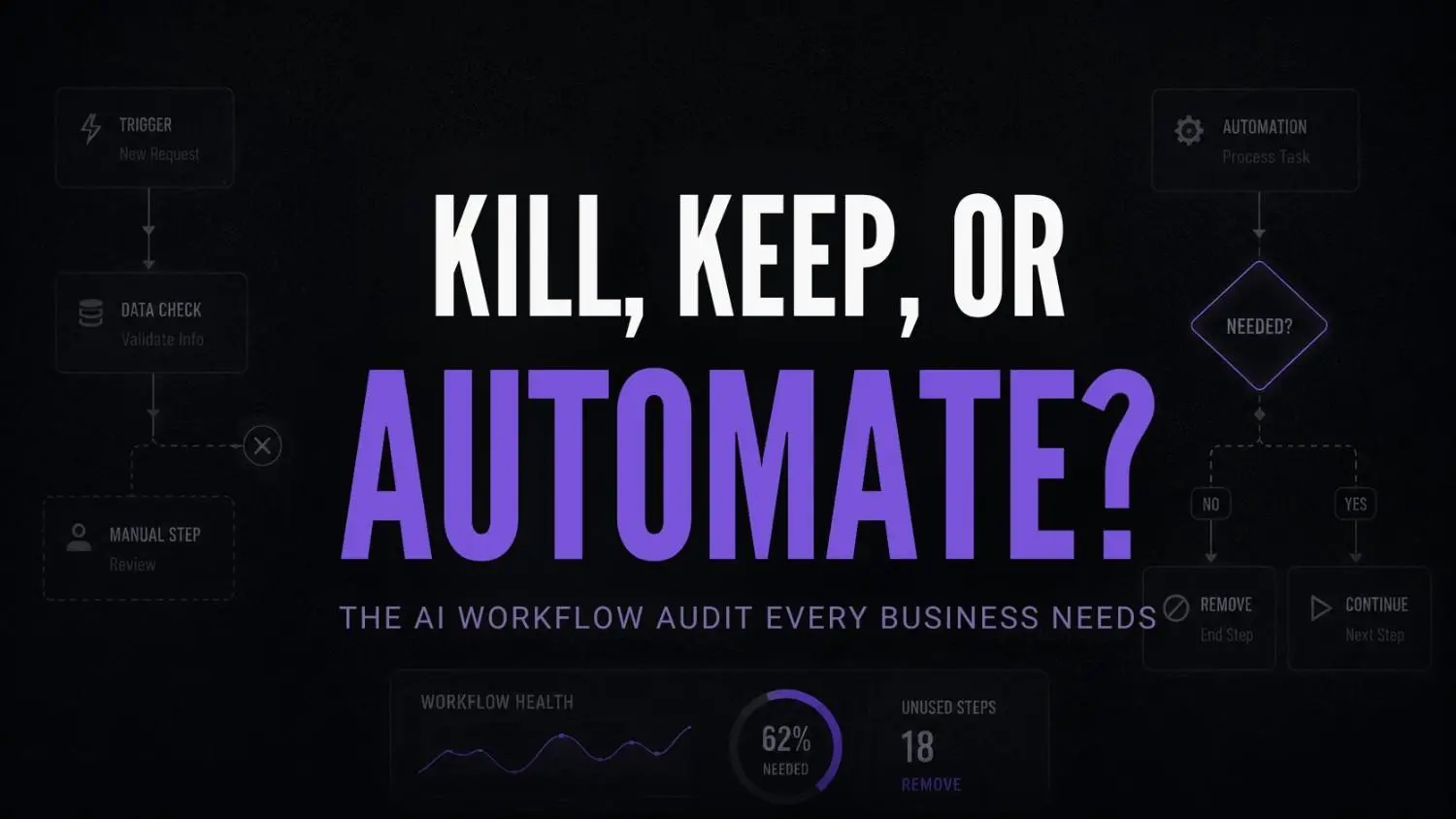
An AI workflow audit isn’t about fixing what’s broken. It’s about asking whether certain automations should exist at all. And the operational debt that builds when nobody asks that question is usually what makes a stack unmanageable. Most teams doing an AI stack audit never get that far.
Nobody stops to evaluate. Builders build. Operators keep things running. And the automations that stopped being useful months ago just keep running too.
Why most teams never audit their automations
There’s a pattern I keep seeing. Someone identifies a problem, builds an automation to solve it, and from that point forward it just lives in the stack. Quietly consuming compute, API credits, and maintenance bandwidth nobody is tracking.
Nobody kills it because nobody owns the decision to kill it. That’s how too many AI tools end up inside one business without anyone noticing the weight.
What I’ve noticed working with businesses is that the automations causing the most drag are rarely the ones that failed loudly. They’re the ones that technically still work but stopped being useful months ago. Output goes nowhere. Nobody checks.
This is operational debt. And unlike financial debt, it doesn’t show up on any dashboard you’re currently looking at.
Building feels productive. Auditing feels like admin. So teams skip it. And that’s usually where failed AI adoption hides, not in the tools that broke, but in the ones still running that nobody remembers building.
The five questions every workflow must answer
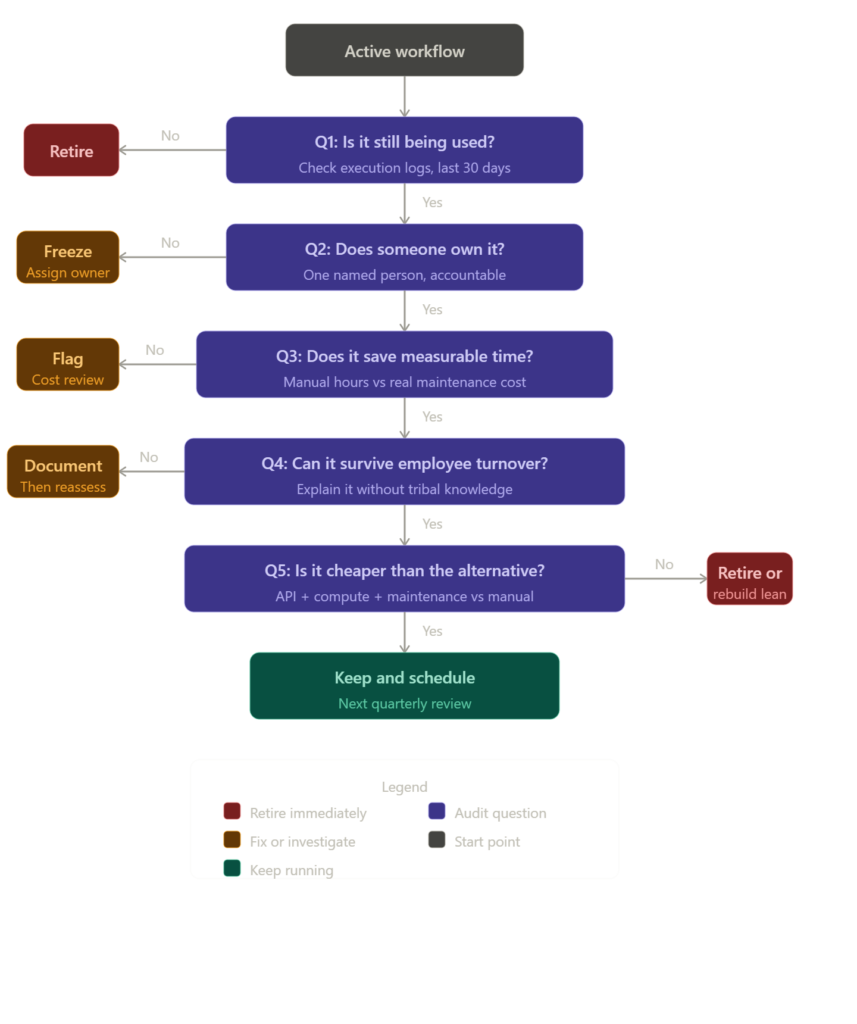
Before any automation survives a quarterly review, it should pass these five questions cleanly. Not approximately. Not “probably yes.” Cleanly.
Question 1: Is it still being used?
Pull the execution logs. When did this workflow last trigger? Who triggered it? Was the output consumed by a human or just passed to another system that also nobody checks?
Usage data is uncomfortable because it’s honest. A workflow that runs on schedule but produces output nobody reads is not a working workflow. It’s infrastructure theater.
Question 2: Does someone own it?
Ownership means one person is accountable for whether this automation continues to exist. Not a team. Not “ops.” One named person who can answer within 24 hours if something breaks.
If you can’t name that person immediately, the workflow is orphaned. Orphaned automations are the loudest category of operational debt because they break at the worst possible time, when nobody knows where to look.
Question 3: Is the output actually correct?
Running isn’t the same as working. Pull a sample of recent outputs and check them against what a human would have produced. Are there edge cases being silently dropped? Errors being swallowed? Results that look right at a glance but fall apart under scrutiny?
Bad output that moves fast is worse than no output at all because it builds decisions on a foundation nobody thought to question.
Question 4: Does it save more than it costs?
Estimate the manual equivalent: how long would a human take to do this, and how often? Then put that next to the real cost API bills, compute, monitoring overhead, maintenance hours, and the cognitive load of keeping it documented and explained.
Some automations don’t save time. They redistribute it. The task moved from a human to a machine, but the machine created three new maintenance tasks that didn’t exist before. Run the actual numbers, not the ones from the initial pitch.
Question 5: Can it survive employee turnover?
Ask the ops lead to walk a newcomer through the workflow no prep, no notes. If that explanation takes more than five minutes or depends on tribal knowledge to make sense, the workflow is fragile.
Fragile automations don’t scale. They just survive until the one person who understood them leaves.
Pause and think
Before continuing, pull up your current automation stack. Pick the three oldest workflows. Can you answer all five questions above for each one right now, without checking with anyone else?
If the answer is no for even one of them, you already have your first audit finding.
What an AI workflow audit actually looks like operationally
It’s Thursday at 10am. You’ve blocked two hours for a quarterly audit. Here’s what this looks like with real tools, not theory.
Stage one: inventory and usage mapping with Celonis
You open Celonis and pull execution data across your active workflows. The process mining layer shows you actual usage patterns, not what you think is happening but what the logs confirm. Three workflows haven’t triggered a single meaningful output in 47 days. Two others are triggering hourly but the data they’re producing feeds into a spreadsheet nobody opens.
You flag all five for review.

Celonis
Celonis is a leading process intelligence and process mining platform that helps organizations discover inefficiencies, optimize workflows, and improve operational performance. It creates a digital twin of business operations using data from enterprise systems, making it easier to identify bottlenecks, automate improvements, and support AI initiatives.
Stage two: performance evaluation with Arize AI
For your AI-driven workflows, specifically the ones using language model calls for summarisation or classification, you open Arize AI. It surfaces drift patterns: places where model outputs have degraded over time without anyone noticing. One of your intake classification workflows has been misfiling leads into the wrong segment for six weeks. Nobody caught it because the downstream CRM still showed activity.
That workflow stays, but it goes into immediate remediation.
Arize AI
Arize AI is an observability platform for machine learning and LLM applications. It helps ML engineers and AI teams monitor performance, detect issues like drift, and improve models in production.
Stage three: tracing LLM-based workflows with LangSmith
Your content processing automation runs multi-step LLM chains. LangSmith gives you step-level tracing so you can see exactly where latency is building up and where outputs are degrading. One step is running a GPT call that costs roughly 40 dollars a month and produces a summary nobody reads. That step gets cut today.
LangSmith
LangSmith is an LLM development and observability platform from LangChain that helps teams trace, evaluate, test, monitor, and improve AI applications. It provides visibility into prompts, agents, chains, tool calls, and model behavior across development and production environments.
Stage four: orchestration review with Temporal
For your longer-running business process automations, you open Temporal’s workflow history. It shows you which workflows completed successfully, which are stuck in retry loops, and which have never been manually reviewed since deployment. Two workflows have been silently retrying a failed step for three weeks.
You add both to the retirement queue.
Temporal
Temporal is a workflow orchestration platform that helps developers build reliable distributed applications without managing complex failure handling logic. It simplifies long-running processes, microservices coordination, and business-critical automation at scale.
Stage five: documentation check with ProcessMaker
Finally, you open ProcessMaker and review which workflows have documented process maps attached. Anything without documentation gets flagged for either documentation or decommission. If it can’t be explained, it can’t be owned. And if it can’t be owned, it shouldn’t be running.
By noon, you have a clear audit output: two workflows retired, one in remediation, one optimised, two flagged for documentation. That’s six months of operational debt cleared in two hours.
ProcessMaker
ProcessMaker is an AI-powered Business Process Automation (BPA) platform that helps organizations design, automate, manage, and optimize workflows at scale. It combines workflow automation, process intelligence, document processing, and agentic AI capabilities to streamline business operations across departments.
Signs a workflow should be retired immediately
Not every automation needs a five-question framework. Some have obvious signals.
- Output goes to a folder, inbox, or system that nobody monitors
Consumption problem – if nothing is reading the output, nothing is depending on the workflow. It’s running in a vacuum. - The workflow was built for a process that no longer exists in the business
Relevance problem – the business moved on. The automation didn’t get the memo. - Maintenance requests come in more than twice per quarter
Cost problem – at that frequency, you’re not maintaining an asset. You’re managing a liability. - Nobody on the current team knows what it was originally built for
Ownership problem – when the context is gone, the judgment calls required to fix or improve it safely are gone too. - It was built for a previous hire’s process and that person left
Succession problem – this isn’t just an ownership gap. The entire rationale for the workflow walked out the door with them.
Any one of these is sufficient reason to decommission. You don’t need all five.
Self-audit checklist: your 15-minute workflow review
Run through this before your next team standup.
- List every active automation currently running in your stack
- Confirm a named owner exists for each one
- Pull execution logs from the last 30 days
- Identify any automation that hasn’t produced consumed output in 30-plus days
- Calculate the monthly cost (API, compute, maintenance time) for your top five workflows
- Confirm documentation exists for every automation that would break if a team member left
- Flag any workflow built more than six months ago that has never been formally reviewed
Comparison: the wrong approach vs the right approach
| The wrong approach | The right approach |
|---|---|
| Build and forget | Build, monitor, and review quarterly |
| Shared team ownership | Single named owner per workflow |
| Automation counted as success at launch | Automation evaluated on ongoing output value |
| No documentation until something breaks | Documentation required before deployment |
| Cost measured at build time only | Cost measured continuously including maintenance |
| Workflow kept because “it works” | Workflow kept because it demonstrably saves time |
| Audit happens reactively after failure | Audit happens proactively on a set schedule |
The quarterly AI operations review process
An AI workflow audit works best when it’s structural, not reactive. Build it into a quarterly cycle.
Month one: inventory audit. Pull all active workflows. Confirm ownership. Flag orphaned automations.
Month two: performance audit. Review execution logs, model drift, error rates, and output consumption. Use tools like Arize AI and LangSmith for AI-specific workflows.
Month three: cost audit. Run real numbers on every active workflow. Compare against manual alternatives. Retire anything where the cost-benefit no longer holds.
And then repeat. Three months is enough time for operational drift to accumulate. Longer than that and you’re dealing with compounded debt. Strong workflow infrastructure is what makes this cycle sustainable rather than a one-time scramble. And any audit that skips workflow handoffs will miss where most silent failures actually start.
According to McKinsey’s operations research, businesses that implement structured automation review cycles reduce redundant workflow costs by up to 30 percent within the first year. That number tracks with what operational audits surface in practice.
FAQs
How often should an AI workflow audit happen? Quarterly is the minimum. If your team is deploying new automations frequently, monthly check-ins on ownership and usage make more sense. The goal is catching drift before it compounds, not doing a full teardown every few months.
What’s the difference between a workflow audit and a workflow review? A review checks performance. An audit questions existence. Reviews ask “is this working?” Audits ask “should this exist?” Most teams only ever do reviews, which is why redundant automations survive indefinitely.
What if nobody knows who owns a workflow? That’s your first finding. Before anything else, establish ownership. If the team can’t agree on an owner within one conversation, the workflow gets frozen until ownership is assigned or it gets retired. Don’t leave it running in ambiguity.
Do small teams need formal AI workflow audits? Yes, arguably more than large ones. Small teams have fewer people watching the stack. One orphaned automation creating bad data or misfiring API calls can cause disproportionate damage. The audit can be lighter, but it needs to happen.
What should I do with workflows that fail the audit? Retire them cleanly. Archive the documentation, log the decision and the reason, and remove the workflow from active infrastructure. Don’t just disable it and leave it. Disabled automations have a way of getting re-enabled by someone six months later who doesn’t know why it was turned off.
Conclusion
The conversation in most ops teams is still oriented around building which automations to add, which tools to connect, which processes to automate next. But the question that will define operational maturity over the next two years isn’t what to build. It’s what to keep.
As AI adoption scales inside businesses, the accumulation problem gets worse faster. More tools, more agents, more workflows, and less visibility into which parts of the stack still justify their existence. Teams that review shadow operations regularly spot redundant automations before they turn into operational overhead.
The teams that build audit cycles now will have a structural advantage over the ones reacting to a broken stack in 18 months. Regular audits also help prevent organizational knowledge loss by documenting why workflows exist in the first place.
The real question isn’t whether your automations are working. It’s whether you’d rebuild them today if you were starting from scratch. That’s often when spreadsheet workflow failures reveal dependencies nobody realized the business was relying on.
And if the honest answer is no that’s not a technical problem. That’s a decision that’s already overdue.
Your next move
Pick one automation in your current stack that you haven’t thought about in more than 60 days. Run it through the five questions in this article right now. Not later. Pull the execution logs, name the owner, and calculate the real monthly cost. That single review will tell you more about the health of your automation stack than any dashboard you’re currently looking at.