Key takeaways
- Many content production problems come from gaps between tools, handoffs, and owners rather than from a lack of tools.
- ChatGPT, Canva, and Buffer can cover much of the creation and publishing workflow, but important content should still go through human review before publication.
- Teams managing multiple brands or higher publishing volumes may need tools such as Hootsuite, Sprout Social, or HubSpot because they offer broader workflow, reporting, or CRM capabilities.
- Therefore, it is better to choose the content marketing tool according to the main content production bottleneck than to focus on the number of functions.
- Google’s spam policies target scaled content abuse, including large volumes of low-value content created primarily to manipulate search rankings. That makes human review and original input important when using content marketing tools at scale.
A missed post equals lost trust and confidence in the work done. In addition, clients may have a negative perception of your company’s work quality based on one missed publication.
Most often, the problems are not caused by the wrong choice of tools for content marketing. Teams working with dozens of content marketing tools have more issues because there is no single source of truth about what has been published, what is being prepared for publication, and what needs to be double-checked for errors before publishing.
The right tool depends on where your content workflow slows down: research, writing, design, video, publishing, or measurement. This comparison helps to determine which tool better automates a specific process for a business.
How we evaluated these content marketing tools
Each tool below was researched against its current product pages, as pricing and features change frequently. Each tool was evaluated based on primary use-case, quality of output, integrations, ease of use, team and approval features, and availability of a free plan or trial. Be sure to confirm pricing on each provider’s page before committing, as plans can change throughout the year.
Content marketing tools at a glance
| Tool | Best for | Main workflow role |
|---|---|---|
| ChatGPT | Ideas, captions, and repurposing | Content assistance |
| Jasper | Brand-controlled marketing copy | Team content production |
| Semrush | SEO research and planning | Topic strategy |
| Canva | Graphics and carousels | Visual creation |
| Adobe Express | Fast branded assets | Creative production |
| VEED | Reels, Shorts, and browser-based editing | Short-form video |
| Descript | Podcast and video repurposing | Text-based editing |
| Buffer | Simple scheduling | Publishing |
| Hootsuite | Social management at scale | Scheduling, listening, reporting |
| Sprout Social | Analytics and engagement | Reporting and team workflows |
| HubSpot | Content-to-lead workflows | CRM and marketing automation |
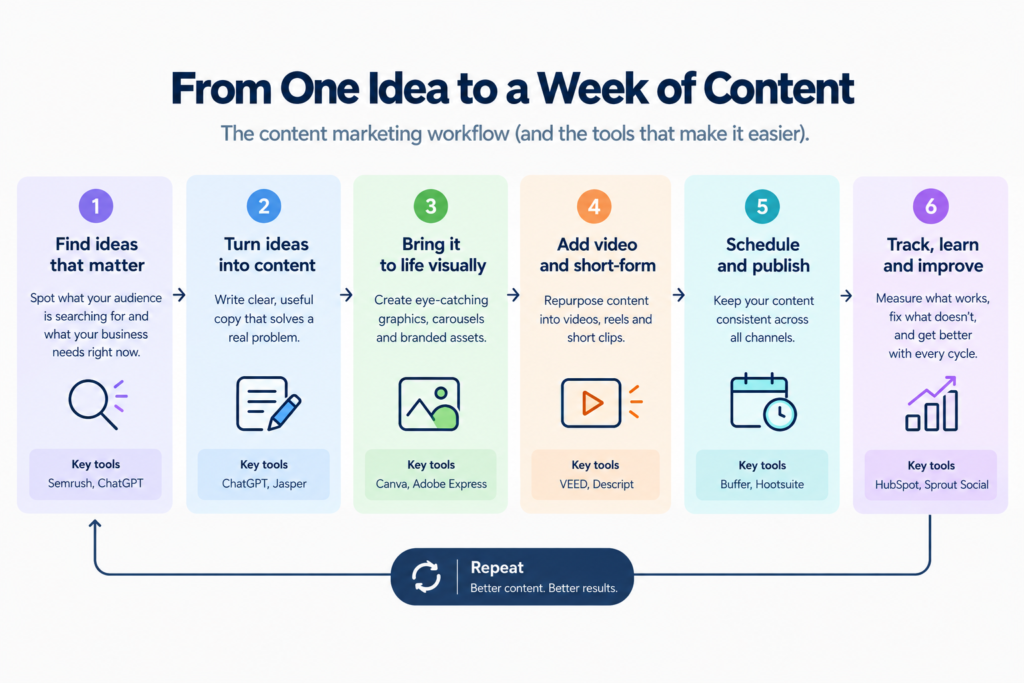
┌──────────────────────────┐
│  1. RESEARCH & PLANNING  │
│                          │
│ Find topics + keywords   │
│ Tools: Semrush, ChatGPT  │
└────────────┬─────────────┘
             ↓
┌──────────────────────────┐
│   2. WRITING & DRAFTING  │
│                          │
│ Turn research into copy  │
│ Tools: ChatGPT, Jasper   │
└────────────┬─────────────┘
             ↓
┌──────────────────────────┐
│    3. DESIGN & VISUALS   │
│                          │
│ Create graphics/carousels│
│ Tools: Canva, Adobe      │
└────────────┬─────────────┘
             ↓
┌──────────────────────────┐
│    4. VIDEO & SHORT-FORM │
│                          │
│ Repurpose into short     │
│ videos                   │
│ Tools: VEED, Descript  │
└────────────┬─────────────┘
             ↓
┌──────────────────────────┐
│     5. SCHEDULE & PUBLISH│
│                          │
│ Schedule across channels │
│ Tools: Buffer, Hootsuite │
└────────────┬─────────────┘
             ↓
┌──────────────────────────┐
│      6. TRACK & IMPROVE  │
│                          │
│ Measure clicks, leads &  │
│ conversions              │
│ Tools: HubSpot, Sprout   │
└────────────┬─────────────┘
             │
             └──────────────→ Back to research
Best content marketing tools for content creation
ChatGPT is powered by the GPT-5.6 family of models, with faster and higher-reasoning options depending on the plan. That makes it useful for fast captioning, outlining, repurposing, research, and first drafts, while longer or more complex content work can benefit from higher reasoning modes. Important outputs still need fact-checking and brand review before publication.

ChatGPT
OpenAI's versatile AI assistant for text, code, and multimodal tasks. It has become the global benchmark for large language model performance.
Operator opinion: ChatGPT is the easiest solution to implement, as it often starts to show results within a day. However, it does not have a built-in layer of brand memory across team members, meaning the voice has to be manually re-established with every new piece. Skip it as the only tool when several people are drafting for the same client and you need shared brand rules, approvals, or centralized context. Teams relying on it alone tend to hit a ceiling fast, worth reading in tools for small businesses that go beyond ChatGPT.
Jasper uses Jasper IQ as a context layer for marketing content, combining brand voice, marketing knowledge, product information, and company knowledge. Its agents can support research, creation, optimization, and campaign workflows.

Jasper
Jasper is an AI-powered writing and marketing platform designed to help teams create high-converting content faster. Built for marketers and businesses, it focuses on generating on-brand copy across blogs, ads, emails, and websites.
Operator opinion: The ability to enforce brand-voice across multiple writers is Jasper’s primary value, and you’ll be paying for the subscription at a rate that works if your team regularly has more than five contributors on its content team. Individual writers or very small teams should look elsewhere, as a well-prompted ChatGPT session would offer significantly better bang for the buck.
Semrush offers its content tools within the Semrush One toolkit, which includes a traditional SEO research tool and the AI-visibility layer to track the brand’s presence in AI-driven search results, the Content Toolkit for topic research, and an SEO Writing Assistant that helps optimize the text in real-time while writing. Semrush is strongest when content decisions need to be grounded in search data, but its current Content Toolkit also supports content creation, optimization, repurposing, collaboration, and publishing.
SEMrush
A comprehensive online visibility management platform that integrates traditional SEO with AI search tracking to help brands dominate both Google and LLM-driven discovery.
Operator opinion: The tool is mostly great for companies that already work on content creation weekly and want to prevent topic guesswork. Its main limitation for smaller teams is cost as requirements grow. Some advanced capabilities, including historical SEO data, are also tied to higher-tier plans.
Best content marketing tools for visual and video content
Canva’s AI suite, Magic Studio, includes around a dozen tools, such as Magic Design, Magic Write, Magic Edit, and Magic Switch, allowing to translate a design into various languages while maintaining its composition. The Brand Kit section stores logos, colors, and fonts to ensure consistency every time one uses Canva. Additionally, Magic Resize alters an image’s attributes right away, and the Teams plan allows for approval workflows and a shared brand kit.

Canva
Canva is an all-in-one visual design platform that helps users create social media graphics, presentations, videos, documents, websites, and AI-generated content. It’s built for creators, businesses, students, and teams who want professional designs without advanced design skills.
Operator opinion: Canva is the easiest tool to learn for a person who is not familiar with graphic design but creates images nevertheless, often being productive during the first hours of use. Its main limitation is that it is sometimes evident that the image was created in Canva, which might not be desirable for a company that wants to appear unique and sophisticated rather than “by-the-template”.
Adobe Express offers a variety of tools, including templates, one-click background removal, and a Content Scheduler that allows scheduling and publishing directly on social networks. Brand Kit and special locking functions are available to ensure Brand compliance in all materials and among various teams. Adobe Express also supports connecting up to five brands to a single template, which can help agencies manage multiple clients while maintaining brand controls.

Adobe Express
Adobe Express is a web-based design platform that helps users create social media graphics, videos, flyers, presentations, and branded content using templates and AI tools. It’s built for creators, marketers, students, and businesses that want fast professional content creation without advanced design expertise.
Operator opinion: The application is recommended for teams that are already using other Adobe software because the primary value is the integration with the Creative Cloud; otherwise, Canva is a better choice.
VEED is a browser-based video editor, which does not require downloading, and offers AI-enabled features such as auto-subtitles in more than 125 languages, Magic Cut to remove filler words and pauses, eye contact correction for presenters, background noise removal, and one-click resizing for Reels, Shorts, and other social formats. With a brand kit, one can ensure the use of specific fonts, colors, and logos while exporting videos and screen recording for making tutorials or product reviews. However, notes the author, generic AI videos remain underwhelming, and their effectiveness is increased when combined with one’s own footage or narration.
VEED
VEED is an online AI video creation and editing platform combining video editing, AI avatars, text-to-video, voice tools, subtitles, translation, image generation, and automation APIs. It is designed for creators, marketers, businesses, and teams.
Operator opinion: VEED is easy to use within an hour or two, since there is no software to download and it utilizes drag-and-drop technology. Its main limitation is the restrictions on the free plan, which can make the paid version necessary for more regular production.
The software is a good choice because it runs in the browser, thus, one does not have to worry about app stores or country-specific restrictions as with other editors.
Descript allows users to edit video and audio content by making changes to a text transcript. Descript’s Season 6 update introduced Underlord, an AI-powered editing assistant to help with editing tasks by responding to natural language prompts, Studio Sound for audio cleanup, Overdub for voice cloning to fix flubs, and automatic creation of social media clips, show notes, and chapter markers from a single recording.
Descript
Descript is an all-in-one audio and video editing platform that lets you edit media by editing text. Built for creators, podcasters, and marketers, it simplifies complex editing workflows with AI-powered tools like transcription, overdub, and filler word removal.
Operator opinion: Descript’s transcript-based editing has the potential to significantly cut down the real-time editing time required for repurposing podcasts and webinars after a team has become accustomed to it, usually within a week. It is not recommended for editing cinematic or heavily graded video, in which case Premiere or DaVinci Resolve would be a better choice. Do not use Descript if your editing process does not start with a conversation.
Best content marketing tools for scheduling and social media management
Buffer’s underlying strength lies in its extreme simplicity: pick channels, pick a time, publish, and maintain a clean view of the editorial calendar, for small teams that do not require social listening or shared inbox at scale.

Buffer
Buffer is a social media management platform that helps individuals, creators, and businesses plan, schedule, publish, and analyze content across multiple social networks. It simplifies content workflows while providing AI-powered writing assistance and performance insights from a single dashboard.
Operator opinion: Buffer is right around the corner from the same-day setup and is reliable as long as the team’s needs remain simple; the moment a client asks for approval workflows or listening streams, it’s time to think about investing in an upgraded social media manager.
Hootsuite offers bulk scheduling, social listening streams, multi-layer approval workflows, and reporting in addition to the core publishing functionality, which is why agencies managing multiple clients or brands tend to adopt it at scale when their publishing volume increases.

HootSuite
Hootsuite is an all-in-one social media management platform that helps businesses schedule content, monitor conversations, engage audiences, and measure campaign performance across multiple social networks. It is designed for marketers, agencies, enterprises, and social media teams looking to streamline their workflows.
Operator opinion: Its learning curve can make it a challenge to set up the approval workflows correctly during the first week or two, but this investment pays off by providing an auditable trail of who did what for a client’s social media, which is invaluable for an agency. Individuals managing their own social media accounts and blogs have more features than they know what to do with.
Sprout Social’s Smart Inbox brings messages from connected social profiles into one workspace, while Collision Detection helps prevent two team members from replying to the same conversation.
Sprout Social
Sprout Social is a social media management and social intelligence platform for businesses and teams. It combines publishing, engagement, analytics, social listening, customer care, and AI-powered insights through its Trellis AI capabilities.
Operator opinion: Its value becomes easier to justify once reply volume exceeds what one moderator can reliably manage. At that point, the shared inbox, routing, and reporting features become more useful, although the cost can be higher than simpler alternatives.
HubSpot’s Content Hub connects content management with its CRM, making it possible to connect content activity with contacts, customer journeys, and broader marketing performance.
HubSpot
HubSpot is an AI-powered customer platform that combines CRM, marketing, sales, customer service, content management, and operations tools in one ecosystem. Its AI features, branded as Breeze AI, help businesses automate workflows, generate content, analyze customer data, and improve team productivity.
Operator opinion: Despite being the slowest tool to adopt correctly (often taking a month or more to set up content, forms, and the CRM), HubSpot is the only one here that addresses the question of “did this content yield revenue.” Skip it unless you have an existing CRM-tracked sales process worth tying into.
Best tool stacks by business type
| Business type | Suggested starting stack |
|---|---|
| Solo creator | ChatGPT + Canva + Buffer |
| Small business | Semrush + ChatGPT + Canva + Buffer |
| Video-first brand | ChatGPT + VEED + Canva + Buffer |
| Marketing agency | Jasper + Semrush + Canva + Hootsuite or Sprout Social |
| Lead-focused company | Semrush + HubSpot + Canva + Hootsuite |
Choose a stack based on a workflow problem that you can name, instead of based on feature counts. A solo founder’s tool stack is not an agency’s tool stack and neither should copy the other, as it ends up being expensive with no output.
How one idea becomes a week of content
- Use Semrush to identify a topic with search demand and a clear audience need.
- Draft an outline and copy variations in ChatGPT or Jasper.
- Add a customer example or expert quote a generic draft won’t have.
- Build a carousel or branded visual in Canva.
- Turn the idea into a short video with VEED.
- Schedule everything in Buffer, Hootsuite, or Sprout Social.
- Review clicks and conversions after a week, then adjust the next piece.
Pause and think: which of these steps currently has no owner on your team? That gap, not a missing tool, is usually where content stalls.
Using content marketing tools without creating search spam
AI can increase the speed of content production, but it doesn’t remove the risk of publishing low-value content at scale. Google’s spam policies specifically target scaled content abuse, including large volumes of unoriginal content created primarily to manipulate search rankings. Useful, original comparison content is still allowed when it genuinely helps readers make a decision and follows people-first content principles.
Before publishing anything created with these tools, add first-hand testing or a real workflow example, fact-check pricing against the provider’s own website, and perform a human review. If output volume is scaling faster than your review process, that’s usually a sign the workflow needs fixing before the next tool gets added, covered further in why AI content sounds generic and Google’s own guidance on handling AI-generated content responsibly.
Frequently asked questions
Start with the most repetitive step that already has a clear process, such as content repurposing, scheduling, or basic reporting. Automating a poorly defined workflow usually creates more review work instead of removing it.
Most small teams can start with a small stack covering research, creation, design, and publishing. Add another tool only when an existing workflow has a clear bottleneck that the new tool can solve.
Not always. An integrated platform can reduce handoffs, but specialized tools can provide deeper functionality in areas such as SEO research, design, video editing, or social management. The better choice depends on where the workflow needs more control.
Consider moving when the team needs shared approvals, social listening, multiple brand accounts, more detailed reporting, or a structured process for handling incoming messages. If the team only needs straightforward scheduling, a simpler tool may be enough.
Using AI does not automatically make content unsafe for Google Search. The larger risk is publishing large volumes of low-value or unoriginal content primarily to manipulate rankings. Human review, original input, useful examples, and genuine reader value matter more than whether a specific tool was used.
Adding tools before defining who owns each step. A team can have software for research, writing, design, scheduling, and analytics and still have content stuck between those stages because nobody owns the handoff.
Start with the parts of the workflow that become difficult at scale: brand control, approvals, account management, reporting, and client visibility. The right stack should reduce coordination work rather than simply add more features.
Which content marketing tool should you choose?
Choose ChatGPT for flexible, everyday content assistance. Choose Jasper when multiple contributors need stronger brand and marketing controls. Choose Semrush when search data should guide what you create. Choose Canva or Adobe Express for graphics, VEED for short-form video, and Descript for repurposing long-form audio or video.
Use Buffer for straightforward scheduling. Consider Hootsuite or Sprout Social when you’re managing multiple brands, approvals, or higher reply volumes. Choose HubSpot when content needs to connect with contacts, campaigns, and the wider marketing workflow.
Which step in your current content workflow has a tool but no owner?
Your next move
Pick one piece of content sitting in your pipeline right now and trace it through write, create, edit, and schedule. Note where it stalls. That’s the tool or the owner you need to fix before adding anything new to the stack. As content production gets faster, the bottleneck will increasingly move from creating content to deciding what deserves to be published.