Key takeaways
- All 8 tools offer some form of free access, but the structure and limits of that access vary significantly.
- Activepieces and Exa explicitly state on their pricing pages that no payment method is required to start. Check the signup flow for the other six before assuming the same.
- Free tiers cap usage in different units: daily credits, monthly traces, monthly search credits, or a daily usage limit. These aren’t directly comparable without checking the unit.
- Arena AI (LMArena) is a free model comparison and voting platform, not a conventional SaaS free plan with a paid tier sitting above it.
- Pricing and free-tier limits were checked against each vendor’s official pricing page in August 2026. These change frequently, so verify the current page before committing a production workflow to a specific number.
Introduction
Founders comparing AI tools on the basis of free options waste real budget in search of the word “free”, without understanding the limitations behind it. A free tier that renews daily can silently fail a recurring workflow that was designed around a monthly billing cycle, and a credit pool that seemed generous in the review can be consumed in three prompts. Plan limits change frequently, sometimes across the same vendor, which is why the vendor’s pricing page is the final authority, not this summary. This guide compares eight AI tools with true free access against their current pricing pages (not articles that were written before a tool’s pricing model was changed) in order to describe what unit is limited, how often it resets, and where you should expect to hit a wall. The comparison below describes what each free tier offers, and what it is right for. The real question is not which of these tools are free, but which constraint will the workflow run into first.
Quick answer
| Tool | Free access | Main free-tier limit | Best use |
|---|---|---|---|
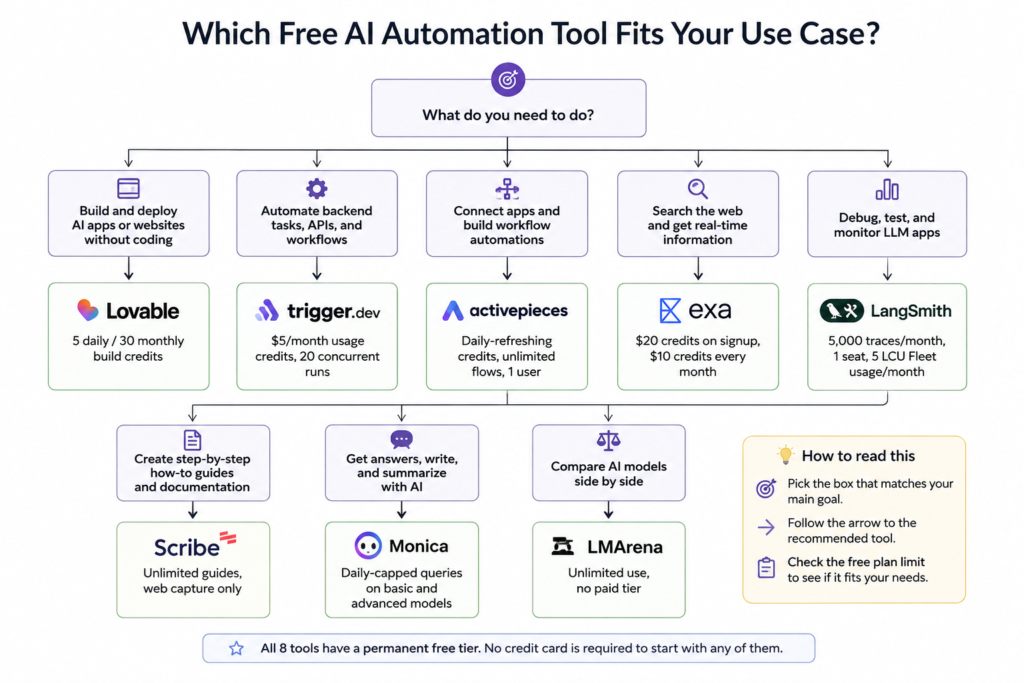
| Lovable | Yes | 5 daily build credits, capped at 30/month, plus 20 Cloud credits and 4 AI credits per month | Rapid app prototypes |
| Trigger.dev | Yes | $5 in monthly usage credits, 20 concurrent runs, 5 team members, 1-day log retention | Background jobs and scheduled tasks |
| Activepieces | Yes | Daily-refreshing credits with a hard cap, unlimited flows, one user | No-code workflow automation |
| Exa | Yes | $20 signup credits, plus $10 in credits every month | AI web search for agents |
| LangSmith | Yes | 5,000 base traces/month, 1 seat | LLM observability and debugging |
| Scribe | Yes | Unlimited guide creation from web apps | SOPs and process documentation |
| Monica AI | Yes | Daily usage limit on basic and advanced models | Multi-model AI assistance |
| Arena AI (LMArena) | Free access | Model comparison and leaderboard platform, no paid tier | Comparing AI models before choosing one |
Methodology: Pricing and free-tier limits were verified against each vendor’s pricing or product documentation as of August 2026. We evaluated the free access as of the date of the research, and not any promotional offers. Since AI pricing is volatile, make sure to double-check the vendor’s pricing page before designing a business-critical workflow around a particular limit.
Free vs. “free trial” why the distinction matters
A lot of pages promoting a free plan miss three different distinctions, which define the limitations one may encounter when building something before upgrading.
A permanent free tier never expires, and it only limits you to a particular amount of certain resources (credits per day, traces per month) or seats, but you can remain on it forever.
A time-bound trial, on the other hand, lets you use the service as a paid user for a limited amount of time (typically after which you’re downgraded) or ask for a card to be saved on file right away. None of the tools reviewed here use this last approach for entry-level accounts, but several (Scribe, in particular) provide an additional limited-time offer of their paid plan on top of a permanent free one.
A free plan with a card requirement, finally, asks to enter your card details when signing up, even if you’re not going to be billed immediately (which is also common enough for services to surprise you with an unbilled charge if you forget to cancel).
The eight products reviewed in this article take different approaches to giving away their resources for free. The majority offer a permanent, but limited, free tier, while Arena AI is closer to a comparison service between various AI models, which uses a free tier only for the lowest amount of credits. Where relevant, the sign-up requirements are specified in the main body of the article, as both Activepieces and Exa note explicitly on their pricing pages that no payment method is necessary. You may want to check the sign-up page for other services before committing since requirements are known to change.
Free plan wrong read vs right read
┌──────────────────────────────┐
│ WRONG READ OF "FREE" │
└──────────────┬───────────────┘
↓
"Free" = Unlimited
↓
┌──────────────────────────────┐
│ RIGHT READ OF "FREE" │
└──────────────┬───────────────┘
↓
┌──────────────────────────────┐
│ Check what the credit or │
│ trace unit actually measures │
└──────────────┬───────────────┘
↓
┌──────────────────────────────┐
│ Compare how the cap resets │
│ Daily ≠ Monthly │
└──────────────┬───────────────┘
↓
┌──────────────────────────────┐
│ Daily-reset free tier? │
│ Use it for evaluation, │
│ not production. │
└──────────────┬───────────────┘
↓
┌──────────────────────────────┐
│ Verify pricing on the │
│ vendor's own website │
│ before building the workflow │
└──────────────────────────────┘
Tool-by-tool notes
Automation & workflow
Lovable grants 5 build credits per day, limited to 30 total a month, which can be used to either generate or edit an existing app and minor monthly grants for hosting or AI powered features (20 Cloud credits and 4 AI credits). This is enough to allow creation of a public prototype. However, private projects, domains or higher limits require a paid plan.
Lovable
Lovable is an AI software engineer that lets users build websites and full-stack web applications through natural-language prompts. It is designed for both technical and non-technical users and can generate, deploy, and iterate on working software without requiring deep coding skills.
Operator opinion: Fast creation of functional prototype for a stakeholder is the main value proposition, and not the production hosting. Easy adoption is another benefit as it can be used by anyone who can describe a screen. The only limit is the daily budget combined with credit hungry prompts: asking to build a landing page with images would use up a third of daily budget. A team actively developing a product requiring more than a dozen iterations a day would be better off with a paid plan or not using the service at all due to time spent on managing credits.
Trigger.dev offering is an open-sourced background-job platform with a free Cloud tier: $$5 of monthly usage credit, 20 concurrent runs, and unlimited tasks. Once the included $$52 of credit is used, Free-plan tasks terminate when the allowance is exhausted or the plan is upgraded. The open-source core can be self-hosted with no usage limitations on any tier.

Trigger.dev
Trigger.dev is an open-source platform for building and deploying long-running background tasks, AI agents, and workflows using code. It provides durable execution, retries, queues, scheduling, observability, and managed infrastructure without serverless execution timeouts.
Operator opinion: The dev tool lacks a founder-focused UI, so adoption depends on whether anyone on the team already writes TypeScript. For a technical co-founder, it’s valuable beyond the demo phase because there’s no forced delay between tasks. In our experience, $5 of credits would be spend quickly on anything more involved than a simple scheduler, so non-technical founders considering the free tier should ask their developers to test out a realistic set of operations before committing to a paid subscription.
Activepieces changed their free plan to be credit based and daily renewed instead of monthly. Flows are unlimited in all plans including the Free one, but the amount of credit consuming steps (runs and AI) is limited to a certain amount before daily resetting. Runs usually cost 1 credit each while AI steps can be 2-20 depending on the model. The open source Community Edition is self-hosted and free forever.

Activepieces
Activepieces is an open-source automation platform that helps teams build AI agents and workflow automations without coding. It’s designed for businesses that want Zapier-style automation with more flexibility, self-hosting options, and enterprise control.
Operator opinion: The daily budget is much more friendly for smaller teams running tens of flows as opposed to hundreds on a monthly plan, because one bad day will not ruin their whole month. It was also easy to get into if you have any experience with Zapier or Make. The difference between 1 credit for a flow run and 20 for an AI step is huge which makes me think that bigger workflows using AI would hit the daily cap much harder than the marketing suggests.
Search & data
Exa is a search API for AI agents and RAG pipelines. The free tier of Exa gives you $20 in credits at signup and $10 in credits every month after that. Exa even says that no payment method is required to get an API key. As of this writing, $7 per 1,000 Search API requests, the recurring $10 credits would be roughly 1,400 standard search requests, if spent all on the search endpoint; the same credit allotment can be used for any other Exa product.

Exa
Exa is an AI-native search engine and web search API built for developers, AI agents, and businesses. It delivers high-quality real-time web results, structured data, and webpage content optimized for LLMs, making it ideal for research, retrieval, and AI applications.
Operator opinion: This is one of the most generous free tiers in this list for a developer looking to build an agent with a web search capability, because the monthly credits renew every month (as opposed to being a one-time grant). This means that a side project can keep using the service indefinitely. It does require a little more work to set up, however, as the developer has to build an API call into their code. Anything more than the most basic search features would eat into that monthly credit allotment, so it’s probably best to keep track of how much you’re using right from the start.
LangSmith, the hosted observability and evaluation product that LangChain sells, has 5,000 base traces per month per seat for free, with pay-as-you-go options available after that. LangChain and the newer.LangGraph are separate open source frameworks with different usage patterns, and not subject to the same pricing constraints as LangSmith.
LangSmith
LangSmith is an LLM development and observability platform from LangChain that helps teams trace, evaluate, test, monitor, and improve AI applications. It provides visibility into prompts, agents, chains, tool calls, and model behavior across development and production environments.
Operator opinion: It makes sense to decouple the framework from the observability product before considering anything too expensive. LangChain and LangGraph are free to use, regardless of your tier in LangSmith. The free option for LangSmith is actually very reasonable for a single developer working on an agent, but gets swallowed up immediately by a second person needing to observe the same traces. Teams that are considering adopting LangChain should keep in mind that our LangChain vs. Airbyte vs. Modal vs. Watsonx comparison might be worth reviewing before jumping to any conclusions about LangSmith being an unnecessary expense.
Content & documentation
Scribes’s Free plan lets you create an unlimited number of guides from web apps with easy customization and shareable links and embeds. Desktop and mobile capture, exports to PDF/HTML/Markdown, screenshot editing, and custom branding are available only with a paid seat, currently priced at $25 per seat per month billed annually, or $35 per month.

Scribe
Scribe is a process documentation tool that automatically creates step-by-step guides, SOPs, and training materials by recording your screen activity. It is widely used by operations teams, agencies, customer support, and internal training teams to document workflows faster.
Operator opinion: The free version is a feature-rich SOP writing tool, which means it has some limitations that may affect active use: the ability to capture desktop apps is absent, which means that any team that wants to document their desktop ERP, legacy application, or downloadable client will be unable to do so before upgrading to a paid plan.
Monica is an AI-powered assistant that brings together multiple LLMs (GPT, Claude, Gemini) in one browser sidebar. On their pricing page, they describe a free tier with limited daily usage and advanced features + higher daily allowance for a paid plan, but do not specify particular numbers.

Monica
Monica AI is an all-in-one AI assistant that works directly in your browser to help with writing, summarizing, coding, and chatting. It integrates multiple AI models into a single interface for faster everyday productivity.
Operator opinion: The tool is useful as a “light” multi-LLM chat hub for someone who wants to experiment with several models without paying for each separately. The setup is extremely user-friendly (browser extension) and requires no additional effort from the user beyond choosing the platform. At the same time, the daily limit makes the tool less attractive for someone who wants to rely on it for a heavy daily workload, because such a user would regularly exceed the free tier’s limits. If the use case contemplates daily model usage (checking daily emails with GPT, daily writing prompts with Gemini), a founder would want to invest in the higher-tier plan to get the increased daily allowance.
Model comparison
Arena AI (LMArena) is a crowdsourced leaderboard for prompting the same question to two anonymous models, then voting on which answer is better. It is not organized as a SaaS pricing tiers, as there is no paid plan above the free one, and most features, including the leaderboard and battle mode, are free to access.
Arena
Arena is an AI evaluation and comparison platform that lets users test multiple AI models against the same prompt. It’s designed for developers, researchers, and AI power users who want to compare quality, speed, and reasoning before choosing a model.
Operator opinion: It is a fundamentally different category from the other seven tools here, and one s hould be clear as to its purpose. LMArena does not perform any automation or become embedded in a workflow; it is a research tool for deciding which model should be tasked with a particular prompt before building a workflow. As such, it has no paid tier to protect: the product is not access to models but the votes and rankings that arise from their comparisons. Its adoption is immediate, as there is no need for an account for its basic use. It tells users which model most people preferred for a certain prompt style, not which model is cheapest, fastest, or most reliable for one’s production use case, and therefore should be considered a shortlist rather than a definitive choice.
What happens when you outgrow the free tier
Across this set, an upgrade usually works one of two ways: either payment is made per seat (LangSmith Plus at $39/seat, Scribe Personal at $25/user/month billed annually or $35 month-to-month) or you keep the same free-tier shape with a bigger credit pool (Lovable Pro at $25/month for 100 credits, Trigger.dev Hobby at $10/month, Activepieces Plus at $16/month billed yearly for 3x the credits). Exa stays pay-as-you-go at $7 per 1,000 search requests after the monthly credit grant, instead having its cost scale linearly with usage rather than jumping up to a per-seat price. Arena AI has no upgrades, as it has no paid tiers to begin with.
This is the point where most of the teams make the same mistake: they add a paid seat to resolve a capacity issue when, in fact, there is no ownership of the tools the workflows run in. Before adding up any of these upgrades, run your AI stack audit and understand whether you are hitting a capacity wall or a point solution explosion. If the tool is critical for the workflows, our AI workflow infrastructure and maintenance guides will tell you what does it mean to truly own a tool beyond just paying for the seats.
Self-audit: is a free plan actually enough for you?
Before you begin shopping for a tool on this list ask yourself a few questions about your requirements and expectations:
- Does your use case renew daily, and can you absorb a sudden wall each afternoon?
- Are you developing something for internal review purposes, or for launch next quarter?
- Would you have upgraded anyway if the free tier vanished tomorrow, or been quietly OK with the transition?
- Have you looked at the current pricing page for the tool you want to buy, or are you relying on a screenshot from a friend?
- Is the number of seats, capture types, or your monthly reset really going to be a pain point in week one
- or do you see it as a long-term investment?
Pause and think: A free tier that serves your needs today can be a crippling crutch if the workflow it supports has long-term potential. Free tiers are good for experimentation and for processes with narrow parameters. The moment they become an impediment to a process that has real value, you need to ask yourself if their limitations and refresh cycles are hindrances to the kind of work you want to do.
FAQ
The Developer plan (5,000 base traces/month, 1 seat) is explicitly allowed for commercial use – it’s intended for individual developers or small teams utilizing the tool on a strictly personal or commercial level. Larger teams or organizations should consider the paid Plus plan.
It has a permanent free plan. The Free plan does not expire – you get 5 daily / 30 monthly build credits for as long as you want. You can only use private projects, custom domains, and exceed the daily limit on the paid plan.
Either the daily limit resets every 24 hours instead of every month (Activepieces, Monica AI), the free tier only unlocks a narrower set of functionality (Scribe’s capture is only available in web versions), or you can’t use more than x credits before having to wait until the next billing period or pay extra (Trigger.dev, Lovable). None of these tools have explicitly confirmed that their sign-up process does not save your card details, so it’s worth double-checking on the specific page for the tool you want.
Conclusion
Free-tier pricing is a moving target. Credits, resets, limits, and exclusions to paid plans can all shift dramatically in ways that don’t reflect changes in the core product. So the interesting question is rarely which tool offers the most generous free tier: the more interesting question is whether that free tier meets the requirements of a particular workflow.
The more important question is not which of these tools is free to use, but whether your teams have ingrained processes to re-check and re-evaluate pricing before it becomes integral to a larger business process, or whether you are one API request away from an expensive accident.
Your next move
Choose one of the tools from the table above that you are already using or evaluating and go to their pricing page (not a review site, not this article) and make sure their free tier limits and reset periods still align with what you’ve read here. It’ll take less than 10 minutes, and it’s the one habit you need to avoid the one mistake everyone else makes in this space.