Key takeaways
- Zapier free plan is limited to two steps per workflow and 100 tasks monthly. It should be enough to test the connection between two apps but not to fully automate your daily sales.
- Pabbly’s Connect also has a 100 tasks limit for the free plan, and other available task numbers are sold as blocks of tasks per month. Other tools have plans with higher tasks a month limits, but their prices grow with the number of workflow steps.
- IFTTT only allows you to build automation between one trigger and one action, which rules out most multi-step orders or replies.
- One automation that you can build and test on the weekend would save you a lot of tasks that otherwise would require a person to do.
- None of the tools described here require you to enter your credit card information to try the tool.
Introduction
Every week a side hustle runs without automation, its founder misses out on hours that could’ve gone into their product, content or customers, by being stuck in a loop of admin work no one is paying for. Five DMs with the same request every day. An order manually copied into a spreadsheet. Restocking a product by hand. It all adds up to a founder that’s busy and the business that’s not growing.
Teen-run side-hustles absorb this opportunity cost more severely than anywhere, because most automation tools exist to charge a company card, and not a debit card. Free digital tools have opened the door for an influx of highschoolers selling from their accounts online, however the same cannot be said about the infrastructure automation layer.
This guide will not teach you what you can do with automation. It will show you how to install one automation tool, link it to free tools, and have it running by Sunday night. Here we go.
Why automation matters for a teen-run side hustle
A side-hustle won’t have employees, meaning the founder will do the work themselves, and the last thing the founder likely has any spare quantity of is their own time. Homework, sports, a paying job, and sleep all add up to a limited number of hours.
Automation doesn’t have to be fancy; any automation at all, even something as simple as a workflow that adds in a frequently requested order to an excel sheet or automatically replies to an email query, is a win. Anything that gets even a little bit of work off the founder’s plate and into a system where the work can be done without them is a worthwhile automation for most side-hustles.
However, most guides on automating side-hustles are written under the assumption that the founder has a steady income they can use to invest in their business which leaves out most people who run side-hustles out of their bedroom, and may not even include those who rely on their parents’ credit cards to do so. This guide will focus primarily on automating work without requiring a subscription.
The free no-code automation stack
These five gems take care of the most frequent side-hustle automations: routing orders, responding to messages, and storing a bare-bones database. All offer a genuinely valuable free tier and don’t require a credit card to sign up.
| Tool | What it replaces | Free tier limit |
|---|---|---|
| Zapier Free | Manually copying data between two apps | 100 tasks/month, 2-step Zaps only |
| Pabbly Connect | Manually copying data between two apps, at higher volume | 100 tasks/month, but flat-rate paid tiers if you outgrow it |
| IFTTT | A single manual trigger-action step | Simple, single-step automations only |
| Manychat | Manually replying to every DM or chat message | Free tier covers basic auto-reply and DM flows |
| Google Forms + Sheets | A paid database or order form tool | Free, unlimited for personal use |
Zapier Free: best for testing a simple connection
It is crucial to define the free plan of Zapier as it features 100 tasks per month and an unlimited number of two-step Zaps, implying one used action and one triggered one. Thus, it is the fastest way to test whether two chosen programs are compatible since the free account highlights the usage limits. The latter ones appear as soon as one hits an action step for a Zap since every Zap step, which implies an individual action, is considered one task. In most cases, it is hard to imagine a scenario when only one action step will be enough; therefore, creating a Zap with more than one step will help hit the limit within days.

Zapier
Zapier Central is a no-code AI automation platform that lets you build intelligent agents to handle tasks across thousands of apps. It’s designed for businesses and teams who want to automate workflows, delegate tasks to AI, and reduce manual work without coding.
Operator opinion: setup takes the shortest time since most connections only require less than ten minutes of one’s time. The tool offers the broadest app library, as well as a steeper learning curve due to the two-step limitation, thus, only confirming the connection proof-of-concept. A founder, who is not sure whether two applications have any relations at all, should rather choose this one. In contrast, those, who fully understand the created workflow and only need to set up the connection proof-of-concept, should explore other tools further since none of the offered two steps will highlight the end result. The latter ones, who already know that they need three or more steps for a specific Zap, should rather choose Pabbly, thus, saving the Zapier’s free account for future use.
Pabbly Connect: best for flat, predictable pricing later
Both Pabbly Connect’s free plan and Zapier offer 100 tasks per month; the difference lies in the need to upgrade to a paid plan if one side-hustle requires more than that. Pabbly Connect’s pricing strategy is lower per task than per step for creating automation. In addition, neither triggers nor steps are counted towards a billing cycle’s task limit. Therefore, such a scenario as a founder outgrowing a free plan is not the case for Pabbly Connect. The information is essential for the founder considering what platform to choose to develop their product. The pricing model’s choice will affect the founder’s future expenses and productivity in the long run.
Pabbly Connect
Pabbly Connect is a no-code workflow automation platform that connects 2,000+ applications and moves data between them automatically. It is built for businesses, marketers, creators, and teams that want to automate repetitive tasks using triggers, actions, multi-step workflows, filters, routers, webhooks, and built-in data tools.
Operator opinion: Setting up automation takes more time and effort than in Zapier because Pabbly Connect’s interface is not as intuitive as Zapier’s. However, the learning curve is worth the investment because steps in the automation are not counted toward the 100 free tasks per month, unlike in Zapier. Therefore, if the founder wants to stay within the free plan for some time, it would be rational to choose Pabbly Connect for its higher number of available tasks. If the founder wants to invest more effort in setting up their automation, then they would benefit from choosing Zapier and the variety of its templates.
IFTTT: best for one simple alert
IFTTT is the easiest to use among the options on the basis of design. IFTTT links a certain trigger to a specific action. The service has a minimal design that only allows one to build a singular automation. If one needs to forward the Instagram message to orders, IFTTT will not work because it requires more than one trigger-action pair to complete the task.
IFTTT
IFTTT, short for “If This Then That,” is a no-code automation platform that connects apps, devices, and online services through Applets. It is especially useful for simple alerts, smart-home routines, social media automation, and lightweight productivity workflows.
Operator opinion: Setting up this tool takes the least time, especially compared to the other two options, and there is no need to learn anything because the interface is as simple as it can be. The issue with such a design is that it only allows one to set up one trigger-action pair, which is sufficient for a small task but not for a complex automation chain. As such, a founder that only wants to receive an order alert can be satisfied with the tool, but someone trying to complete the full DM-order flow should only take it as an option for an additional step.
Manychat : best for DM-to-order or auto-reply
Manychat helps automate Instagram and Facebook DMs, where a lot of teen-run stores will be doing their sales anyway. So if someone comments “order”, the bot replies with a link or a form instead of the founder having to type this out for every customer. This is what a DM-to-order system looks like in ManyChat.
Before even starting to build on ManyChat, I think it’s important to note that in March 2026, the company cut the free plan from 1000 contacts to only 25 active contacts per month. 25 contacts is extremely low, especially for someone who’s doing a Reel that gets liked by hundreds which then results in a bunch of comments asking to order. As mentioned below, the keyword trigger + auto reply setup works perfectly fine for what’s needed, but it’s very possible for the founder to reach the contact limit very quickly when doing regular promotional activities for the store. It might be worth it to invest in the paid plan right away if the store has enough potential to sell on a consistent basis.

Manychat
Manychat is a chat marketing and automation platform built for creators businesses and brands that want to turn social engagement into conversations leads and sales. It automates comments DMs follow-ups broadcasts and customer journeys across channels including Instagram WhatsApp Facebook Messenger TikTok Telegram SMS and Email.
Operator opinion: Setting up ManyChat takes under 15 minutes once the Instagram account is linked in, and the keyword-trigger builder doesn’t require any technical expertise at all, making it a perfect tool to throw into use during a boring Friday night. The 25 contact limitation is a pretty big deal – it’s enough to test out the system and see if it’s worth it to invest further, but a serious founder with a consistent amount of DM sales will likely reach the limit pretty quickly. Someone who posts Reels or promotes the account regularly can survive on the free plan for a little while longer, and someone who does a promotion or runs ads weekly should upgrade to a paid plan.
Google Forms + Sheets: the free database
Every automation tool needs somewhere to store the information. Google Forms collects the orders/inquires and Sheets stores the data for you for free with unlimited storage for personal accounts

Google Forms
Google Forms is a web-based form and survey builder for collecting information, feedback, registrations, applications, quizzes, and other structured responses. Responses can be analyzed inside Forms or automatically stored in Google Sheets for deeper analysis and workflow automation.
Operator opinion: It’s not something that’s fancy itself and sits in the middle of the system, and everything else connects to it. All three of the tools mentioned are free to use with no limitations for personal accounts, meaning that the only real limitation is your imagination. The only “Catch” is that Sheets is more of a storage medium, meaning that nothing would be written there by itself; you would need Zapier/Pabbly/Manychat or another tool to write the information there automatically. Every founder mentioned in the article should have Sheets in their toolkit, period. There’s no alternative scenario where any of them wouldn’t.
What automating a side hustle actually looks like operationally
Friday night. Sixteen years old. Running a small jewelry business out of her bedroom. She boots up her laptop to process some orders after finishing her homework. Her only employee is her teenage self. All communication happens via Instagram direct messages. Every single order requires a reply with payment details (Venmo handle) and shipping instructions. This process can happen twenty-plus times per day during a restocking.
Her automation triggers when an Instagram direct message contains the word “order.” It replies with a Manychat auto responder that links to a Google form. The Google form asks for the item, size, and shipping address. When the form is submitted, a row is added to a Google sheet, and a Zapier Zap (she has 100 free zaps a month) announces the submission via slack-free alternative, IFTTT (which sends a simple text message when a new row is added).
She still has to confirm payments and pack and ship the item herself, but the time spent doing so is reduced, because she can avoid the repetitive task of typing the same reply, asking the same questions, entering the same information into a spreadsheet that now happen automatically, instead of twenty times per day, costing her twenty minutes per notification.
This is the shape of her automation for the weekend. And it is not fully automated. It is one task, lifted from her shoulders.
Pick your one weekend automation
Building five automations in one weekend isn’t realistic. Pick one simple workflow that solves a real problem, build it properly, and leave the other ideas for later.
YOUR ONE WEEKEND AUTOMATION
↓
PICK ONE
↓
┌──────────────────────┐
│ 1. DM-TO-ORDER │
│ Keyword → Form → │
│ Google Sheet │
└──────────┬───────────┘
↓
OR
↓
┌──────────────────────┐
│ 2. AUTO-REPLY │
│ Common question → │
│ Instant response │
└──────────┬───────────┘
↓
OR
↓
┌──────────────────────┐
│ 3. RESTOCK ALERT │
│ Update → Email/Text │
│ notification │
└──────────┬───────────┘
↓
BUILD ONLY ONE
↓
TEST → FIX
↓
LAUNCH
The other two can wait until next weekend.
Pick one, build it, test it, and get it live. The other two can wait.
Wrong approach vs right approach
WRONG APPROACH → RIGHT APPROACH
Sign up for every free tool
→ Pick one automation + one tool stack
Automate an inconsistent process
→ Test it manually first → Automate what repeats
Add more tools when something breaks
→ Find the workflow gap → Fix it
Ignore free-tier limits
→ Check usage weekly → Plan the next step
Pause and think: before building anything this weekend, write down the exact task being replaced and how many times it occurs in a normal week. If the latter number can’t be answered, the process being automated isn’t occuring consistently enough to warrant automation.
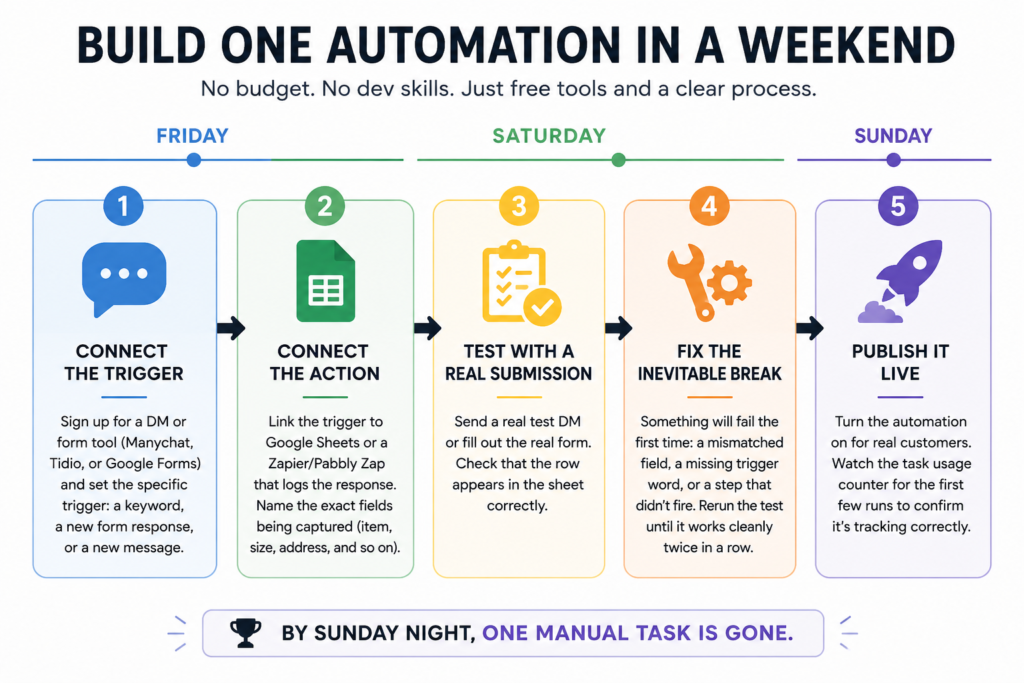
Step-by-step: build it (Friday to Sunday)
Where free plans break (and what to do next)
Zapier Free has a restriction of 100 tasks and 2 steps. If you have one order DM to order flow with 3 action steps (auto-reply, form log, alert) and several such recurring orders, you would burn through their free tier in a matter of weeks. Pabbly Connect’s free tier also has a barrier of 100 tasks, but their paid plans do not have a step pricing structure like Zapier’s.
The truth is that the free tier of most services is meant for light testing. You should have a good idea of what your monthly spending would be before signing up for a paid plan. At the time of writing, Pabbly’s entry-level tier has a lower price per task than Zapier’s. This is because the former has a flat rate per task per month while the latter has an increased price for every step beyond a certain limit. It is recommended that you research the pricing on both services before committing to a plan.
What this actually replaces
Automation of a side-hustle with no employees still has costs associated with it. It shows up in the founder’s paycheck in the form of time that could have been spent doing more productive things or getting proper rest. A single automation created over a weekend does the work of a part-time employee who would have replied to direct messages, logged the form, and sent an alert. I keep seeing founders of companies of all sizes prioritize automating the dull, repetitive processes first. It makes much more sense to me than investing time and money into automating the exciting new task that everyone wants to do.
Self-audit checklist
Before you try to automate, ask yourself these questions.
- Is this something that is going to happen multiple times a week, consistently?
- Does it require the same exact steps every single time, with no room for human error?
- If you automate it, will it free up time spent on something more productive?
- Can you find a free tool that can do it without requiring a credit card?
- Is there a point where you will hit a limit on the free version, and a plan in mind for what comes next?
If any answer is no, the task probably isn’t ready to automate yet, or the wrong tool is being considered.
FAQ
Yes. Zapier, Pabbly Connect, IFTTT, Manychat, and Google Forms with Sheets all offer free tiers with no card required to sign up (with the exception of Manychat’s free tier, which only allows 25 active contacts per month).
IFTTT is the most beginner-friendly automation tool, as it only requires setting up one action to happen once another has happened, with no branching logic involved.
No. In fact, Zapier’s free plan doesn’t ask for any payment details and has no expiration date: however, it’s limited to 100 tasks per month and two-step zaps only.
A DM-to-order automation using Manychat for the reply and Google Forms + Sheets for the order log would be the most common use case for a teen running an online store: automatically answering the same questions over and over when someone sends a direct message.
Conclusion
The tools designed for solo, budget-contrained founders will continue to evolve, and the distance between “business using a company card” and “business done in bedroom” is shrinking at an exponential rate that far exceeds any automation guides suggest. And the founders who will benefit most from the trend will not be the ones who build on top of this trend; they will be the ones who automated one single time-consuming task that previously sapped their soul every month and left the rest alone until it became a burden.
What single task are you currently doing by hand twenty times per week for your side-hustle could you automate over the weekend?
Your next move
Open up a free google form right this minute and create the one question your side-hustle needs customers to put in to order to get what they want. That’s the first ten minutes of the entire build.