

Key takeaways
- Kling AI’s free plan gives 66 credits per day, and resets every 24 hours, but with a maximum resolution of 720p and a visible watermark.
- PixVerse gives 90 signup credits and 60 daily credits, which allows for about 2-3 clips per day.
- Luma’s free tier has a monthly generation limit of about 30, and it’s strictly non-commercial.
- Runway’s free plan gives you a one-time “deposit” of about 125 credits, which gets you about five short clips before needing to pay.
- Hailuo/MiniMax’s free credit allocation is currently unclear as of early 2026, as some sources suggest that it might have changed to a one-time signup bonus in mid-2025, while others indicate otherwise.
Kling AI is at the top of most 2026 realism rankings, and its motion physics are difficult to dispute, according to eesel AI’s 2026 Kling AI pricing list. However, the free plan is not very attractive, so many creators exploring a kling ai alternative tend to run out of budget in their first week.
The test included the same prompt in all five tools: Kling AI, PixVerse, Luma Dream Machine, Hailuo (MiniMax), and Runway. The same image was used as a reference, and all tools got identical instructions; no tool was favored or prompted to give the best result. The purpose of the test was not to score the tools but to provide an honest comparison of each AI image generator, based on which you can choose the best among them.
If you make short-form content on a regular basis, edit any full-length production, or just want one perfect hero shot, the best free kling ai alternative for you will be determined by that answer. Here’s what our tests said.
Kling AI quick recap: strengths and free plan limits
Before comparing any two things, it is helpful to understand the context of the comparison.
- Motion physics and realism – Kling 3.0 from Kling AI is unrivaled in its ability to depict crowds, cloth, and human motion, which puts it ahead of the majority of its competitors at any given price point, making it a top choice on numerous benchmark lists.
- Character consistency -Two-minute clips produced with it retain the same subject without engaging in undesirable morphing, unlike most budget alternatives.
- Free plan credits – According to Atlas Cloud’s Kling AI pricing page , all registered users get 66 credits per day with no rollover.
- What that actually buys you – Six reasonably priced, low-resolution (720p) videos with watermarks and no commercial usage rights would be the result of spending 66 credits in a day on a standard plan.
- The catch. Free-tier queue times can get excessively long, and one Kling 3.0 render at a higher quality takes a decent chunk of the daily allotment to finish.
This is the part where users start seeking an alternative since the disconnect between “generous daily credits” and the actual usable output makes it easy to feel cheated out of potential content.

Kling AI
Kling AI is an advanced text-to-video and image-to-video AI developed by Kuaishou. It allows users to create highly realistic, cinematic videos with natural motion, camera control, and storytelling capabilities.
How we compared these tools
Given the same prompt (product photo with slow horizontal camera movement) plus a reference image, we tested every tool in this round using the free plan + default settings. We graded them on:
- Free credits – How much you can use for free, and how quickly the free tier renews.
- Output quality – Coherence of motion, image quality, and degree of conformity to the given prompt.
- Speed – How long it takes to generate a video.
- Watermark rules – Whether free videos require a watermark for commercial use.
We’ll leave comparisons of paid tiers to other posts. Suffice it to say, this isn’t a contest about which tool is objectively the best – it’s a question of how these tools fit into an overarching strategy of reducing context-switching overhead for small teams. In this respect, AI video tools for small teams fixing the context switching tax are tools that reduce the overhead of using multiple disparate tools, but have downstream effects on the quality of the output.
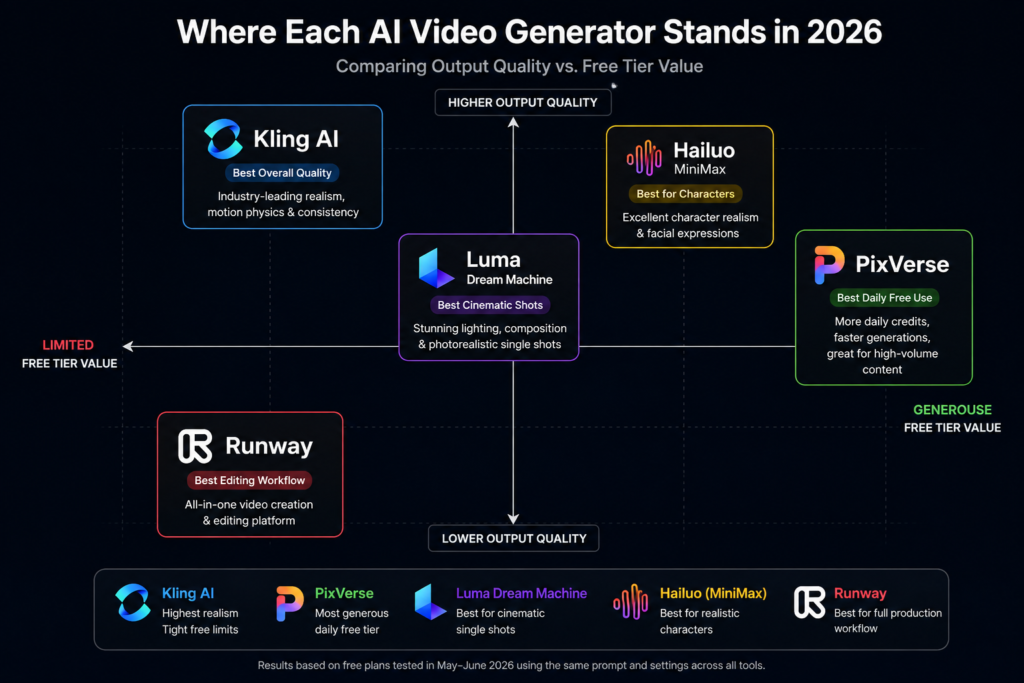
Kling AI vs. PixVerse: best for fast, high-volume free generation
The PixVerse platform offers 90 free credits on registration and provides another 60 credits each day thereafter, according to the PixVerse Free Credits Breakdown . With approximately 25 credits needed for a single short animation, this gives about two to three free creations per day in addition to the six offered by Kling.
The main advantage of PixVerse is its faster rendering time, which takes between 30 to 60 seconds, significantly quicker than what Kling offers for free animations. In addition, PixVerse includes native voice generation, which is not available in Kling’s free plan.
One area where Kling excels is in the quality and realism of the generated videos; while the animations from PixVerse are high-resolution and suitable for social media, they appear artificial when viewed closely, particularly in facial features and movement.

PixVerse
PixVerse is an AI video generation platform that turns text prompts and images into short, high-quality videos. It is designed for creators, marketers, businesses, and social media teams looking to produce engaging video content quickly without traditional editing skills.
Verdict: If someone needs to create many animations for TikTok or Reels and prioritize quantity over visual quality, then PixVerse would be the better choice. On the other hand, if the animations’ quality is essential, then Kling would be a better option.
Kling AI vs. Luma: best for cinematic single shots
Luma Dream Machine free plan provides approximately 30 generations per month, with a non-commercial, watermarked, and lower-than-1080p resolution. Compared to Kling’s daily limit, the monthly subscription suggests that the former is more appropriate for sporadic use rather than for daily basis.
Luma’s greatest strength lies in its utilization of lighting and composition within a single scene. Compared to Kling’s free plan, products, architecture, liquids, and other objects that rely on the interplay of light tend to appear more realistic in Luma. However, the quality of the generated images diminishes when multiple shots are arranged in a coherent series. Thus, it is less suitable for creating multi-scene projects, especially for those with a frequent content generation schedule.

Luma
Luma is an AI-powered creative platform from Luma AI that generates realistic videos from text prompts and images using its Dream Machine model. It is built for creators, filmmakers, marketers, designers, and businesses that want high-quality AI-generated motion with natural camera movement and consistent visuals.
Verdict: Luma Dream Machine free plan is better at providing a single high-quality image within a month, which makes it appropriate for those who only intend to use it occasionally. In contrast, Kling’s daily subscription resets the counter each day, providing more flexibility for those who want to use it more frequently.
Kling AI vs. Hailuo (MiniMax): best for realistic characters on a budget
Hailuo’s free allowance is confusingly reported, with conflicting sources declaring anywhere from a one-time signup bonus of about 200 credits to a smaller monthly amount, so it’s worth checking in-app before designing your creative strategy around the service. Either way, prepare to make six to eight short clips before needing more content.
The quality of character performance is the main strength, with facial animation, lip-sync, and crowd scenes comparable to Kling’s, and superior to the free tier. Clips are limited to six seconds, compared to Kling’s eight, and there’s no free account camera controls, such as panning or dolling.

Hailuo AI
Hailuo AI is an AI video generation platform developed by MiniMax that creates short, high-quality videos from text prompts and images. It is designed for creators, marketers, educators, and businesses that need fast, realistic video content with minimal production effort.
Verdict: If your project’s emphasis is on characters and human features, Hailuo is much better value for money than Kling, but for product and environmental photography, Kling’s free tier is unrivaled.
Kling AI vs. Runway: best for full production workflow (not just clips)
As stated in Writingmate’s article on free text-to-video AI generators, Runway’s free plan only includes a one-time payment of approximately 125 credits, “which will allow you to create a total of 5 short videos,” and a limited trial with no daily refill. Compared to Kling’s daily refill option, Runway seems to have significantly fewer opportunities for repeated use.
Meanwhile, Runway appears to offer better value in its creation possibilities. Unlike other free options, Runway provides users with an option to edit their creations within the same platform. In other words, Runway includes production software in its AI video generator, which is an apparent advantage when it comes to video creation.

Runway
Runway is a professional AI-powered creative suite that helps users generate, edit, and enhance videos using generative AI. It is widely used by filmmakers, marketers, designers, content creators, and creative teams to produce high-quality visual content with advanced AI tools.
Verdict: Runway is useful for checking out the editing possibilities of an AI video creation platform, but it does not provide much value in terms of generating videos for free. However, for someone who wants to get to know the video production platform with a built-in editor and eventually pay for the premium rates, a free trial can be beneficial. On the other hand, for those who are strictly interested in obtaining certain amount of video content for free, Runway may not be the most suitable option.
Comparison table: all tools side by side
| Tool | Free tier | Best for | Watermark on free? | Output quality |
|---|---|---|---|---|
| Kling AI | 66 credits/day (resets daily) | Realism and motion physics | Yes | Highest overall |
| PixVerse | 90 signup + 60/day | Fast, high-volume social clips | Yes | Good, softens on close-ups |
| Luma Dream Machine | ~30 generations/month | Cinematic single shots, lighting | Yes | Strong on light and physics |
| Hailuo (MiniMax) | ~6-8 clips (varies by source) | Realistic faces and characters | Yes | Strong on character motion |
| Runway | ~125 credits (one-time) | Full editing workflow | Yes | Solid, but limited free volume |
Quick Decision Flow
┌────────────────────────────────────┐
│ What do you need most? │
└────────────────────────────────────┘
│
▼
┌──────────────────────────────┐
│ Best overall video quality? │
└──────────────────────────────┘
│
▼
➜ Kling AI
│
▼┌──────────────────────────────┐
│ Daily TikTok/Reels content? │
└──────────────────────────────┘
            │
            ▼
➜ PixVerse │
▼┌──────────────────────────────┐
│ Cinematic hero shots? │
└──────────────────────────────┘
            │
            ▼
➜ Luma Dream Machine │
▼┌──────────────────────────────┐
│ Realistic faces & characters?│
└──────────────────────────────┘
            │
            ▼
➜ Hailuo (MiniMax) │
▼┌──────────────────────────────┐
│ Editing + generation together?│
└──────────────────────────────┘
            │
            ▼
➜ RunwaySo, which Kling AI alternative should you actually use?
It depends on what you need it for and how frequently. For creators making content every day for TikTok or Reels, PixVerse’s daily refresh rate better supports your posting schedule than Kling’s queue system. If you need a single, polished looking product shot or character model for a portfolio or shop, Luma’s lighting capabilities are worth the monthly budget better than Kling’s credits. If you’re doing expressive character driven videos that rely on realism, Hailuo’s free tier gets closer to Kling’s level of detail than their budget would suggest. And if you’re trying to see if a full production pipeline with dedicated tools fits your workflow better than a text prompt system, Runway’s one time credit purchase is enough to test this without spending money elsewhere.
None of them are replacing Kling AI’s raw power, but each addresses the particular weakness in Kling’s free plan that limits your own production. That’s the real comparison to make when choosing between AI tools. This guide on different AI tools for small business otherwise focused on avoiding the trap of using ChatGPT for everything by learning when another option better fits your needs.
FAQs
Yes. All accounts get 66 free credits per day, which resets every 24 hours. The output video resolution is limited to 720p, and a watermark is added. It is for personal or experimental use only, not for commercial use.
Hailuo (MiniMax) is closest to Kling AI in terms of character and facial realism, and PixVerse is closest in terms of daily output volume. None of them can fully replicate the quality of motion in Kling AI videos, but each covers a different part of Kling’s free tier.
Most of them do, including Kling, Luma, Runway, and Hailuo. To remove watermarks from AI videos on any of these platforms, you need to subscribe to their paid plans.
Final verdict
Kling AI continues to lead in raw production quality, which isn’t likely to change in nearest future due to its significant headroom over competitors in terms of motion physics. With that said, “best tool” and “best free tool for my workflow” are two different questions, and the second one has shifting parameters depending on whether you prioritize quantity, quality, characters count, or the ability to edit the generated video.
Worth considering this free plan comparison for two of these factors before jumping to any conclusions about Kling being your optimal choice, as the version that would save you most time given your post schedule will be different for every case.
If you’re looking to design a video production stack rather than pick a single tool for isolated use cases, consider this article’s findings as a part of the larger system selection process. With video generators tending to occupy the lowest possible tier in one’s editing pipeline, it’s often useful to have an idea of how the rest of the stack will be built beforehand.
For further considerations on the topic of comparing and contrasting AI tools before investing significant time and money into one, see this exploration of research and validation tools for founders. If you’re trying to decide between a monolithic stack of AI agents versus a set of point tools as described in this article, you might want to look into this AI agents versus automation comparison for an expanded discussion.
Finally, if you’re working within a company or team environment that needs to distribute repetitive production tasks (such as weekly social media clips) between members, this guide to automating roles for solo founders may be of interest to you besides the considerations stated in this article. Should you wish to learn more about using Kling AI in particular, Aadhunik’s Kling AI video creation guide contains considerable detail about prompt engineering and settings not mentioned here.
Your next move
Choose the tool that fits your actual output needs for the week (daily volume, single hero shot or character work), sign up for a free account and run any reference prompt through it before spending a cent on a paid plan. See how much you really like it in ten minutes.
