key takeaways
- Mintlify’s free Starter plan includes MDX-based docs-as-code, Git sync, API playground, and MCP server, but no analytics and limited AI credits beyond trial.
- Custom CSS and JS available across all plans, but only Enterprise provides full unlinking of your documentation from Mintlify’s brand.
- Analytics and agent analytics available from Pro, with advanced options and data warehouse streaming reserved for Enterprise.
- Pro grants unlimited seats, 10,000 monthly AI credits, preview deploys, and writing agent – with overage costs billed per credit spent beyond the 10k limit.
- SSO, SCIM, role permissions, and audit logging all reserved for Enterprise – a necessity if you have any compliance-focused roadmap items.
Introduction
Most people who have done due diligence on Mintlify probably already know what it is. The real danger here is picking the wrong documentation platform, not the right one. There is nothing more terrifying than falling in love with a plan, migrating all the content and then realizing after three months that the neat feature you assumed was included was actually a level above.
Custom branding and advanced analytics are the two most common examples. A founder reads the word “customizable”, falls in love with the idea, and designs their entire onboarding around it, only to realize during installation that this is a Pro feature and they have a Starter subscription.
Mintlify’s own pricing page actually lists four categories (security, publishing, customization, and agents) with significantly varying levels between the plans. This is the information a prudent buyer should actually be comparing against their needs. There is no point in using this page as a self-educational resource on what Mintlify offers. It is a fit-check tool. If you already know that Mintlify uses MDX files for documentation and utilizes the Git workflow for deployment, you can skip ahead to the relevant section.
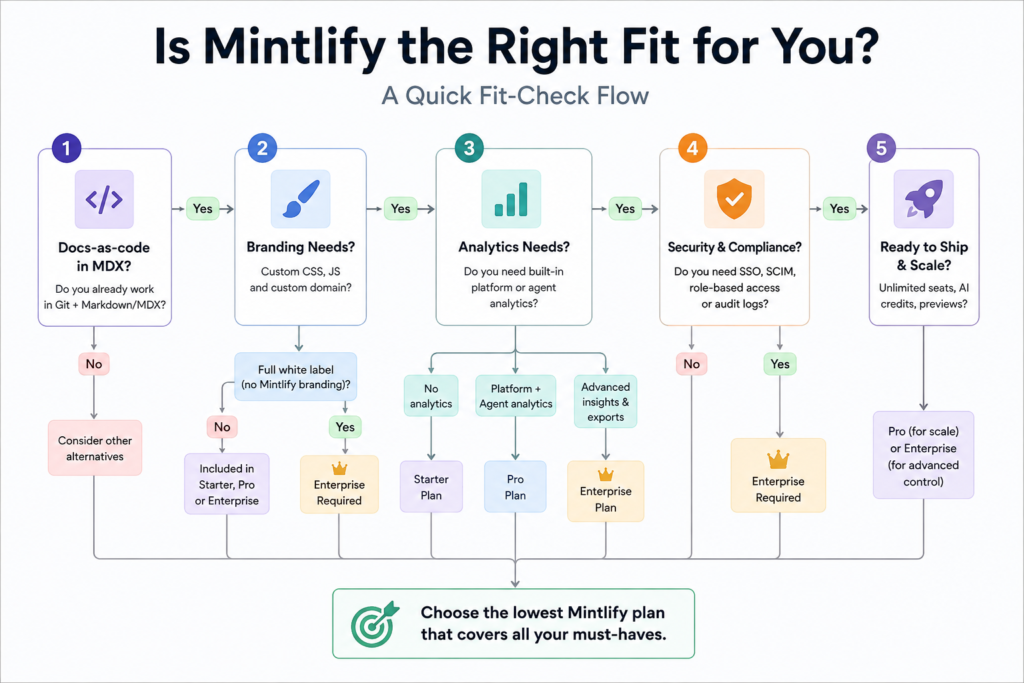
What checking Mintlify fit actually looks like operationally
┌──────────────────────────────┐
│ 1. Start with your workflow │
│ Do you already work in │
│ Git + Markdown/MDX? │
└──────────────┬───────────────┘
↓
┌──────────────────────────────┐
│ 2. Check your branding need │
│ Custom CSS + domain? │
│ → Starter / Pro / Ent. │
│ Full white label? │
│ → Enterprise │
└──────────────┬───────────────┘
↓
┌──────────────────────────────┐
│ 3. Check analytics needs │
│ No analytics? → Starter │
│ Platform + agent data? │
│ → Pro │
│ Advanced export? │
│ → Enterprise │
└──────────────┬───────────────┘
↓
┌──────────────────────────────┐
│ 4. Check security needs │
│ SSO / SCIM / audit logs? │
│ → Enterprise │
└──────────────┬───────────────┘
↓
┌──────────────────────────────┐
│ 5. Pick the lowest tier that │
│ covers every requirement │
│ you actually need │
└──────────────────────────────┘
Does Mintlify support MDX
Yes, Mintlify’s documentation is built using the docs-as-code methodology. This means that documentation is stored as code in a Git repository in MDX format (Markdown with JSX components). It then syncs bidirectionally with Mintlify’s web editor. This works on all plans, including Starter.
The practical implication of this approach is that technical writers can work on documentation the same way developers do – by submitting code reviews. At the same time, non-technical users can edit documentation in the web editor without needing to learn Git. Both approaches are fully compatible and contribute to the same documentation base.
Pause and think: If your team already reviews code in Git, think about how your current documentation tool wants you to review documentation changes. If the answer is “in a separate interface,” Mintlify’s approach of using Git for documentation management (on all plans) will help you streamline your workflow.
One area where Mintlify is less developed is in visual specification design. While Mintlify can consume OpenAPI and AsyncAPI specifications to generate documentation, it does not have a built-in spec designer. Most teams that want to design an API first then document it later use a dedicated spec design tool alongside Mintlify.
What custom branding you actually get
Custom branding is divided into two separate questions on Mintlify – and conflating the two is the source of the most frequent fit-check error.
Custom styling (CSS and JS, custom components, a custom domain) is available in all plans starting with the cheapest tier – so that a free-tier site can already have the branding and visual style of its choosing.
White-labeling (erasing Mintlify’s interface elements) is only available with the Enterprise plan, which also includes the dashboard SSO and role management for the admin panel. If your request is ‘our docs should look like ours’, Starter is probably sufficient. But if the requirement is ‘there should be no visible elements that identify the supplier of this software’, you need Enterprise.
The same applies to search filters – another customization feature that is only available in the highest tier.
For a founder who has six weeks before their launch and a limited budget, this kind of prioritization is more important than the price difference between tiers. A marketing team that was promised ‘full white-labeling’ as a part of the Starter plan trial will inevitably ask these very questions at the next briefing.

Mintlify
Mintlify is an AI-native documentation platform built for developer-focused teams. It helps companies create beautiful, searchable, and AI-ready documentation with interactive API references, smart search, and automated workflows.
What analytics ships on each plan
Analytics is the aspect that is most often taken for granted. In Mintlify, analytics for both platform and agents are not included in the Starter plan at all; they become available on Pro.
Agent analytics is worth mentioning separately as it is one of Mintlify’s differentiating features. It breaks down traffic to the documentation by the types of AI agents used (ChatGPT, Claude, Perplexity, etc.) and highlights the pages they visited while searching for information until they found the answer. This might be an essential distinction for companies whose documentation page views are now largely driven by code-completion agents. The volume of page views from code completion agents can be several times higher than those from traditional human visitors.
Advanced analytics and data warehouse exports are available on the Enterprise level only. As such, it is necessary to consider this option if a company needs to analyze raw data at the level of individual events and not just have pre-aggregated dashboards.
My experience shows that analytics requirements are often vague at the planning stage (”we want to track everything”) but become much more specific when the time comes to deliver reports to stakeholders (“we want to see agent breakdowns for the executive briefing”). To avoid such last-minute realizations, it might be helpful to first define the specific reports you need to help make decisions before choosing a CRM plan and analytics solution.
Wrong approach vs right approach
| Wrong approach | Right approach |
|---|---|
| Reading a features comparison and declaring the “customizable” option fully white label-able | Cross-referencing the pricing page’s features rows against your specific needs |
| Choosing a plan based on price alone | Prioritizing plans based on which rows (features, such as analytics or SSO) your team will actually utilize in month one |
| Prioritizing MDX support as a differentiator between documentation platforms | Prioritizing MDX support as table stakes, since it’s included in most modern documentation platforms, and evaluating options on branding, analytics, and security tiers |
| Believing free-tier AI credits roll over indefinitely | Confirming whether Starter’s ongoing plan actually includes any AI credits past the initial trial period |
What to pair Mintlify with if you hit a gap
Mintlify has its gaps, and there’s no single platform which covers everything it misses, but these three are particularly interesting alternatives to consider before rather than after choosing Mintlify.
Stoplight: a visual API design tool which addresses a different set of responsibilities than Mintlify does. It would slot into a technical documentation workflow for an API-first company which needed to produce an OpenAPI spec before finalizing on Mintlify as their documentation tool
Operator opinion: easy to adopt if you already think in terms of OpenAPI specs but not worth the overhead if your API surface is small and stable
A status page tool. Mintlify can document your API, but not keep track of its uptime, and this capability is often tacked on late in the adoption process, after a customer asks where the status page is
Operator opinion :low risk, low overhead, and worth adopting in the same sprint as your documentation migration rather than delaying until an unspecified point six months later
An event analytics tool. Only if you need to extract raw data before moving your team onto Mintlify Enterprise.
Operator opinion: only worth adopting if your board or executives need a report before Mintlify Enterprise is viable; otherwise, it’s another tool which will need to be migrated off of later
Self-audit checklist
Before choosing a plan, ensure that you’ve answered these questions honestly in accordance to your needs, not a preconcieved idea of what the product should be:
- Do you require white-labeling or only visual customization + a custom domain?
- Does your team require analytics or do they need something more in-depth like dashboard-overviews or raw exportable data?
- Will you need enterprise-grade features like SSO, SCIM, or audit logs within the next two quarters?
- Is your team’s size likely to grow beyond five – the max allowed on the Starter plan?
- Have you accounted for your projected monthly usage of the AI credits or will you be surprised by an overage fee on the Pro plan’s 10,000 allowance?
Is Mintlify worth it
Worth it for teams that are already using Git for their code, need content authoring in MDX-based docs-as-code, but don’t need to rebrand beyond colors & domain (i.e. no white-labeling). Starter tier covers that use case for free.
If you need SSO, audit logging, or native white-labeling – skip it (or pay for Enterprise upfront). Those are not available in any Pro plan and require separate conversations with Sales.
FAQ
No. Analytics (for platforms and agents) are only available on the Pro plan and above. The Starter plan is focused on publishing content and does not include analytics dashboards
No. You can customize the appearance with CSS/JS, but white labeling is only available on the Enterprise plan
Yes. All plans support MDX as the default format for docs-as-code with Git syncing. It’s not a separate paid feature
With the Pro plan, you get 10,000 credits each month. If you exceed this amount, you will be billed for additional credits at a higher pay-per-use rate. You could also purchase larger bundles of credits if you expect to consistently use more than 10,000 credits per month.
Conclusion
Documentation platforms will continue to diverge their pricing by the type of user: humans, agents, and, increasingly, compliance departments. Mintlify’s announcement of an agent-level analysis feature is precisely the tip of the iceberg. Teams that will make the most decisions in this space in 2023 are the ones which start documenting their agent-specific needs now, before every documentation platform includes an agent-specific pricing tier.
How do your documentation requirements change if you assume that 50% of your users are AI agents?
Your next move
Open Mintlify’s pricing page and compare the three lines that matter most to your team: white labeling, analytics, and AI credits directly to your requirements. You will find out more in ten minutes than you would reading another review article.