
Key takeaways
- Coursera’s business-focused AI specializations focus on teaching the fundamentals of automating processes and the logic of automation, rather than specific tools.
- The only true risk Coursera faces is that most will complete the specialization but fail to implement the acquired knowledge; the actual content is less important.
- Typically, those asking “is Coursera worth it” are already considering taking a course and want to know if it is more beneficial than self-learning to implement the knowledge.
- The three specializations, GenAI for Business Process Automation, AI-Powered Business Operations, and Workplace Automation cover the majority of areas needed for independent founders to integrate AI into their operations.
- Without a 30-day implementation plan, the completion of courses will likely have little impact on the business process. without a 30-day implementation plan rarely changes how a business runs.
Introduction
Most founders searching ‘is Coursera worth it’ aren’t simply deciding whether to pay for an educational platform. They’re trying to work out whether structured AI training will help them actually implement AI in their business. They hesitate between the fear of missing out and the frustration of already having seen 3 ‘must know AI tools’ videos on LinkedIn this week, yet having zero automated workflows on their own business. And this is where the value of Coursera comes in.
While the tools to build AI products may be simple, the harder part is designing a workflow you can actually run inside an existing business. Radixweb’s 2026 AI Failure Report found that 31.2% of reported AI failures were linked to workflow integration, rather than model issues. Teams can also end up running duplicate manual work even after introducing an AI tool. Integrating AI into an existing business takes more than choosing the right tool.
With that said, is Coursera worth it? In short: yes, but only for a very particular application. And this is where this article comes in: we’ll look into which specialisations are currently worth your time and attention in 2026, and which should be avoided, as well as what you should do next if you’ve just finished a course.
Quick verdict: is Coursera worth it for AI in 2026?
Coursera is worth it if one needs non-technical AI courses with a final implementation outcome applied to a specific business process. It’s not worth it if you’re looking for a quick solution to an implementation problem without doing the hands-on work. The real value comes from what you do after the course, including following a 30-day implementation plan.
Worth it for:
- Structured AI learning instead of scattered YouTube tutorials
- Non-technical, business-focused AI skills
- Automation and workflow training with guided projects
- A repeatable framework for spotting where AI fits in your business
Not worth it for:
- A quick fix with no hands-on project work
- A certificate you expect to transform your business by itself
- Advanced AI engineering or machine learning research training
Our starting-point pick for a non-technical solo founder: GenAI for Business Process Automation.
Why knowing AI tools isn’t the same as having AI skills
Knowing how to prompt ChatGPT is not synonymous with knowing how to design a workflow around AI. Most founders know one and assume they know the other. They do not.
The distinction is easier to see in an example. A founder familiar with the tool might be able to generate a follow-up email. A founder familiar with the workflow would be able to redesign the entire sequence:
Lead comes in → AI qualifies intent → CRM updates automatically →
AI drafts a personalized follow-up → Founder approves → Proposal sent
None of the technical jargon is necessary to create this kind of AI product. You don’t need to know math for machine learning algorithms, Python programming, or AI engineering at this point. What you need is a reduced set of competencies: fundamentals of AI, thinking in terms of processes, prompting a model in business context, process mining, choosing appropriate tools, basic automation logic, and evaluation of any solution’s effectiveness.
These are the areas Coursera’s best specializations train you on. And that is why understanding why Coursera is worthwhile is a more interesting task than stating the obvious.
What learning AI for business actually looks like operationally
Here’s what a Tuesday morning could look like for a sole proprietor running a two-person service business.
8:00 a.m.: I check my e-mail and roughly forty new requests have come in from a weekend advertising campaign. Because I handle every lead manually until a deal is closed, it takes me the whole morning to go through every e-mail, type the information in a spreadsheet, and reply to each inquiry.
Imagine being three weeks into my GenAI for Business Process Automation specialization, and this week’s lesson is about designing a process around a manual task to be automated later. Instead of trying to think of an immediate use case for the tools learned last week, I spend some time describing the task at hand. I need to describe each step in detail: retrieving a request, copying the lead’s name and budget into a spreadsheet, scoring the lead based on the given budget, sending an e-mail reply to each, and logging the conversation for later evaluation.
9:15 a.m : Using the no-code agent designer learned last week, I am now building a basic workflow that can parse each incoming e-mail, extract the relevant information, score the leads, and create a draft of the reply e-mail.
10:00 a.m : Instead of spending two hours a day creating e-mails from scratch, I spend twenty minutes approving the automatically generated drafts. The task that required me to make a judgment call about whether a lead is worth pursuing has been automated. The only part of the process that I handle is scoring the leads and deciding which ones to pursue. The part that a no-code designer automated is considerably more involved than I initially thought, and this is the primary lesson that the business process design has taught me so far.
Wrong approach vs right approach
| Wrong approach | Right approach |
|---|---|
| Adding more AI tools without a plan | Mapping the workflow gap first, then choosing one tool |
| Automating a broken process as-is | Fixing the process, then automating it |
| Taking a course and stopping at the certificate | Taking a course and running a 30-day implementation after |
| Learning AI tools in isolation | Learning AI inside a specific business context |
Top Coursera AI specializations for founders
Coursera offers thousands of courses, among which only dozens are actually designed for a solo entrepreneur without a technical background. I have highlighted the three most relevant below, according to the 2026 catalog.
1. GenAI for Business Process Automation: best starting point
Level: Intermediate, no coding required Duration: Three courses, about 12 weeks at 3 hours a week Best for: Founders who are new to AI automation and don’t know where to start What you’ll learn: How to identify automation opportunities, design multi-step AI workflows with no-code tools, apply prompt engineering, and build AI agents that handle complex tasks on their own
Operator opinion: This is the right option if you’re a founder building your business on your own. It’s fast and doesn’t waste your time with theory. You start applying the concepts through practical automation work early in the specialization. The only downside is that it doesn’t go very deep. If you need a more thorough explanation of orchestration or multi-agent systems, this isn’t the option for you.
View the GenAI for Business Process Automation specialization on Coursera
2. AI-Powered Business Operations: best for broader operations
Level: Intermediate Best for: Founders managing more than one function, like sales, support, and fulfillment together What you’ll learn: Modeling and automating business workflows with AI, generating product strategies with GenAI tools, turning sales data into visual reporting, and planning responsible, sustainable AI use
Operator opinion: Stronger fit once you have more than one moving part in the business. It’s slower to get going and less intensive in the first course, so if you’re hoping to get quick wins on automation in the first week, first spec is better.
View the AI-Powered Business Operations specialization on Coursera
3. Next-Gen Workplace Automation with GenAI: best for advanced users
Level: Intermediate Duration: Eight courses, about 4 weeks at 10 hours a week Best for: Founders who already have automations running and want to connect them What you’ll learn: Designing and deploying AI-powered automation systems, working with enterprise-grade GenAI tools and multi-agent frameworks, and building automated reporting for decision-making
Operator opinion: This is not a beginner’s course, and it should not be your first one. It moves quickly for a solo founder with clients to maintain, and much of it may be unnecessary if you don’t already have a functioning automation to improve. Skip it until after the first specialization and its application.
View the Next-Gen Workplace Automation with GenAI specialization on Coursera
Which course should you start with?
| If you are… | Start with |
|---|---|
| New to AI entirely | AI fundamentals course before any specialization |
| Aware of AI, unsure how to use it in your business | GenAI for Business Process Automation |
| Running day-to-day operations across teams | AI-Powered Business Operations |
| Already automating and want to go further | Next-Gen Workplace Automation |
| A non-technical solo founder | GenAI for Business Process Automation |
For an individual entrepreneur who understands the importance of artificial intelligence but has not yet implemented any specific automation, GenAI for Business Process Automation is the most relevant offer from the list. The course is designed for people with no prior AI or coding experience, which describes the majority of people who wonder if Coursera is worth it.
What to use alongside Coursera
A course provides you with knowledge. It does not provide you with a business to practice on. That is a mistake founders make, and that is why so many finish a specialization but do not have a functioning automation.
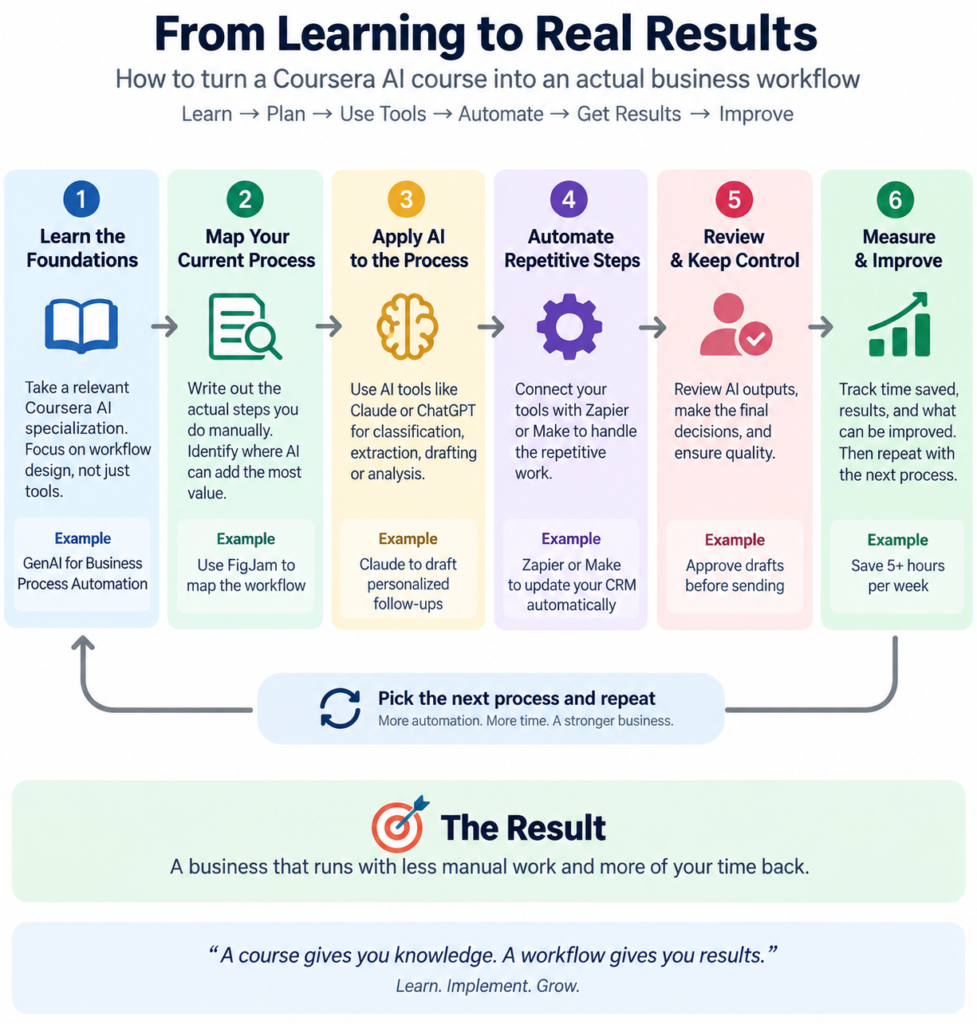
The solution isn’t to adopt five more tools. It’s to use a small set of tools across the same sequence you’re learning: map the process, apply AI, automate it, then scale the workflow.
1. Map it first: FigJam Use it for: mapping the workflow before you touch automation. Best fit: founders who can’t yet explain, step by step, how a process actually runs today. Where it breaks down: mapping a process isn’t the same as fixing it. Don’t spend hours making a beautiful diagram of a broken workflow.

FigJam
FigJam is Figma’s online collaborative whiteboard for brainstorming, meetings, diagramming, planning, and organizing ideas. Teams can work together in real time using visual boards, templates, sticky notes, diagrams, voting, and AI-powered tools.
2. Apply AI: Claude Use it for: analyzing documents, drafting, research, and any step where the workflow needs to interpret unstructured information before a human decides. Best fit: the parts of a workflow that involve reading, classifying, or writing, not just moving data from one app to another. Where it breaks down: Claude doesn’t design the workflow for you. You still have to decide what information it receives, what it should produce, and where a human reviews the output.

Claude
Anthropic's safety-focused AI for complex document analysis and coding. Known for its more "human" writing style.
3. Automate it: Zapier Use it for: connecting apps and automating the repetitive steps once you’ve confirmed the underlying process makes sense. Best fit: founders turning one manually repeated task into a simple trigger-then-action workflow. Where it breaks down: it’s easy to keep bolting on steps until a simple automation becomes harder to maintain than the manual process it replaced.

Zapier Central
Zapier Central is a no-code AI automation platform that lets you build intelligent agents to handle tasks across thousands of apps. It’s designed for businesses and teams who want to automate workflows, delegate tasks to AI, and reduce manual work without coding.
4. Scale the workflow: Make Use it for: visual, multi-step workflows where you need branching logic or tighter control over how data moves between apps. Best fit: founders who’ve outgrown a basic Zapier automation and need to connect several systems at once. Where it breaks down: more flexibility means more complexity, so it’s easy to build something harder to maintain than the problem you started with.
Make
Make (formerly Integromat) is a visual automation platform that lets you connect apps and build workflows without coding. It’s designed for businesses and creators to automate repetitive tasks and streamline operations across tools.
Note that none of this is new software on top of the course. It’s the course’s ideas applied to what is already in your business. If you finish a module and cannot find a place where you applied one of these four that week, then the module has not done its job yet.
You don’t need to learn everything about AI
Here’s the part that gets left out of all the “is Coursera worth it” reviews: finishing a certificate without applying it won’t change how your business runs.
Pause and think: if you stopped reading AI news for a month but automated one repetitive task in your business, would your business be better off? For most solo founders, the answer is yes.
A realistic 13-week path looks like this:
- Weeks 1 to 4: AI fundamentals and terminology you’ll actually use
- Weeks 5 to 8: Business use cases specific to your industry
- Weeks 9 to 12: Build one automation, start to finish
- Week 13 and on: Measure what it changed
What I’ve noticed while working with companies is that founders who try to understand everything about AI before building something will build nothing. Information only has value when it transforms the system it’s introduced into.
Self-audit: are you ready to start a Coursera AI course?
Run through this before you enroll in anything:
- I can name one of the repetitive tasks worth automating in my business that eats more than three hours a week.
- I know which tools I currently use for that task, if any
- I have 3 to 5 hours a week free for coursework, not just intention
- I’m willing to finish the course before judging whether it worked
- I have a specific workflow in mind to apply what I learn to, not a vague goal like “get better at AI”
If you checked fewer than four boxes, fix that gap before paying for a specialization. A course won’t compensate for not having a real problem to point it at.
What to do after finishing a course
Certificates don’t run businesses. Implementation does. Use this 30-day framework right after finishing a specialization:
- Week 1: Map your current workflows and flag the most repetitive tasks
- Week 2: Sort tasks by type: classify, summarize, generate, or extract
- Week 3: Build one workflow, not ten. Resist the urge to automate everything at once
- Week 4: Measure hours saved, errors reduced, and whether you’d keep the workflow running without the course as a safety net
This is where the answer to ‘is Coursera worth it?’ becomes practical. The course gives you the knowledge. The next 30 days are when that knowledge has to become a working system.
FAQs
The certificate itself wouldn’t qualify someone for the position, but a basic understanding of the concepts in a business-focused specialization can help you assess proposals, spot unclear scopes of work, and ask better questions during contracting
Yes. In fact, that can be a useful starting point if you already have a specific manual process to work on. Start with one repetitive workflow, map how it works today, and use the course to identify where AI or automation can improve it.
Start with a repetitive, measurable task that happens often and has clear inputs and outputs. Good candidates include lead qualification, document processing, reporting, data entry, and routine customer communication. Avoid starting with a process that still changes every time someone runs it.
Measure the workflow before and after implementation. Track metrics such as hours saved, processing time, error rates, manual handoffs, and the number of exceptions that still require human review. If the workflow saves time but creates more checking work, it hasn’t delivered the improvement you expected.
Treat that as an adoption problem rather than immediately replacing the tool. Check whether the workflow adds extra steps, produces outputs people don’t trust, or leaves employees responsible for checking too much work manually. The next fix may be in the workflow design rather than the AI model.
Conclusion
The founders who will have maximized their use of Coursera in 2026 will not be those who finished the most courses. They will be those who used a specialization as a forcing function to finally diagram out and improve one workflow, then halted to evaluate the results before moving on to the next. With the democratization of AI tooling, the comparative advantage is shifting away from those who know about tools first to those who have revised their processes around them. So the better question isn’t simply whether Coursera is worth it. It’s whether you’ll finish something and use it before signing up for anything else.
Your next move
Open up any blank note right now and write down one task you handled manually this week that you’d automate if you knew how. One sentence is enough to identify which Coursera specialization, if any, is worth investigating.
