Key Takeaways
- Automation is programmed to follow particular orders and, therefore, it is suitable only for specific tasks.
- The usage of AI agents that operate by the context is more versatile compared to automation processes.
- 38% of small and medium-sized businesses have applied AI assistants or systems with automation functions to improve their customer service, marketing, or recruitment.
- Multi-agent systems require more operational capacity, maintenance, and inference than the traditional automation methods.
- Contexts define the value or the complexity of the agent in relation to a particular process.
Introduction
Another post claiming that AI agents will disrupt the existing business processes. Founders read the headlines, look at their own operations and think about which of their processes can now be substituted for an AI agent. Founders are not wrong to think that their own operations could benefit from an AI agent, but are mostly wrong to believe that the reason they should adopt one is that they are “behind” on AI.
In fact, founders are probably behind in general business process optimization. Sales pipelines have empty stages, follow-ups go missed, approvals languish in inboxes, unanswered and unsigned for days or longer.
That gap in optimization has a price, because for every function that isn’t automated, there is a corresponding opportunity cost. 38% of small and medium-sized businesses have already adopted some form of AI assistant or automation, and the trend is accelerating. The companies that have seen the most benefit from adopting AI have not done so by adopting the most capable agents (which would be impractical for most business applications anyway). They have done so by optimizing their process first, and then adding automation on top.
This article will identify the key differences between automated systems, and AI agents. It will also describe the costs associated with either, and help you to make the right choice the first time.
Automation first: The foundation most businesses need
Automation is deterministic in nature. It does exactly the same thing every time it is triggered. It is a repeatable, reliable process that yields the same results. No nuance, no interpretation, and that’s a good thing.
Example: Lead Management Workflow
When a prospect fills out a form on your website, your workflow may be programmed to do the following:
- Create a CRM record
- Assign the lead to a sales owner
- Send a confirmation email
- Create a follow-up task
- Update the pipelines
No one has to think about this. It gets done. Tools like Zapier, Make, and n8n exist for this very category of work, and most small businesses are not building this layer, despite often already shopping for agents
Pause and think: how many of your current “manual processes” are simply automations you have not built?
AI agents: When workflows need decision-making
Automation breaks down at any point that requires judgement. That is where agents come in. An agent investigates, understands, determines what comes next, and adapts to what it finds. It is not a set process. It works towards an ultimate goal.
Industry Example: B2B SaaS Sales
Standard automation: new lead in CRM → send templated email → create follow up task.
Agent-driven version: a new company gets added to the CRM.
- Researches the company’s website
- Reviews company’s recent LinkedIn posts
- Identifies a relevant business challenge
- Scores buying potential
- Drafts personalized outreach
- Logs findings back into the CRM
The process branches out depending on what the agent finds. This is the most important distinction. What comes next is not scripted. It is decided by the agent and its findings. This is not possible with automation, but it can be achieved with an agent.
What choosing the right system actually looks like operationally
Monday, 9 a.m. Ten customer support representatives are staring at an email inbox containing 140 new customer messages. A few are asking about order status. Others are requesting refunds. A handful of messages describe some combination of damaged shipments and mismatched invoices.
Your support lead grabs the first twenty messages and begins triaging them by hand, because the ticketing system wasn’t configured to handle any of these use cases. By 10:30 a.m., two representatives are still triaging instead of actually resolving tickets, because nobody owns the intake process. The same problem will occur again next Monday.
The answer isn’t an AI agent, but a different form of automation. Incoming messages get routed to the appropriate rep based on request type, order status, customer profile, and other variables. An agent only reviews the ticket if none of the automation rules apply, and their role is limited to processing complaints that fall outside of standard procedures. This approach reduces manual triaging by ninety minutes per Monday morning and eliminates the need for a dedicated agent to review every new ticket.
It’s not that AI has no place in customer support. The right agent can reduce resolution time by up to seventy percent. But automation should always come before augmentation. The most valuable AI software doesn’t make humans smarter, it makes processes more reliable by taking judgement out of repetitive tasks.
AI agents vs. automation: The real difference
| Decision Factor | Automation | AI Agents |
|---|---|---|
| Logic | Fixed rules | Dynamic decisions |
| Inputs | Structured data | Unstructured information |
| Output | Predictable | Variable |
| Maintenance | Lower | Higher |
| Human review | Less frequent | Often required |
| Best use case | Repetitive workflows | Complex decisions |
The wrong approach vs right approach
| Wrong approach | Right approach |
|---|---|
| Adding an agent to a faulty process. | Fixing the workflow process that has a gap. |
| Automating the entry of wrong information. | Designing a reliable source of information and then automating. |
| Trying to buy a new tool. | Mapping judgment steps in the process. |
Real business example: Choosing the wrong system creates waste
Example: Customer Support
Wrong approach: Building an AI agent to answer any customer question via an automated process, but without updating the knowledge base used for training in 8 months.
What went wrong: The agent did what it was programmed to do, it didn’t fail. However, the company trained the agent to give incorrect information at scale automatically, much faster than any human could ever hope to provide wrong answers, let alone manage this volume of tickets.
What should have been done: Automate the triage first – assign tickets, set priorities, route the conversations, apply responses, and only then involve an agent. The agent would then be used to investigate the conversation history and internal knowledge base, and suggest possible responses they can then approve and send to the customer.
Lessons learned: An agent is only as good as the process that surrounds it. A broken process is not fixed by an agent, it is only accelerated and performed at scale, with higher confidence.
Realistic implementation workflow
Example Industry: E-commerce Business (10-person team)
The problem: the support team spends 20 hours a week on repetitive requests.
Phase 1: The automation foundation
Customer email → ticket categorization → order status check → customer profile analysis → support system update.
This step’s goal: remove repetitive, time-wasting tasks.
Phase 2: Add an AI Agent Layer
The agent is tasked to perform the following after the information has been processed and organized:
- Analyze complaints with anomalous patterns
- Assess situations with a refund risk
- Offer solutions
- Escalate sensitive issues
This step’s goal: help humans make better decisions rather than replace them.
Phase 3: Monitor, measure, and enhance
The agent’s mistakes, workflow flaws, irrelevant information, and overrides should be constantly analyzed and optimized. An abandoned AI system is a severe liability.
Where AI agents actually make sense
| Function | Automation handles | Agent handles |
|---|---|---|
| Sales | Lead assignment | Prospect research and outreach drafts |
| Customer Support | Ticket routing | Investigating cross-system customer issues |
| Operations | Invoice reminders | Flagging payment risk and recommending action |
| Recruiting | Interview scheduling | Screening candidates and summarizing applications |
The founder decision framework
Before adding an agent, run the workflow through four questions:
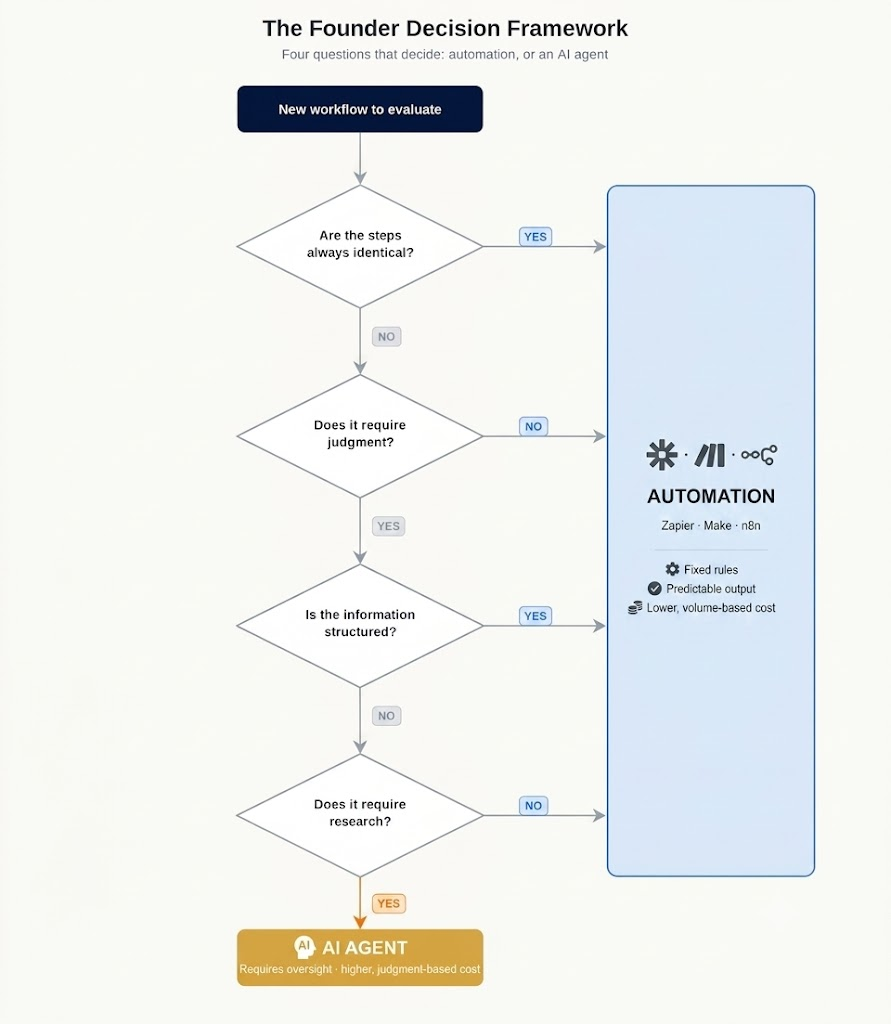
- Are the steps always identical? Yes → automation. No → agent.
- Does the workflow require judgment? No → automation. Yes → agent.
- Is the information structured? Yes → automation. No → agent.
- Does the workflow require research? No → automation. Yes → agent.
If automation wins most of these, that’s the priority; automation is where you should be allocating budget first. An agent added on top of an unautomated workflow adds a second layer of possible judgement and a second layer of costs.
Self-audit checklist
Before even considering the purchase or adoption of a generative AI agent tool, ask yourself these questions:
- Is customer or operational data siloed or scattered in Excel spreadsheets and email inboxes?
- Does every important process already have a clear owner, or do they run rampant without oversight?
- Have you automated repetitive or rule-based tasks, so that only nuanced or complex decisions are made by humans?
- Is there a formal review process for anything produced by an AI?
- Can your team describe, in one sentence, the decision an AI agent is being asked to make?
If you answered “no” to any of these, your business is not ready to adopt an agent. You’re ready to revise the workflow under one.
The practical AI adoption path
- Fix workflow visibility. Know where data lives and where it breaks.
- Automat processes tasks. Take away judgement-free work.
- Connect business systems. Make the automation layer self-aware.
- Add agents where judgment is genuinely required. Not before.
The goal is not maximum AI adoption. The goal is to stop wasting time and money on the friction that eats up hours every week.
Tools worth knowing (and what they actually cost)
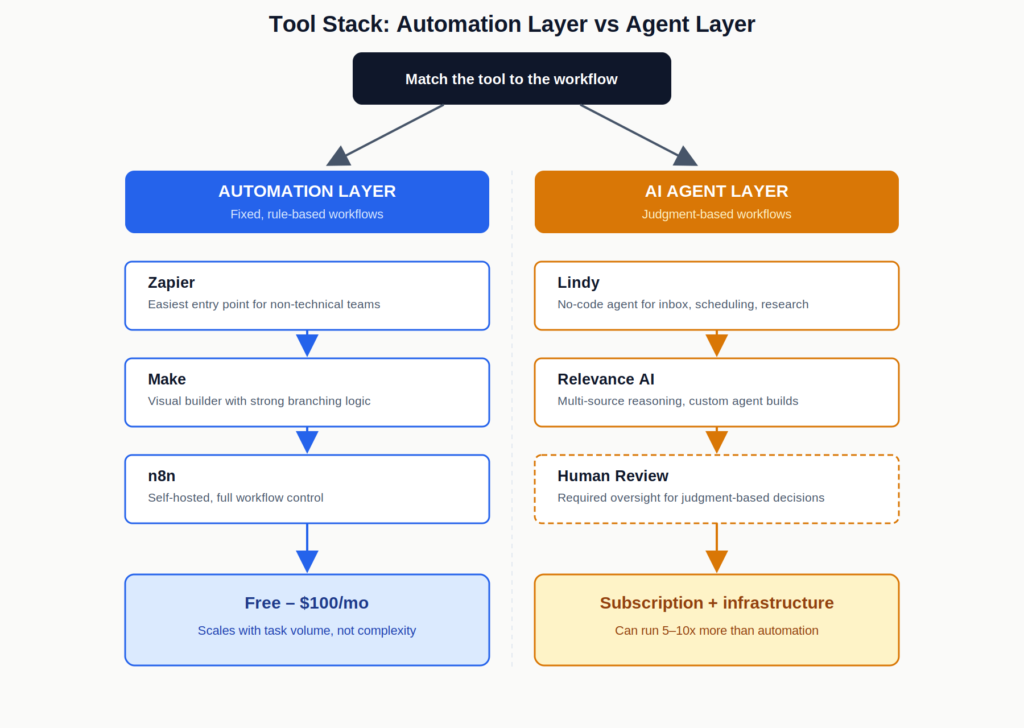
Automation layer tools and pricing
- n8n – Self hosted automation tool focused on team workflow, with no costs for additional tasks. n8n requires technical expertise to setup, but has faster adoption by technical operators. It is not suited for teams without engineering resources. Self-hosted version is free, but teams usually pay for hosting and maintenance. n8n Cloud starts around €20/month for the Starter plan.
- Make – A visual workflow designer focused on branching logic. It is heavier than Zapier but lighter than n8n, and better at more complicated branching logic than either. The only significant downside is that very complicated workflows can become visually confusing to read. Starts with a free plan, with paid plans beginning around $9/month for basic usage and scaling based on credits/operations.
- Zapier – The easiest tool to adopt, especially for teams without technical engineers who need to connect common integrations. However, its costs can skyrocket for larger teams, and it is not suited for complex decision making workflows. Free plan available, with paid plans typically starting around $19.99/month (billed annually) and increasing with task volume.

n8n
n8n is a workflow automation platform built for technical teams that need more flexibility than traditional no-code tools. It supports self-hosting advanced logic AI integrations and custom workflows while giving developers full control over automation infrastructure.
Make
Make (formerly Integromat) is a visual automation platform that lets you connect apps and build workflows without coding. It’s designed for businesses and creators to automate repetitive tasks and streamline operations across tools.

Zapier Central
Zapier Central is a no-code AI automation platform that lets you build intelligent agents to handle tasks across thousands of apps. It’s designed for businesses and teams who want to automate workflows, delegate tasks to AI, and reduce manual work without coding.
The automation cost is straightforward, with most platforms offering a free tier and a paid tier at the price of approximately 0.5-1$/task at the level of a small team, and costing more for higher volumes. The higher level tools do not have complexity costs, and have volume costs instead, which are more predictable.
AI agent layer tools and pricing
- Lindy – Best for non-technical founders who want an agent to help with inbox, scheduling, or research tasks, and don’t want to write code. Easy to adopt but limited in scope for highly customized, multi-system workflows. Starts at around $49.99/month for the Plus plan, with higher tiers for heavier usage.
- Relevance AI – Best for teams that need their agents to reason across different data sources. More work to set up but better for operations-focused teams and a specific use-case, rather than general purpose. Uses usage-based pricing through actions and AI credits rather than a simple flat subscription, with plans depending on agent usage and requirements.

Lindy.ai
Lindy.ai is an AI assistant that manages emails, meetings, scheduling, and follow-ups from one place. It’s designed for busy professionals and teams who want to automate repetitive admin work and save hours every week.

Relevance AI
Relevance AI is an AI agent platform that helps businesses build, deploy, and manage autonomous AI agents for operations, customer support, sales, and internal workflows. It is built for teams that want AI automation beyond simple chatbots or task automation
What agents actually cost beyond the subscription
Agent cost is not the subscription. It is everything else around it. The real investment includes infrastructure, inference, dev-ops, and human oversight, not just the model itself. That is not a reason not to use agents. It is a reason to make sure they are focused on the one decision that actually requires judgment, rather than trying to automate a whole process with an agent when a no-code or low-code tool would be cheaper and faster.
The cost foundation that founders don’t think about is oversight. Your automations run themselves. Your agents have to be monitored to make sure they are actually doing what you need them to do. Someone has to review their work, accept or reject their suggestions, and make sure that their actions haven’t begun to drift from the original parameters. This is not a software cost; it is a labor cost, and it has to be budgeted for, even if it is only one person reviewing ten thousand agent suggestions per day.
Automations should be priced by the volume; agents should be priced by the value. If an agent makes your representative’s job easier by giving him or her two extra hours of prospecting time per day, it has paid for itself. An agent added onto an automation that was already designed to handle the task has no such justification.
What I have seen in working with multiple companies implement these kinds of solutions is that they almost universally automated the “boring” layer before adding in any agents. The agent always addresses the second layer decision, not the first purchase.
FAQs
Automation comes first, as it is easier to standardize a predictable, rule-based process than create algorithms that mimic human judgment.
If a process requires an activity that could be done by a human that changes based on the information received, or the task requires research, it is an agent-shaped problem. If the actions taken are the same regardless of information received, it is automation.
The subscription is rarely the issue, as infrastructure, oversight, and auditing typically comprise the majority of costs, and many multi-agent systems see expenses significantly outpace automation once those three factors are considered.
Both systems are commonly used together, typically to delegate rule-based processes to the faster, cheaper, more reliable automation, using agents where human judgment is necessary.
Conclusion
AWS’s very own Generative AI Innovation Center advises executives to favor simple solutions that get the job done and save true autonomy for the processes that actually need it. Coming from a company that has every possible incentive to sell you more agent infrastructure, that’s a surprisingly honest perspective. The next big leap in small business automation will not be defined by whoever deploys the most agents. It will be ruled by whomever can demonstrate that their workflows are cleanly designed and tightly budgeted enough to trust an agent with a decision.
Which of your current workflows would stop working first if you had to replace any procedure that required human discretion with something that had to think for itself?
Your next move
For this exercise, pick a business process that is now automated, governed by a human, or a set of hard-coded procedures that were originally designed to govern the same set of procedures. In a single sentence, identify the decision to be made, and the reason why it needs to be governed by humans, an agent, or hard-coded procedures in the first place. You have ten minutes.